- Why Most Website Visitors Leave Without Taking Action
- Why Traditional Website Banners Often Fail
- What is a Lightbox Popup?
- How Businesses Use Lightbox Popups to Improve Conversions
- Benefits of Using Lightbox Popups in WordPress
- How to Add a Lightbox Popup in WordPress
- Step-by-Step Guide to Add a Lightbox Popup in WordPress
- Why Most WordPress Popup Campaigns Fail
- Best Practices for High-Converting Lightbox Popups
- Why Businesses Choose YS LeadGen for Lightbox Popups
- How Lightbox Popups Impact SEO and User Experience
- Conclusion
- Frequently Asked Questions (FAQs)
How to Add a Lightbox Popup in WordPress Website (Complete Beginner Guide)

- Why Most Website Visitors Leave Without Taking Action
- Why Traditional Website Banners Often Fail
- What is a Lightbox Popup?
- How Businesses Use Lightbox Popups to Improve Conversions
- Benefits of Using Lightbox Popups in WordPress
- How to Add a Lightbox Popup in WordPress
- Step-by-Step Guide to Add a Lightbox Popup in WordPress
- Why Most WordPress Popup Campaigns Fail
- Best Practices for High-Converting Lightbox Popups
- Why Businesses Choose YS LeadGen for Lightbox Popups
- How Lightbox Popups Impact SEO and User Experience
- Conclusion
- Frequently Asked Questions (FAQs)
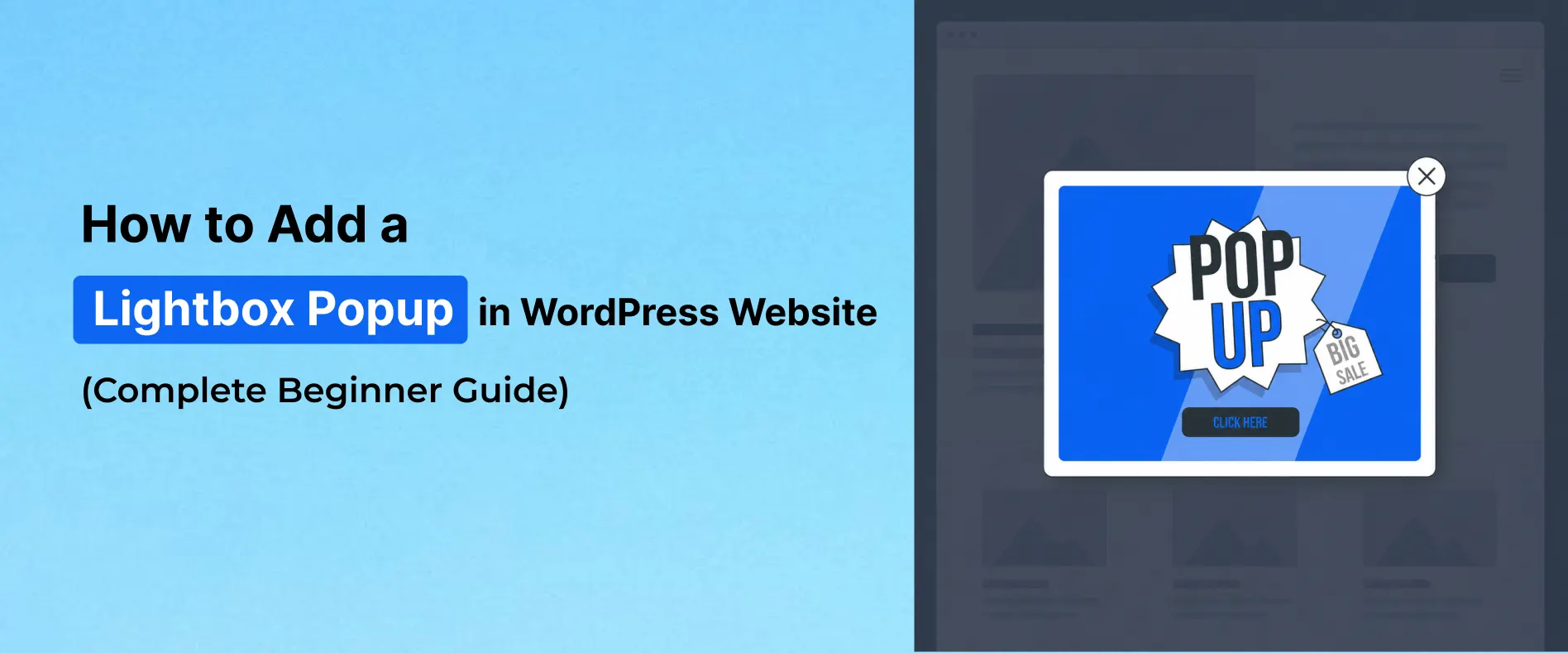
How to Add a Lightbox Popup in WordPress Website
Every website owner experiences the same frustrating problem.
Visitors arrive from Google search, social media, paid ads, or direct traffic. They browse product pages, read blog posts, explore pricing pages, and spend time engaging with the website — but most of them leave without taking action.
No signup.
No inquiry.
No purchase.
No conversion.
For WooCommerce stores, SaaS businesses, agencies, bloggers, and service websites, this silent visitor drop-off becomes one of the biggest barriers to online growth.
Businesses spend enormous effort trying to increase traffic through:
- SEO
- Google Ads
- Meta Ads
- Content marketing
- Email marketing
- Social media campaigns
But traffic alone does not guarantee business growth anymore.
Modern websites must also focus on conversion optimization — turning existing visitors into subscribers, leads, and customers.
This is exactly where Lightbox Popups become powerful.
A Lightbox Popup appears directly on top of the webpage while softly dimming the background content. Instead of competing with dozens of distractions across the page, the popup becomes the center of visitor attention for a few seconds.
When implemented strategically, Lightbox Popups help businesses:
- Increase email subscribers
- Improve WooCommerce sales
- Reduce visitor drop-offs
- Promote discounts and flash sales
- Generate qualified leads
- Improve customer engagement
- Increase conversion rates
- Highlight important announcements
Today, popup overlays are widely used across:
- WooCommerce websites
- SaaS platforms
- Online stores
- Agency websites
- Bloggers and publishers
- Coaches and consultants
- Course creators
- Service businesses
The best part is that you can create professional Lightbox Popups in WordPress without coding knowledge using popup builder plugins like YS LeadGen.
In this complete guide, you’ll learn:
- What a Lightbox Popup is
- Why popup campaigns work so effectively
- How businesses use popup overlays to improve conversions
- How to add a Lightbox Popup in WordPress
- Best practices for high-converting popup campaigns
- Common popup mistakes that hurt conversions
- How to optimize popup campaigns for SEO and user experience
By the end of this tutorial, you’ll be able to create modern popup campaigns that improve engagement, generate leads, and help grow your WordPress website effectively.
Why Most Website Visitors Leave Without Taking Action
One of the biggest misconceptions in digital marketing is assuming that traffic automatically leads to conversions.
In reality, most website visitors are distracted, uncertain, or simply not ready to take action immediately.
A visitor may genuinely like your products or services but still leave because:
- they got distracted
- they planned to return later
- they were comparing competitors
- they missed your CTA section
- they needed additional motivation
- they were not emotionally ready to commit yet
This behavior is extremely common across modern websites.
For example:
A shopper may add products to a WooCommerce cart and abandon the checkout process minutes later.
A blog reader may enjoy your content but leave without subscribing.
A SaaS visitor may explore your pricing page but postpone starting a free trial.
A potential client may read your services page but forget to submit an inquiry form.
This is why conversion optimization has become just as important as traffic generation.
Businesses are no longer asking only:
“How do we get more traffic?”
They are also asking:
“How do we convert more existing visitors?”
This shift has completely changed how modern websites approach customer engagement.
Instead of relying only on static banners, businesses now use:
- popup overlays
- lead capture forms
- personalized offers
- smart targeting campaigns
- behavioral triggers
…to improve visitor engagement at the right moment.
Among all these strategies, Lightbox Popups remain one of the most effective because they solve a very important problem:
Attention.
Why Traditional Website Banners Often Fail
Most websites already contain CTA buttons, promotional banners, and signup sections.
The problem is that modern users rarely notice them.
Today’s visitors browse websites extremely quickly.
Users:
- scroll faster
- skim content
- ignore sidebars
- skip banners
- overlook footer promotions
This behavior is commonly known as banner blindness.
Over time, users subconsciously learn to ignore traditional promotional areas on websites because they are overloaded with information everywhere online.
This creates a major conversion problem.
Even valuable offers often remain invisible simply because users never fully notice them.
For example:
A WooCommerce store may offer:
“Get 20% OFF Today”
…but if that offer sits quietly inside a small homepage banner, many visitors may never pay attention to it.
Similarly:
A SaaS website may have an excellent free trial CTA hidden halfway through a long landing page.
Most visitors will never reach it.
This is exactly why popup overlays continue performing well.
Unlike static banners, a Lightbox Popup temporarily isolates visitor attention.
It creates a focused interaction moment.
For a few seconds, the visitor stops scrolling and notices the offer directly.
That small interruption — when used strategically — can dramatically improve engagement and conversions.
What is a Lightbox Popup?
A Lightbox Popup is a popup overlay that appears on top of a webpage while dimming or blurring the background content.
Instead of redirecting visitors to another page, the popup opens directly inside the current webpage and becomes the visual focus of the screen.
This helps businesses present:
- offers
- signup forms
- announcements
- promotions
- lead generation campaigns
…without forcing users to leave the current page.
Lightbox Popups are widely used because they create a balance between:
- visibility
- engagement
- user experience
When designed correctly, they feel less aggressive than traditional intrusive advertisements while still capturing attention effectively.
Modern WordPress websites commonly use Lightbox Popups for:
- email subscriber growth
- WooCommerce discount campaigns
- flash sales
- webinar registrations
- lead generation
- free trial promotions
- contact form interactions
- product announcements
How Lightbox Popups Work
When triggered, the popup appears above the webpage content while slightly reducing the visibility of the background.
This naturally guides user focus toward:
- the popup headline
- CTA button
- signup form
- promotional message
Visitors can then:
- subscribe
- claim offers
- start trials
- continue shopping
- contact the business
…without navigating away from the current page.
This is important because reducing friction improves conversions.
The easier it feels for users to interact with an offer, the higher the conversion opportunity becomes.
Why Lightbox Popups Still Work in 2026
Many businesses assume popup marketing is outdated.
In reality, poorly implemented popups are outdated.
Modern popup campaigns are very different from the aggressive popups used years ago.
Today’s high-converting popup strategies focus on:
- behavioral timing
- contextual relevance
- mobile responsiveness
- clean design
- conversion psychology
- personalized targeting
For example:
A popup appearing after meaningful engagement usually performs far better than a popup appearing immediately after page load.
Similarly:
A relevant WooCommerce discount popup shown on product pages feels much more natural than random generic promotions.
This is why modern popup campaigns continue generating strong conversion results across:
- eCommerce
- SaaS
- blogging
- lead generation
- service businesses
How Businesses Use Lightbox Popups to Improve Conversions
Different businesses use popup campaigns differently depending on their goals.
The strategy behind the popup matters just as much as the design itself.
How WooCommerce Stores Use Popup Campaigns
WooCommerce stores use Lightbox Popups extensively to improve customer engagement and reduce lost sales opportunities.
For example:
Many shoppers browse products with genuine buying intent but leave before completing checkout.
This happens because:
- they become distracted
- they compare prices
- they hesitate before purchasing
- they postpone decisions
Smart popup campaigns help recover this attention.
WooCommerce stores commonly use popup overlays for:
- coupon offers
- flash sales
- free shipping promotions
- cart reminders
- bundle offers
- product recommendations
Example:
“Complete Your Order & Get FREE Shipping Today.”
That single popup may recover conversions that would otherwise disappear.
How SaaS Businesses Use Popup Overlays
SaaS businesses often spend heavily on customer acquisition.
Because acquisition costs are high, improving conversion rates becomes extremely valuable.
Even small increases in free trial signups can significantly impact long-term growth.
SaaS companies commonly use popup campaigns for:
- free trial promotions
- demo bookings
- webinar registrations
- lead generation
- onboarding offers
For example:
A popup saying:
“Start Your 14-Day Free Trial”
…after users spend time exploring pricing pages can perform extremely well because the popup appears during high-intent moments.
How Bloggers and Publishers Grow Email Subscribers
Most blog readers never return after leaving a website.
Without email capture strategies, businesses lose long-term audience-building opportunities.
This is why bloggers use popup campaigns to:
- grow newsletter subscribers
- promote lead magnets
- build communities
- improve email marketing performance
For example:
A digital marketing blog may display:
“Get Weekly SEO Tips Directly to Your Inbox.”
That popup transforms casual readers into long-term subscribers.
How Agencies and Service Businesses Generate Leads
Agencies, consultants, and freelancers often use Lightbox Popups to increase inquiry submissions.
Instead of relying only on contact pages, businesses place lead capture opportunities directly within the browsing experience.
Examples include:
- consultation booking popups
- quote request forms
- audit offers
- strategy session promotions
This reduces friction and improves lead generation opportunities.
Benefits of Using Lightbox Popups in WordPress
Lightbox Popups are not just visual elements.
When implemented strategically, they become conversion optimization tools that improve business performance across multiple areas.
Increase Email Subscribers
Email marketing remains one of the highest ROI marketing channels.
Popup campaigns help businesses grow subscriber lists faster by presenting signup opportunities during active browsing sessions.
Improve WooCommerce Sales
Well-targeted popup campaigns help:
- recover abandoning shoppers
- increase average order value
- promote discounts
- improve purchase motivation
Generate More Leads
Popup forms help businesses collect:
- inquiries
- demo requests
- consultation bookings
- subscriber information
This transforms website traffic into long-term lead opportunities.
Improve User Engagement
Popup campaigns encourage users to:
- interact with offers
- continue browsing
- explore promotions
- revisit products
This improves overall engagement metrics.
Highlight Important Campaigns
Businesses use popup overlays to increase visibility for:
- launches
- webinars
- seasonal sales
- announcements
- limited-time campaigns
Because popup overlays isolate attention, users notice these campaigns more effectively than traditional banners.
How to Add a Lightbox Popup in WordPress
Creating a Lightbox Popup in WordPress is much easier than most beginners expect.
Using popup builder plugins like YS LeadGen, businesses can create responsive popup campaigns without coding knowledge.
Step-by-Step Guide to Add a Lightbox Popup in WordPress
One of the biggest reasons many businesses avoid popup marketing is the assumption that popup creation is technically complicated.
Years ago, creating custom popup overlays often required:
- developers
- custom JavaScript
- CSS styling
- manual integrations
Today, modern WordPress popup builders have simplified the entire process.
Using plugins like YS LeadGen, businesses can create professional popup campaigns visually without touching code.
Whether your goal is to:
- increase email subscribers
- improve WooCommerce sales
- generate more leads
- promote discounts
- launch seasonal campaigns
…the setup process can be completed within minutes.
But before jumping into the tutorial itself, it’s important to understand something many businesses overlook:
The popup tool alone does not improve conversions.
The strategy behind the popup matters far more.
A popup shown at the wrong moment, with weak messaging, poor design, or aggressive behavior can actually reduce engagement.
This is why modern popup creation focuses on:
- visitor intent
- timing
- user experience
- contextual relevance
- conversion psychology
The technical setup is easy.
The strategic implementation is what separates high-converting popup campaigns from annoying distractions.
Let’s start with the setup process.
Step 1 – Install a Lightbox Popup Plugin in WordPress
The first step is choosing a popup builder that supports:
- responsive popup overlays
- popup customization
- lead generation forms
- smart display rules
- WooCommerce compatibility
- mobile optimization
Many WordPress popup plugins create problems like:
- slow page speed
- poor mobile responsiveness
- limited targeting
- complicated user interfaces
- intrusive popup behavior
This is why choosing the right popup builder matters.
For this tutorial, we’ll use YS LeadGen because it simplifies popup creation while providing modern conversion-focused popup features.
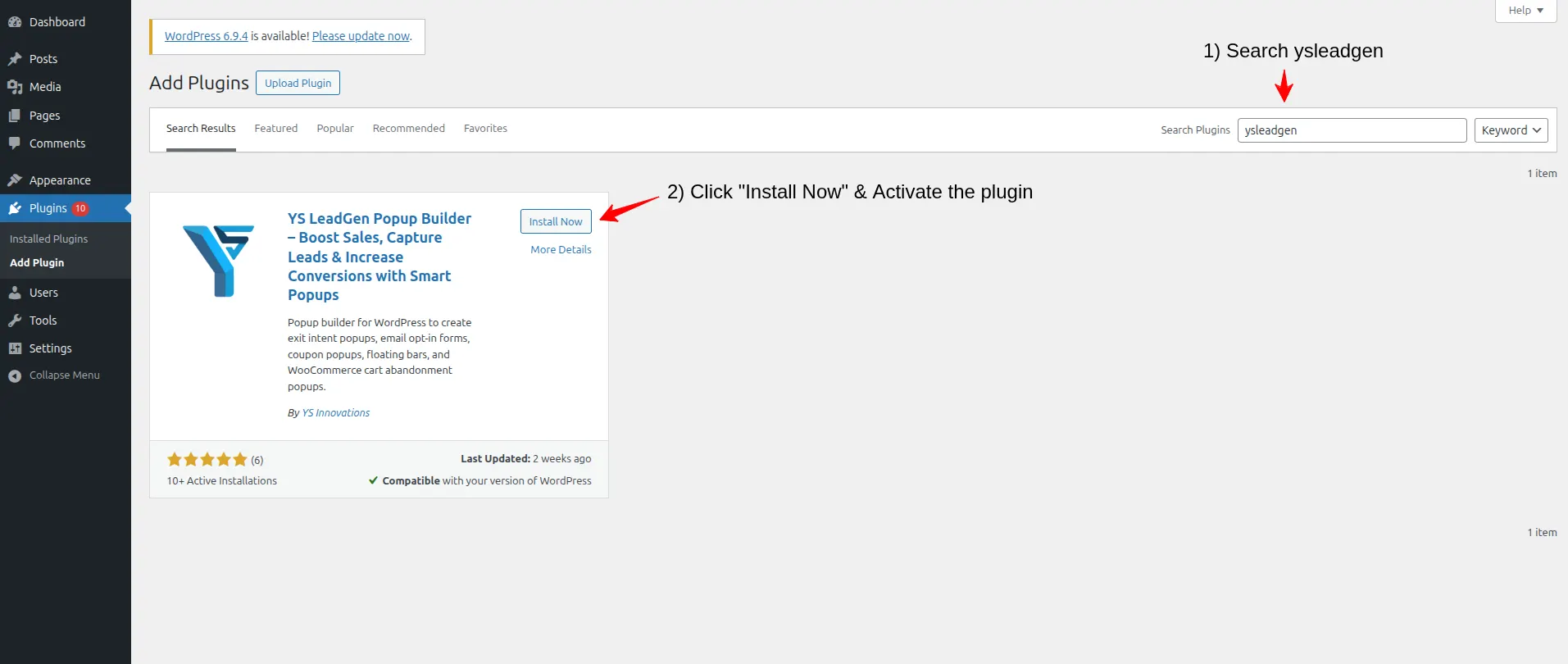
To install the plugin:
Login to your WordPress dashboard.
Navigate to:
Plugins → Add New Plugin
Search for: YS LeadGen
Now:
- Click Install Now
- Click Activate
After activation, the plugin menu will appear inside your WordPress dashboard.
At this stage, many beginners immediately try to create aggressive promotional popups.
That is usually a mistake.
The goal is not simply to “show a popup.”
The goal is to create a popup experience that feels:
- relevant
- helpful
- timely
- valuable
That mindset changes how popup campaigns perform.
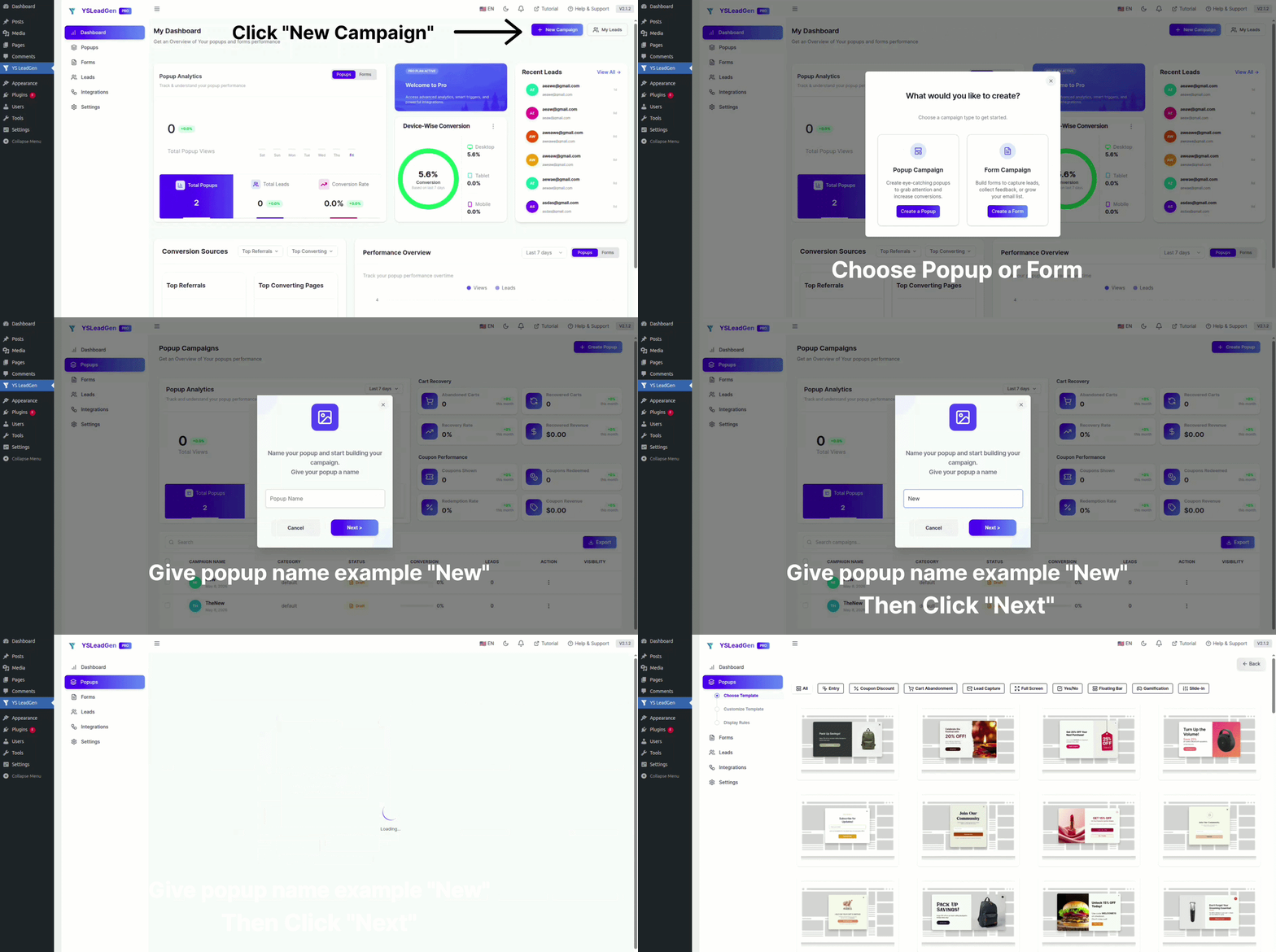
Step 2 – Create a New Popup Campaign
After installing the plugin, the next step is creating your popup campaign.
Navigate to:
YS LeadGen → New Campaign
Click:
Create Popup
Now enter a name for the campaign.
Most businesses underestimate the importance of campaign organization.
But once websites begin running multiple popup campaigns simultaneously, poor organization becomes chaotic quickly.
For example, businesses often create different campaigns for:
- homepage promotions
- email subscriber growth
- WooCommerce discounts
- flash sales
- lead generation
- webinar registrations
- seasonal campaigns
Using clear campaign names helps maintain long-term popup management efficiency.
Good campaign naming examples include:
- Homepage Discount Popup
- Newsletter Signup Campaign
- Black Friday Popup
- Free Trial Promotion
- WooCommerce Coupon Campaign
This becomes especially important for larger websites running continuous marketing campaigns throughout the year.
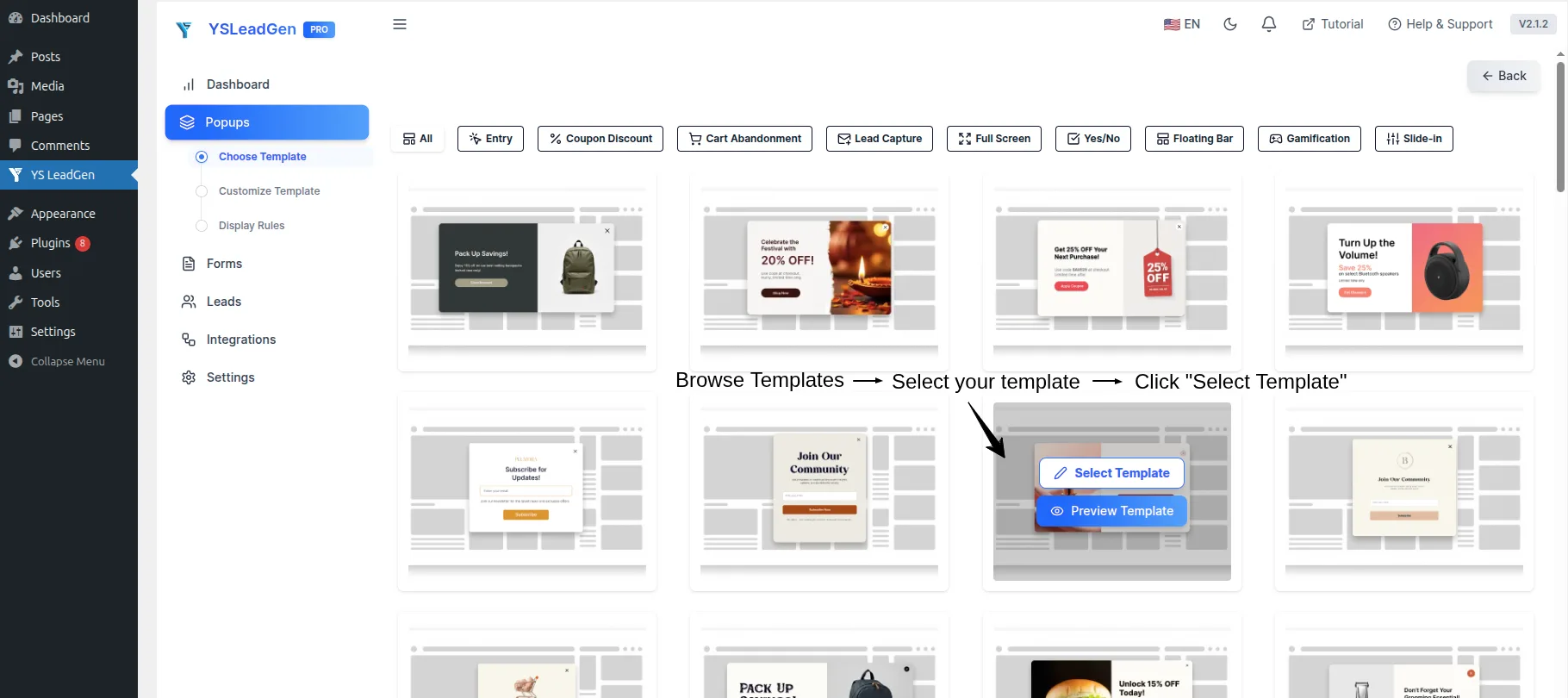
Step 3 – Choose the Right Popup Template
This is where popup strategy becomes extremely important.
Most businesses choose popup templates based only on visual appearance.
But high-converting popup campaigns are usually driven by:
- clarity
- relevance
- simplicity
- offer positioning
- CTA visibility
Not flashy designs.
YS LeadGen provides ready-made popup templates optimized for different conversion goals including:
- lead generation
- email subscriptions
- WooCommerce promotions
- free trial campaigns
- webinar registrations
- flash sales
- announcement popups
The biggest mistake businesses make here is trying to include too much information inside the popup.
Visitors make decisions extremely quickly.
If a popup feels visually overwhelming, users close it immediately.
Modern popup campaigns perform better when they:
- focus on one primary offer
- use clean layouts
- communicate value instantly
- reduce decision friction
For example:
This:
“Get 15% OFF Your First Order Today”
…usually performs much better than:
“Subscribe to our newsletter for updates, promotions, blog posts, offers, announcements, and future campaigns.”
The second example creates cognitive overload.
The first example creates immediate clarity.
That difference matters heavily for conversions.
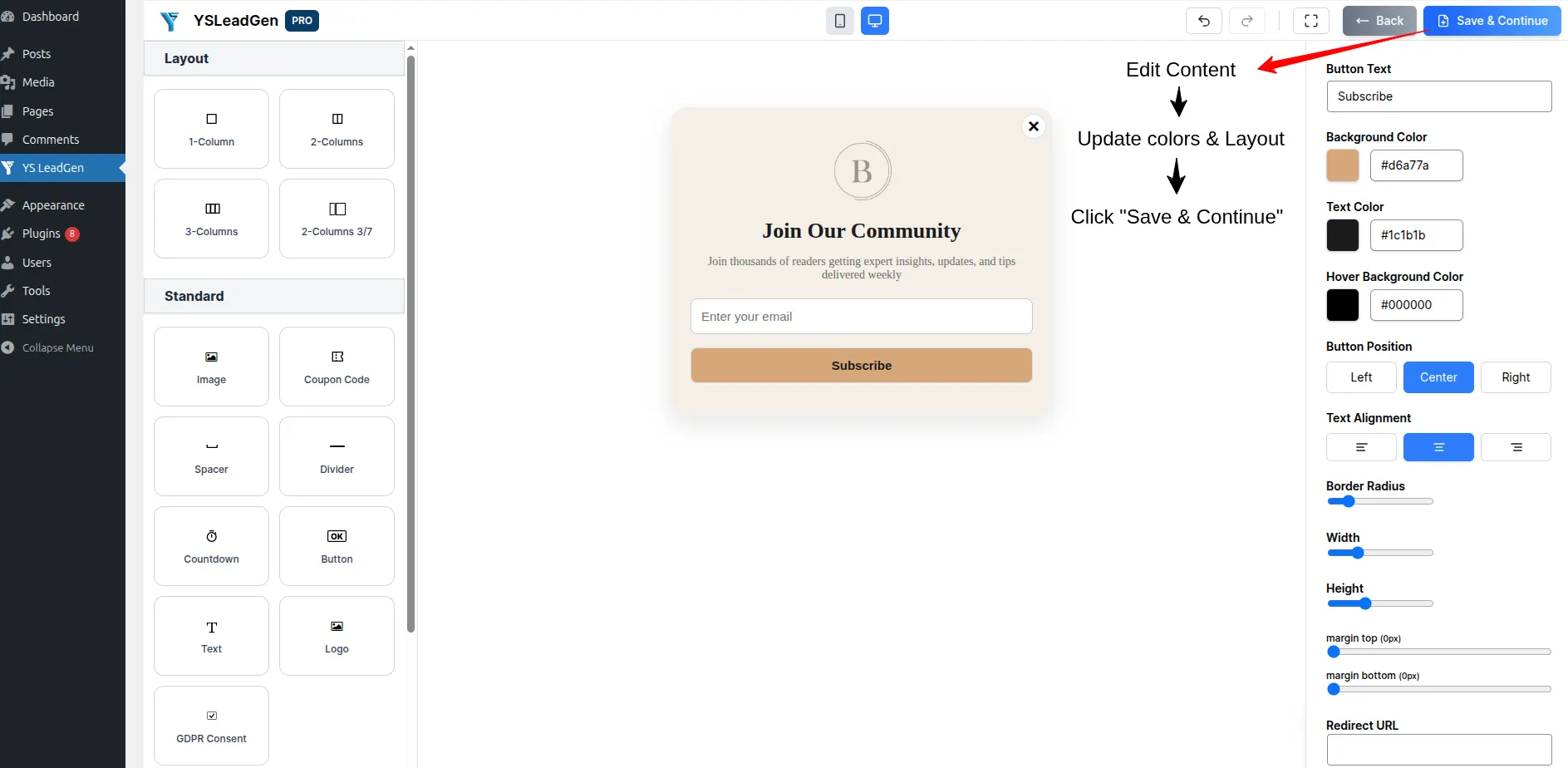
Step 4 – Customize the Lightbox Popup Design
After selecting the popup template, you can begin customizing the popup design.
This includes editing:
- headlines
- descriptions
- CTA buttons
- images
- typography
- background styles
- form fields
- branding colors
Most businesses focus heavily on popup aesthetics.
But popup psychology matters more than visual complexity.
In modern conversion optimization, clarity almost always outperforms visual overload.
A high-converting popup typically includes:
- a clear headline
- one focused offer
- a short supporting description
- a visible CTA button
- minimal distractions
For example:
A popup saying:
“Unlock 10% OFF Today”
…feels much more actionable than:
“Welcome to our website. We provide premium services and would love for you to explore our offerings.”
One creates urgency.
The other creates friction.
How Headlines Influence Popup Conversions
Your popup headline is usually the first thing visitors notice.
Weak headlines reduce engagement immediately.
Strong headlines communicate:
- value
- urgency
- relevance
- outcome
Examples of effective popup headlines:
- Get 15% OFF Today
- Unlock Exclusive Member Deals
- Start Your Free Trial
- Claim Your Discount
- Get Free Shipping Before Checkout
These headlines work because they:
- feel direct
- explain benefits quickly
- reduce decision uncertainty
Modern users scan extremely fast.
Your popup headline often has only a few seconds to capture attention.
Step 5 – Configure Display Rules
Now it’s time to decide where your popup should appear.
This is one of the most important parts of popup optimization.
Many websites fail because they show the same popup to every visitor regardless of:
- browsing intent
- page context
- user behavior
Modern popup campaigns work best when they feel contextually relevant.
Using YS LeadGen, you can display Lightbox Popups on:
- homepage
- WooCommerce product pages
- blog posts
- landing pages
- checkout pages
- category pages
- custom pages
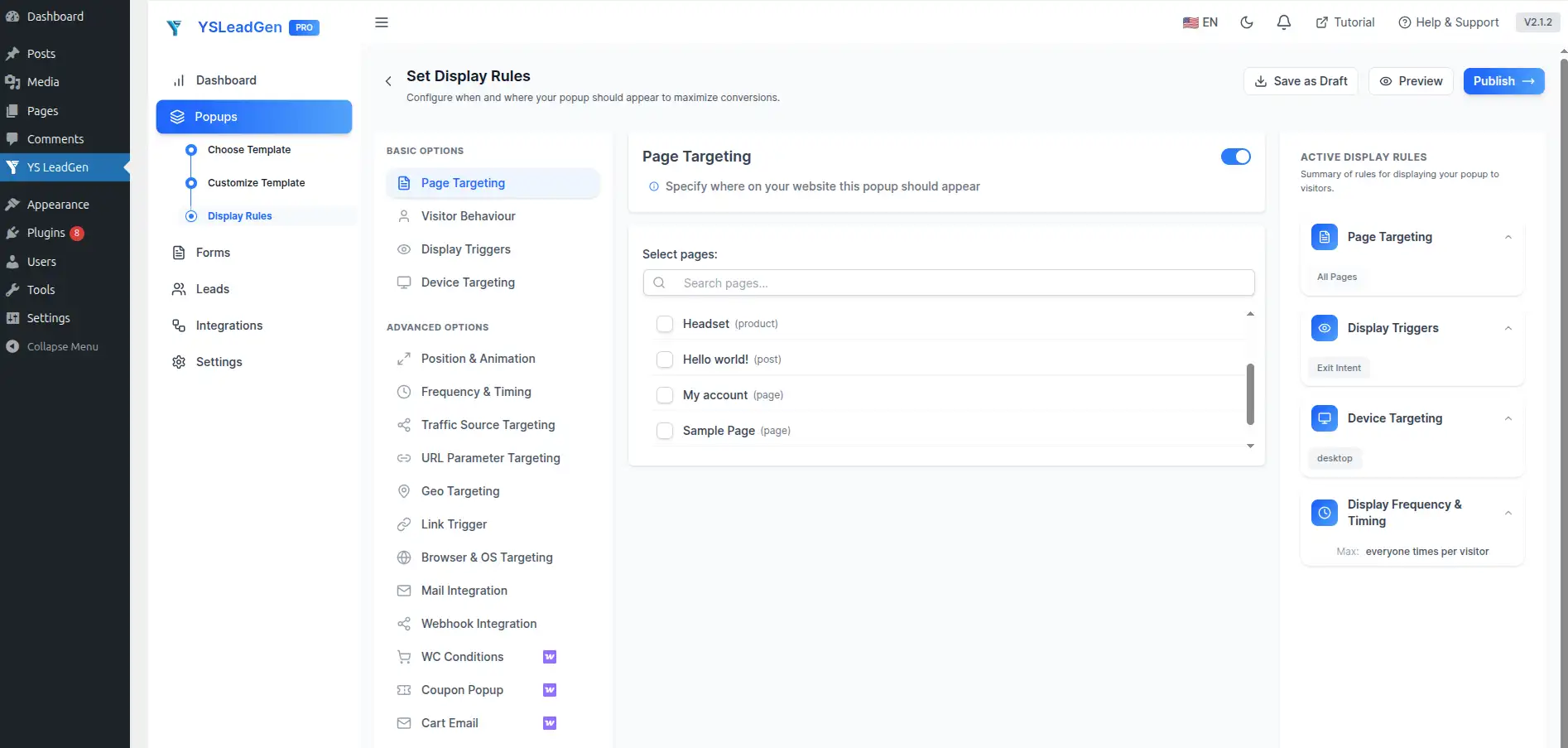
For example:
A WooCommerce store may display:
- discount popups on product pages
- shipping offers on cart pages
- bundle promotions during checkout
Meanwhile:
A SaaS website may display:
- free trial popups on pricing pages
- webinar offers on blog posts
- demo request forms on service pages
This creates better alignment between:
- visitor intent
- popup messaging
- conversion opportunities
And that dramatically improves popup performance.
Step 6 – Configure Optional Popup Triggers
Unlike Exit Intent Popups, Lightbox Popups can appear automatically without advanced triggers.
However, businesses can still configure optional popup triggers for more personalized campaigns.
These include:
- time delay triggers
- scroll percentage triggers
- click-based triggers
- inactivity triggers
- Exit Intent triggers
The important thing is understanding that popup timing heavily impacts user experience.
Showing a popup too early often frustrates visitors.
But showing a popup after meaningful engagement can improve conversions significantly.
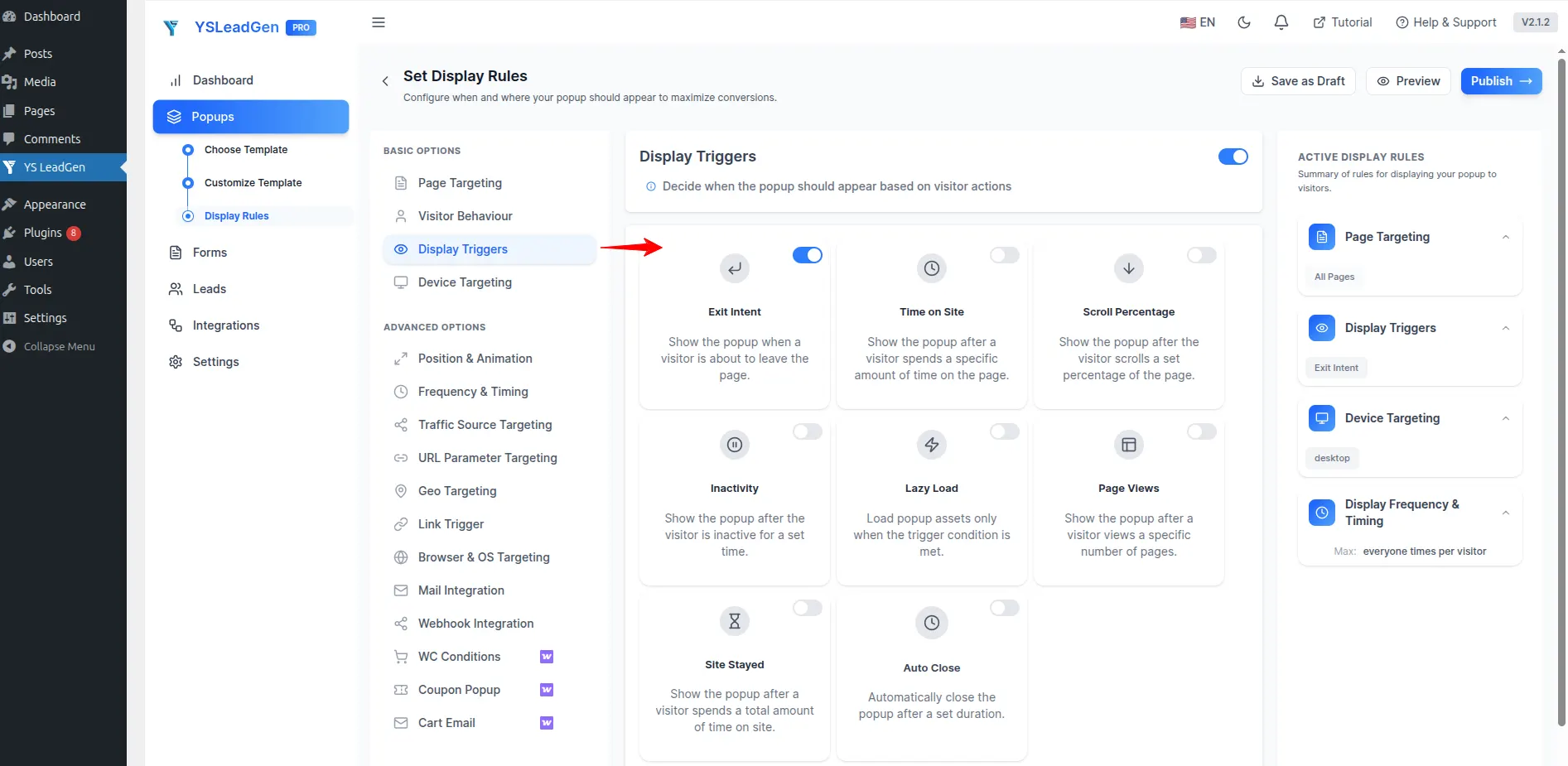
For example:
A popup shown after:
- reading 50% of a blog post
- spending time on a pricing page
- browsing multiple products
…usually performs better than a popup appearing immediately after page load.
This is because visitor intent has matured.
Modern conversion optimization increasingly focuses on behavioral timing rather than aggressive interruption.
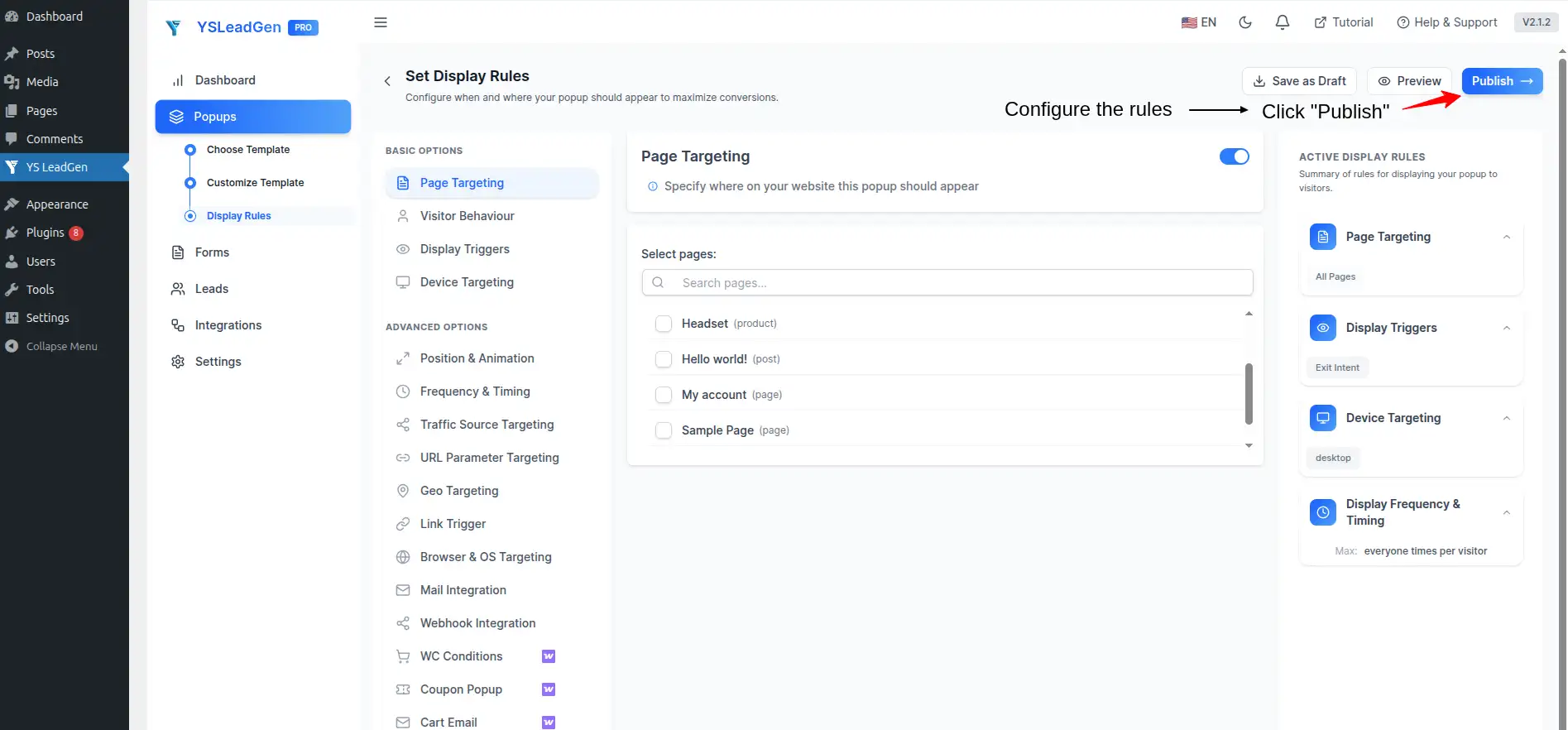
Step 7 – Publish and Test the Popup
Once your popup campaign is configured, click:
Publish
Your Lightbox Popup is now live on your WordPress website.
But this is where many businesses make another mistake.
They launch popup campaigns without testing the user experience properly.
Before fully publishing the popup, test:
- mobile responsiveness
- popup loading speed
- CTA visibility
- form submissions
- popup positioning
- close button visibility
- readability across devices
A popup may look perfect on desktop but feel broken on mobile devices.
This is especially important because mobile traffic now dominates many websites.
Why Most WordPress Popup Campaigns Fail
Many businesses install popup plugins expecting instant conversion improvements.
But after launching popup campaigns, they often experience:
- low engagement
- poor click-through rates
- weak signup performance
- increased bounce rates
- frustrated visitors
The problem is usually not the popup itself.
The problem is how the popup strategy is implemented.
Modern users are highly sensitive to intrusive browsing experiences.
Aggressive popups that interrupt visitors too early or provide little value often create the opposite effect:
- users close the popup instantly
- engagement drops
- trust decreases
- conversions suffer
This is why successful popup campaigns today are built around:
- timing
- relevance
- behavioral understanding
- visitor psychology
- contextual engagement
Not simply “displaying offers.”
Many websites still use outdated popup strategies that feel:
- interruptive
- generic
- repetitive
- overly promotional
Those approaches worked years ago.
Modern conversion optimization is very different.
Today’s highest-performing popup campaigns feel:
- timely
- relevant
- visually clean
- strategically positioned
- naturally integrated into the browsing experience
Understanding why popup campaigns fail is extremely important before optimizing them.
Showing Popups Too Early
This is one of the most common popup mistakes across WordPress websites.
Many businesses display popups immediately after page load because they assume earlier visibility increases conversions.
In reality, early interruptions often damage user experience.
Visitors need time to:
- understand the page
- explore products
- read content
- evaluate offers
- build trust
If a popup appears before users engage with the website meaningfully, the popup often feels intrusive instead of helpful.
For example:
Imagine landing on a new website and instantly seeing:
- newsletter requests
- discount offers
- signup forms
…before even reading the content.
Most users close the popup immediately.
Modern popup campaigns perform far better when they appear after:
- meaningful browsing activity
- product exploration
- content engagement
- pricing page interaction
Behavioral timing matters significantly.
Using Weak Offers
Many popup campaigns fail because the offer itself lacks value.
For example:
“Subscribe to Our Newsletter”
This type of generic messaging usually performs poorly because users do not immediately understand:
- what they gain
- why it matters
- why they should act now
Modern visitors respond better to clear value-driven offers.
Examples include:
- Get 15% OFF Today
- Unlock Exclusive Member Deals
- Claim Free Shipping
- Download Free SEO Checklist
- Start Your Free Trial
These offers create:
- clarity
- urgency
- stronger motivation
The value proposition becomes obvious instantly.
Adding Too Much Information
Many businesses overload popup campaigns with:
- long paragraphs
- multiple offers
- too many buttons
- excessive form fields
- complicated layouts
This creates cognitive friction.
Modern users scan content quickly.
If a popup feels visually overwhelming, visitors close it immediately.
High-converting popup campaigns usually focus on:
- one message
- one CTA
- one primary action
Simplicity improves:
- readability
- attention
- engagement
- conversion rates
In conversion optimization, clarity almost always outperforms complexity.
Ignoring Mobile Optimization
Many popup campaigns look good on desktop but create terrible mobile experiences.
This is a serious problem because mobile traffic now dominates many industries.
Poor mobile popup experiences often include:
- oversized overlays
- unreadable text
- broken layouts
- difficult close buttons
- slow loading times
These issues hurt:
- user experience
- SEO performance
- conversions
- engagement metrics
Modern popup campaigns must be:
- responsive
- lightweight
- mobile-friendly
- touch-optimized
Google increasingly prioritizes mobile usability signals across websites.
This means popup optimization directly impacts both:
- conversions
- search performance
Using Generic Sitewide Popups
Many businesses display the exact same popup across every page of the website.
This reduces relevance dramatically.
A visitor reading:
- SEO blog articles
- pricing pages
- WooCommerce product pages
- service pages
…usually has different intent depending on the page context.
Modern popup strategies focus heavily on:
- contextual targeting
- page relevance
- visitor behavior
For example:
A WooCommerce product page popup may promote:
“Get FREE Shipping Today.”
Meanwhile:
A blog article popup may offer:
“Download Our Free SEO Checklist.”
These feel naturally connected to the browsing experience.
And that improves:
- engagement
- trust
- conversions
Best Practices for High-Converting Lightbox Popups
The difference between an average popup campaign and a high-converting popup campaign is usually strategic execution.
Modern popup optimization is not about showing more popups.
It is about showing:
- better popups
- at better moments
- with better messaging
- to the right audience
Here are the most important strategies used by high-performing WordPress websites today.
Focus on One Clear Goal
One of the biggest mistakes businesses make is trying to achieve too many objectives inside one popup.
For example:
- newsletter signup
- discount offer
- social media promotion
- multiple CTA buttons
…all inside a single popup.
This creates confusion.
High-converting popup campaigns usually focus on:
- one message
- one offer
- one CTA
- one conversion goal
This improves:
- clarity
- decision-making
- conversion performance
Visitors should instantly understand:
- what the popup offers
- why it matters
- what action they should take
Use Conversion-Focused Headlines
Your popup headline is the first thing visitors notice.
Strong headlines create immediate attention.
Weak headlines reduce engagement within seconds.
Effective popup headlines typically:
- communicate value quickly
- create urgency
- reduce uncertainty
- feel actionable
Examples:
- Unlock 15% OFF Today
- Start Your Free Trial
- Claim Your Discount
- Get Exclusive Member Access
- Download the Free Guide
These headlines work because they focus on:
- outcomes
- benefits
- action
Instead of generic messaging.
Reduce Form Friction
Many businesses collect too much information too early.
Long forms reduce conversions significantly.
For example:
Asking for:
- full name
- phone number
- company name
- website URL
- business size
…inside a popup often creates unnecessary friction.
Modern popup campaigns usually perform better with:
- minimal form fields
- faster interactions
- lower commitment requirements
In many cases:
- email address only
…is enough to begin the customer relationship.
Reducing friction improves:
- form completion rates
- subscriber growth
- lead generation
Create Contextually Relevant Offers
The best popup campaigns feel naturally connected to the visitor’s browsing intent.
For example:
A WooCommerce product page popup offering:
“Get 10% OFF Your Order”
…feels highly relevant.
Meanwhile:
A popup promoting:
“Subscribe to Our Newsletter”
…may feel less compelling during active shopping sessions.
Understanding visitor intent helps businesses create:
- stronger engagement
- higher conversions
- better user experiences
Context matters heavily in modern conversion optimization.
Optimize Popup Timing Carefully
Popup timing directly affects user experience.
Showing a popup too early often creates interruption frustration.
Showing it too late may reduce visibility.
Modern popup strategies commonly trigger overlays after:
- scroll engagement
- browsing activity
- content interaction
- pricing page visits
- shopping behavior
Behavior-based timing generally outperforms aggressive instant popups.
Use Mobile-Optimized Popup Designs
Responsive popup optimization is no longer optional.
Modern popup campaigns must:
- load quickly
- display properly across devices
- use readable typography
- include touch-friendly buttons
Mobile usability affects:
- conversions
- engagement
- SEO performance
- customer trust
Even high-converting desktop popups can fail if mobile experiences are poor.
Continuously Test Popup Campaigns
Many businesses launch popup campaigns once and never optimize them again.
This is a major mistake.
Even small popup improvements can significantly increase conversions over time.
High-performing businesses continuously test:
- headlines
- CTA buttons
- popup timing
- popup layouts
- offer positioning
- colors
- form structures
This ongoing optimization process improves long-term popup performance significantly.
Why Businesses Choose YS LeadGen for Lightbox Popups
Choosing the right popup builder matters more than many businesses realize.
Many WordPress popup plugins create problems such as:
- slow loading speed
- intrusive experiences
- poor mobile responsiveness
- limited targeting
- difficult customization
- weak WooCommerce integration
Modern businesses need popup tools that support both:
- conversion optimization
- user experience
This is where YS LeadGen helps WordPress website owners create modern popup campaigns more effectively.
Unlike older popup plugins focused only on displaying overlays, YS LeadGen is designed around:
- engagement
- lead generation
- conversion optimization
- responsive experiences
- smart targeting
Built for Modern WordPress Websites
Modern websites require popup campaigns that work smoothly across:
- desktops
- tablets
- smartphones
YS LeadGen provides responsive popup experiences optimized for:
- performance
- readability
- mobile usability
- conversion-focused layouts
This helps businesses maintain:
- better engagement
- lower friction
- improved user experience
Across all device types.
Designed for WooCommerce and Lead Generation
YS LeadGen supports popup campaigns for:
- WooCommerce promotions
- coupon offers
- lead generation
- subscriber growth
- free trial campaigns
- webinar registrations
- service inquiries
This flexibility allows businesses to create popup campaigns aligned with different marketing goals.
Easy Popup Customization Without Coding
Many businesses want professional popup campaigns without relying on developers.
YS LeadGen allows users to customize:
- headlines
- popup layouts
- CTA buttons
- forms
- colors
- typography
- branding styles
Without coding knowledge.
This helps businesses launch campaigns faster while maintaining brand consistency.
Smart Display Rules and Targeting
Modern popup campaigns perform better when they are contextually relevant.
YS LeadGen supports:
- page targeting
- device targeting
- timing triggers
- behavioral triggers
- popup visibility controls
This helps businesses display more relevant popup campaigns based on:
- browsing behavior
- page context
- user engagement
And that improves overall conversion opportunities significantly.
How Lightbox Popups Impact SEO and User Experience
Many businesses worry that popup campaigns negatively affect SEO.
In reality, modern popup optimization is more nuanced.
Poor popup implementation can absolutely hurt:
- user experience
- engagement metrics
- mobile usability
But strategically implemented popup campaigns can improve:
- engagement
- lead generation
- session duration
- customer interaction
Google primarily evaluates whether popup behavior creates frustrating browsing experiences.
For example:
- intrusive full-screen mobile overlays
- impossible-to-close popups
- aggressive interruptions
…can negatively affect user experience signals.
However:
- responsive
- well-timed
- contextually relevant
- user-friendly
popup campaigns generally perform much better.
The key is balancing:
- visibility
- usability
- conversion optimization
Modern popup campaigns should support the browsing experience — not fight against it.
Conclusion
Most website visitors leave without taking action.
That is the reality almost every modern business faces online.
Traffic alone is no longer enough.
Businesses must also focus on:
- engagement
- conversion optimization
- lead generation
- customer retention
This is exactly why Lightbox Popups continue playing an important role in modern WordPress marketing strategies.
When implemented correctly, popup overlays help businesses:
- increase email subscribers
- improve WooCommerce sales
- generate qualified leads
- promote offers effectively
- improve visitor engagement
- increase conversions
But successful popup campaigns are not built around aggressive interruptions.
They are built around:
- timing
- relevance
- user behavior
- clear messaging
- strategic engagement
Using popup builder plugins like YS LeadGen, WordPress website owners can create responsive and high-converting popup campaigns without coding knowledge.
By combining:
- smart targeting
- clean design
- conversion-focused messaging
- mobile optimization
- behavioral timing
…businesses can create popup experiences that feel helpful instead of intrusive.
And that is what modern conversion optimization is really about:
Creating the right interaction at the right moment for the right visitor.
Frequently Asked Questions (FAQs)
What is a Lightbox Popup in WordPress?
A Lightbox Popup in WordPress is a modal popup overlay that appears above webpage content to capture visitor attention and improve conversions.
Businesses use Lightbox Popups to display:
- email signup forms
- WooCommerce discount offers
- lead generation forms
- promotional campaigns
- announcements
These popups help improve:
- customer engagement
- email subscribers
- WooCommerce sales
- conversion rates
Can I Create a Lightbox Popup in WordPress Without Coding?
Yes. You can create a Lightbox Popup in WordPress without coding using popup builder plugins like YS LeadGen.
Modern popup plugins allow users to:
- create popup campaigns visually
- customize popup layouts
- add forms and CTA buttons
- configure display rules
- publish responsive popups easily
This makes popup creation beginner-friendly for WordPress website owners.
Do Lightbox Popups Work on Mobile Devices?
Yes. Modern Lightbox Popups are fully responsive and work across:
- smartphones
- tablets
- desktop devices
Mobile-friendly popup campaigns help improve:
- user experience
- engagement
- lead generation
- conversion rates
Responsive popup optimization is important because mobile traffic now dominates most WordPress websites.
Can Lightbox Popups Improve WooCommerce Sales?
Yes. Lightbox Popups can improve WooCommerce sales by promoting:
- discount offers
- free shipping campaigns
- coupon codes
- flash sales
- bundle offers
- cart recovery messages
Strategically timed popup campaigns help reduce cart abandonment and improve WooCommerce conversion rates.
Are Lightbox Popups Bad for SEO?
No. Responsive and user-friendly Lightbox Popups do not negatively affect SEO when implemented correctly.
Modern popup campaigns should:
- load quickly
- remain mobile-friendly
- avoid aggressive interruption
- provide easy popup closing
- improve user engagement
Google primarily evaluates overall user experience and mobile usability signals.
What Types of Offers Work Best in Lightbox Popups?
The highest-converting Lightbox Popup offers usually provide immediate value to visitors.
Popular popup offers include:
- discount coupons
- free shipping
- free trials
- downloadable resources
- webinar registrations
- lead magnets
- exclusive member offers
Clear and value-driven offers generally improve popup engagement and conversions significantly.
How Often Should Popups Appear on a Website?
Popup frequency should be optimized carefully to avoid frustrating visitors.
Most websites use popup frequency settings such as:
- once per session
- delayed repeat display
- hide after conversion
- behavior-based triggers
Well-optimized popup frequency improves user experience while maintaining strong conversion opportunities.
What Is the Best WordPress Popup Plugin for Lightbox Popups?
The best WordPress popup plugin depends on:
- conversion goals
- WooCommerce requirements
- lead generation needs
- popup customization preferences
YS LeadGen helps businesses create:
- responsive Lightbox Popups
- WooCommerce popup campaigns
- lead generation forms
- conversion-focused overlays
- mobile-optimized popup experiences
The plugin is designed for:
- WooCommerce stores
- SaaS businesses
- bloggers
- agencies
- service websites
- online marketers
without requiring coding knowledge.
About the author

YSLeadGen Pro - Lifetime Deal
Access to unlimited popups, advanced targeting, event triggers, and premium templates.
14-Days Risk Free Money Back Guarantee