Most website visitors do not make a purchase or complete a signup the first time they visit a website. They may browse a few products, compare prices, read an article, or look around for an offer before leaving without taking any action. For an online store or business that depends on website conversions, those lost visits can add up quickly.
This is one reason Coupon Popups have become a common conversion strategy for WordPress websites. A Coupon Popup gives visitors a timely reason to take action by presenting a discount, promotional offer, or coupon code while they are browsing the site. Depending on the campaign, the same popup can be used to encourage a first purchase, recover an abandoning shopper, collect an email address, or promote a limited-time sale.
Coupon Popups are particularly useful for WooCommerce stores, but they are not limited to eCommerce websites. SaaS businesses, agencies, service providers, and blogs can also use discount-based offers to generate leads or encourage visitors to take the next step.
The important part is timing and relevance. A coupon shown at the right moment can support the visitor’s decision, while the same offer shown too early or too frequently can become an interruption. That is why modern WordPress popup campaigns typically combine the offer with display rules, visitor targeting, responsive design, and clear calls to action.
The good news is that you do not need coding knowledge to create one. With a popup builder such as YS LeadGen, you can start with a ready-made template or build a campaign from scratch, customize the offer, add forms or countdown timers, and control where and when the popup appears.
In this guide, we’ll walk through what a Coupon Popup is, why businesses use them, how to create one in WordPress, the design and targeting practices that can improve performance, and the common mistakes to avoid.
What Is a Coupon Popup?
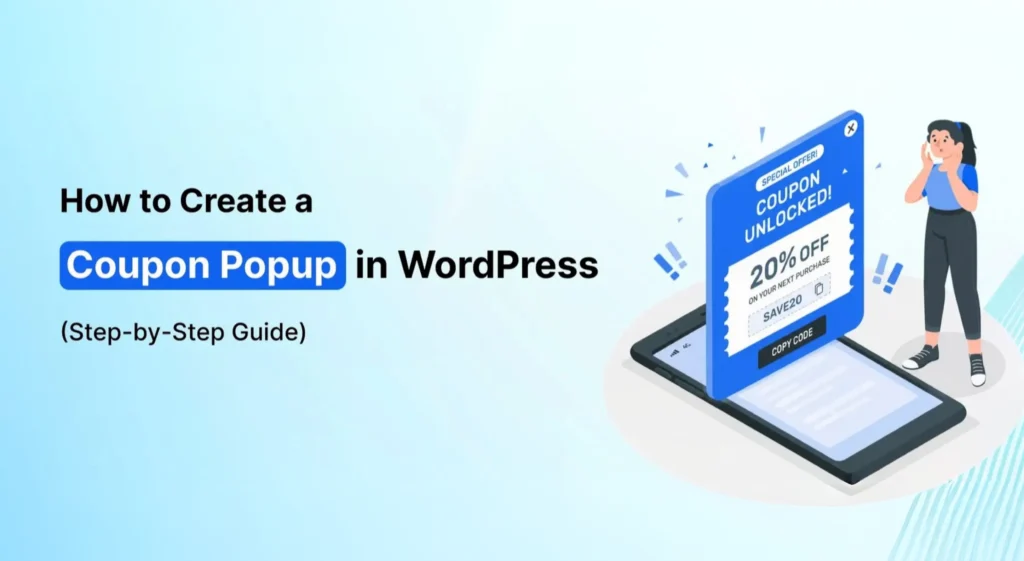
A Coupon Popup is a website popup that presents a discount, coupon code, or promotional offer to visitors while they are browsing a website. Unlike a general-purpose popup that might simply display an announcement or signup message, a Coupon Popup gives visitors a specific incentive to take action.
For example, an online store might show a message such as “Get 10% OFF on Your First Order” or “Claim Your Limited-Time Coupon.” The visitor can then claim the offer, use the discount toward a purchase, or provide their email address to receive the coupon.
Coupon Popups are commonly used by WooCommerce stores and other eCommerce businesses, but they can also be useful for SaaS websites, agencies, bloggers, and service providers. The offer can be adapted to match the business model and the action you want visitors to take.
Why Businesses Use Coupon Popups
Getting a visitor to take action is not always straightforward. Someone may browse several products, compare prices with competitors, add an item to their cart, or read through your website and still leave without purchasing or signing up.
A well-timed coupon can give that visitor an additional reason to continue. Instead of simply reminding them that they can buy something, the popup adds a tangible incentive such as a percentage discount, free shipping offer, or limited-time deal.
Businesses commonly use Coupon Popups to support several goals, including increasing WooCommerce sales, reducing cart abandonment, growing email lists, generating leads, increasing average order value, and promoting seasonal campaigns.
The timing matters just as much as the discount itself. A coupon shown during a flash sale or when a visitor is about to leave a product page serves a different purpose from a first-order offer shown to a new visitor. Matching the campaign to the visitor’s situation makes the promotion more relevant.
Benefits of Coupon Popups
1. Increase WooCommerce Sales
Discounts can give shoppers an additional reason to complete a purchase, particularly when they are already considering a product.
WooCommerce stores can use Coupon Popups during flash sales, seasonal promotions, product launches, checkout campaigns, or as first-order incentives. A clearly presented offer can help turn a visitor who is still deciding into a customer.
Depending on the campaign, the coupon can also support improvements in customer engagement and average order value alongside the immediate sales objective.
2. Reduce Cart Abandonment
Not every shopper who adds a product to their cart completes the checkout process. Some leave because they are still comparing prices, reconsidering the purchase, or waiting for a better offer.
A Coupon Popup can be used as part of a cart-recovery campaign by presenting an incentive before the visitor leaves. The offer could be a percentage discount, free shipping, a limited-time coupon, or another relevant cart recovery incentive.
For example:
“Complete Your Purchase & Get 10% OFF.”
When used at an appropriate point in the shopping journey, this type of campaign can give an abandoning visitor another reason to complete the purchase.
3. Increase Email Subscribers
A coupon does not have to be offered only in exchange for an immediate purchase. You can also use it as an incentive for newsletter subscriptions.
For example, a popup could say:
“Subscribe & Get an Exclusive Discount Coupon.”
The visitor enters their email address to receive the offer, giving the business an opportunity to grow its email list while providing the visitor with a clear benefit.
This can be particularly useful for stores that want to build an audience they can reach again through future promotions, product launches, and other email campaigns.
4. Improve Lead Generation
Coupon Popups can also be used as a lead-generation tool. Depending on the campaign, the popup can collect an email address, phone number, customer inquiry, or other lead information.
The discount gives visitors a reason to complete the form, while the business gains contact information that can be used for future communication and promotional campaigns.
5. Create Urgency and FOMO
A coupon becomes more compelling when there is a legitimate reason for visitors to act now rather than later.
Businesses can combine Coupon Popups with countdown timers, limited-time offers, and flash-sale campaigns to communicate that the promotion will not remain available indefinitely, creating FOMO.
For example, a popup might display a coupon alongside a countdown showing how long the offer remains valid. The purpose is not simply to add another visual element, but to make the expiration of the offer clear when the campaign genuinely has a time limit.
6. Easy to Create in WordPress
Creating a Coupon Popup does not necessarily require custom development. With a popup builder such as YS LeadGen, WordPress website owners can choose a template, customize the popup layout, add a coupon code, configure display rules, and publish the campaign.
This makes coupon-based conversion campaigns accessible even to website owners who do not have coding experience.
How to Create a Coupon Popup in WordPress
Creating a Coupon Popup in WordPress is straightforward once you have a clear idea of the offer you want to promote and where you want visitors to see it. You do not need to build the popup with custom code. A popup builder can handle the design and targeting while you focus on the offer, messaging, and conversion goal.
In this guide, we’ll use YS LeadGen to create the campaign. You can use the same general process whether your goal is to increase sales, promote a discount, generate leads, grow your email list, or recover visitors who are about to leave your website.
Step 1: Install the Coupon Popup Plugin
Start by installing a WordPress popup plugin that supports coupon campaigns.
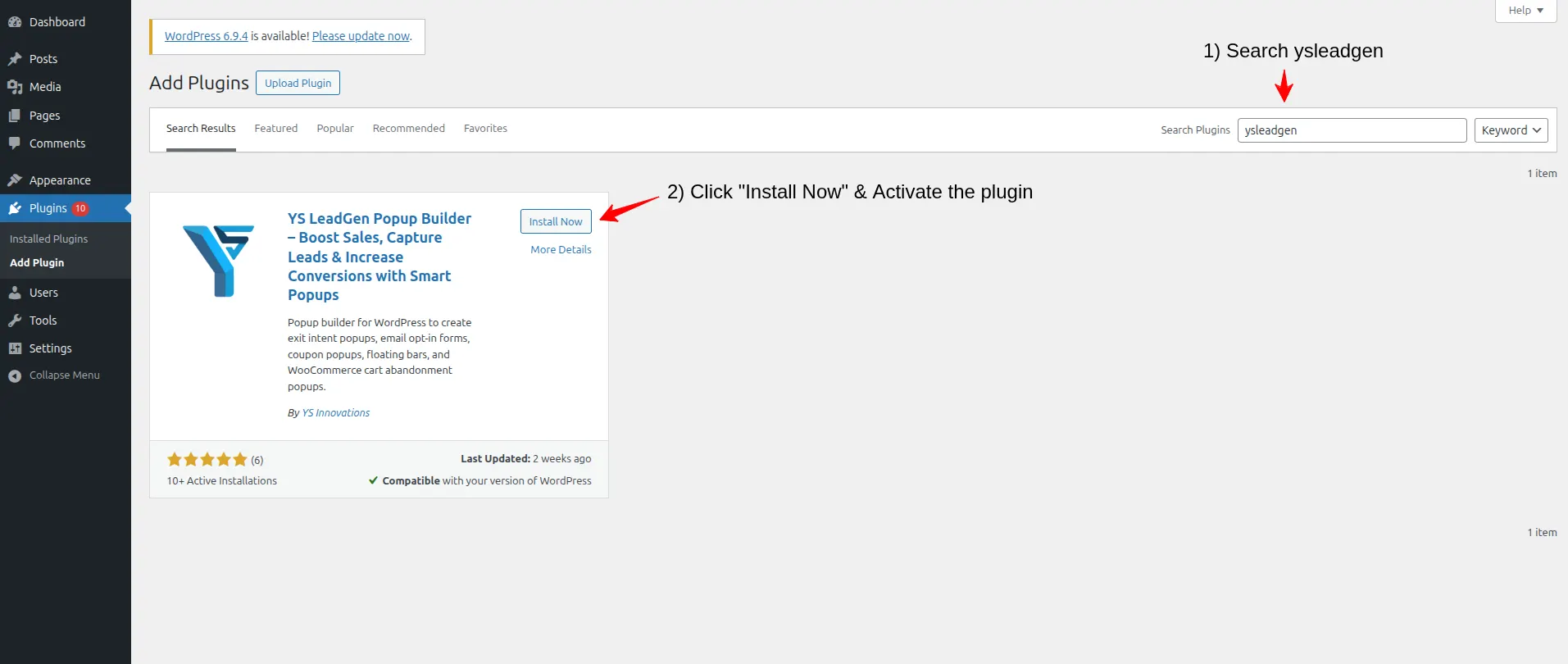
Log in to your WordPress dashboard and go to:
Plugins → Add New Plugin
Use the search field to search for:
YS LeadGen
Then click Install Now and, after the installation is complete, click Activate.
Once the plugin has been activated, the YS LeadGen menu will appear in your WordPress dashboard. You can use this section to create and manage your popup campaigns.
Why Using the Right Popup Plugin Matters
A basic popup can display a message, but a coupon campaign usually needs more control. You may want to add a coupon code, collect an email address, display a countdown, target specific WooCommerce pages, or show the offer only under certain visitor conditions.
When choosing a popup builder, look for features such as coupon popup templates, responsive designs, smart display targeting, lead-generation forms, WooCommerce campaign support, and a drag-and-drop editor.
These features make it easier to build and adjust coupon campaigns without depending on custom development for every change. YS LeadGen helps businesses create conversion-focused popup campaigns easily.
Step 2: Create a New Popup Campaign
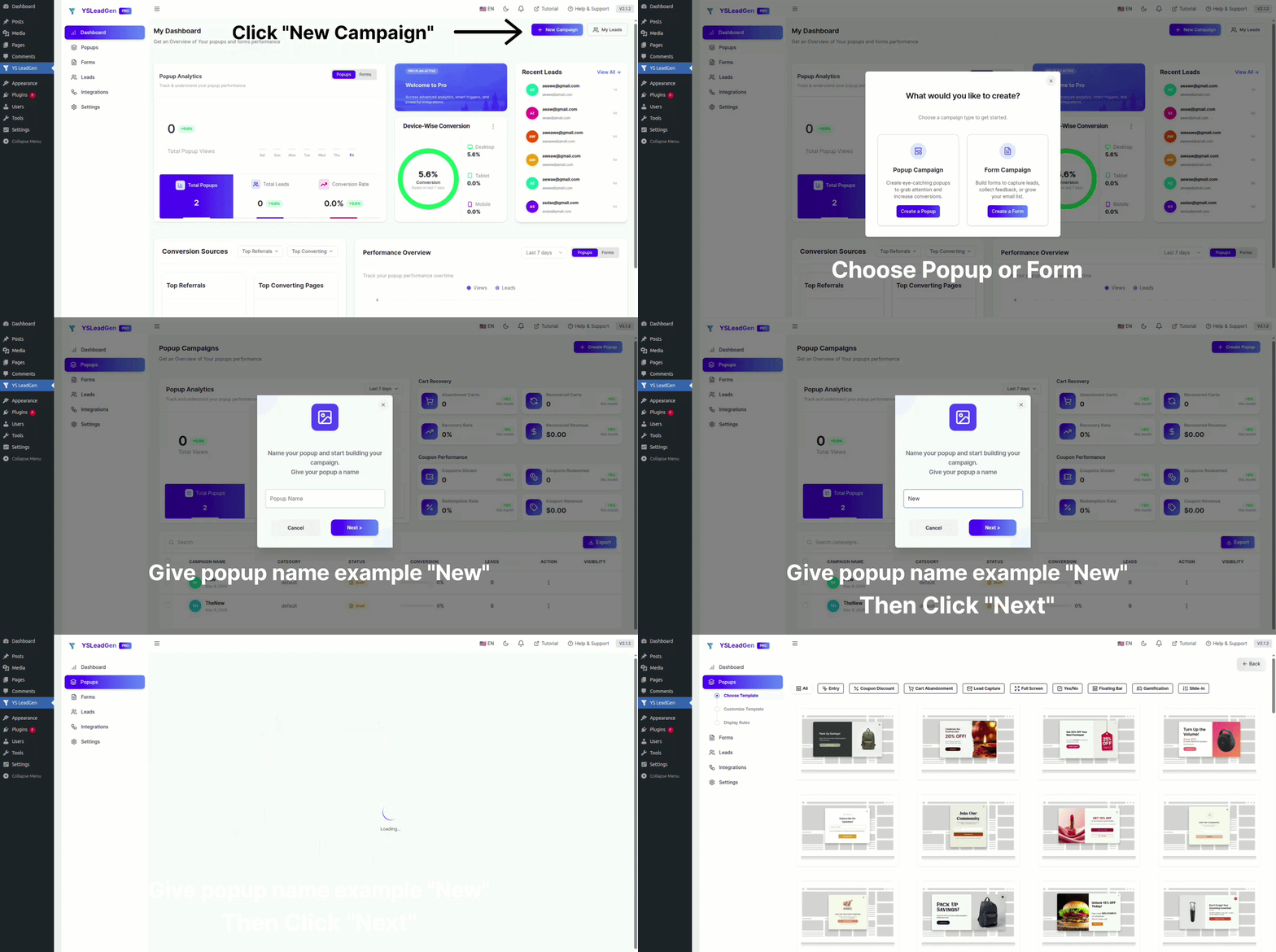
After installing and activating YS LeadGen, create a new campaign.
From your WordPress dashboard, go to:
YS LeadGen → New Campaign
Then click:
Create a Popup
You will now need to give the campaign a name. Use a name that clearly describes the purpose of the popup, especially if you expect to create several campaigns over time.
For example:
- First Order Discount Popup
- WooCommerce Coupon Popup
- Flash Sale Coupon Popup
- Newsletter Coupon Popup
- Exit Intent Coupon Campaign
Clear campaign names make it easier to find and manage the right popup later, particularly when different offers are running on different pages.
Step 3: Choose a Coupon Popup Template or Start From Scratch
Once the campaign has been created, you can start working on the popup design.
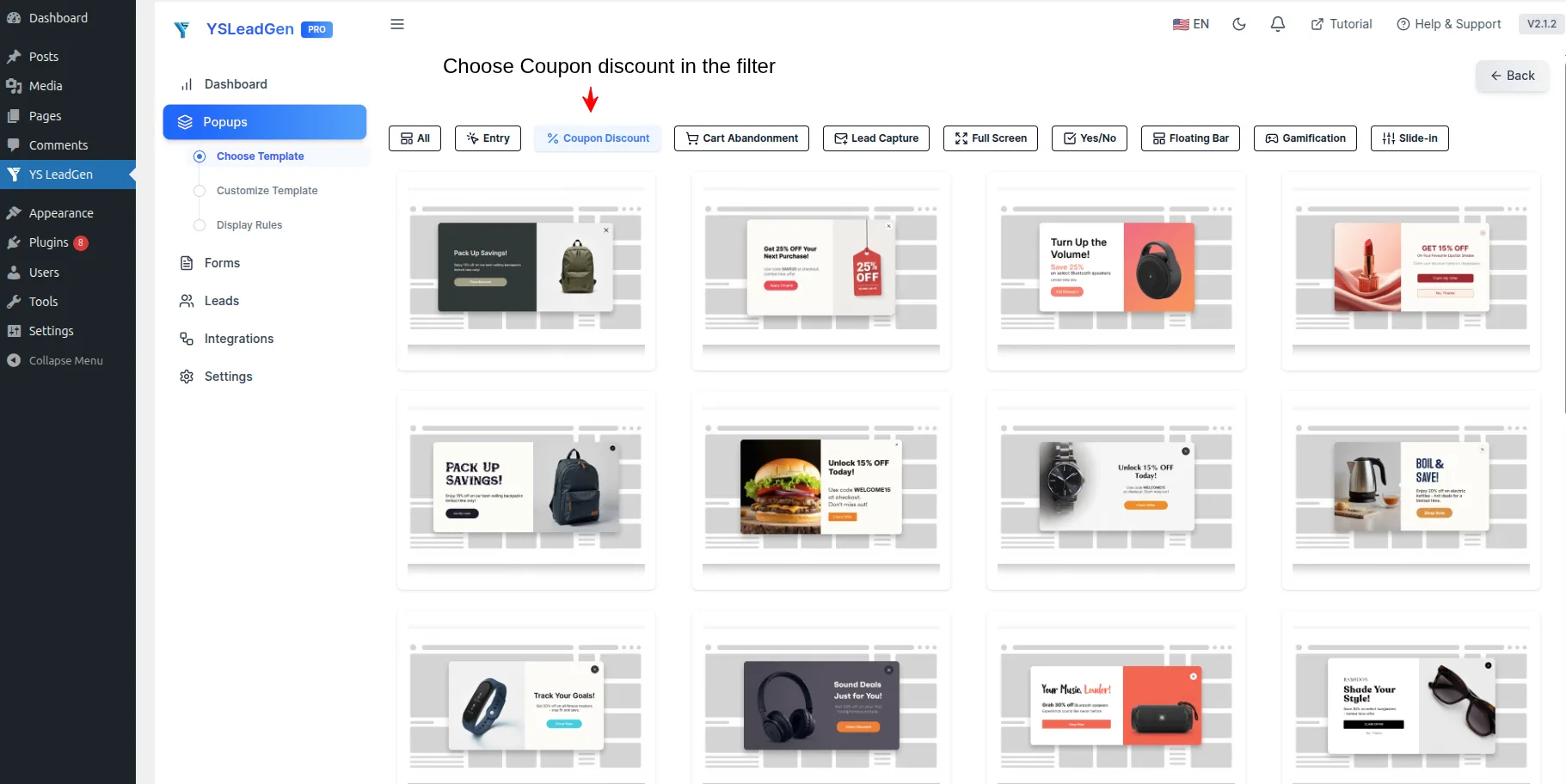
YS LeadGen allows you to either select a ready-made Coupon Popup template or start from scratch using the popup editor. Templates can be useful when you want to get a campaign running quickly, while starting from a blank design gives you more control over the structure and presentation.
Depending on your campaign, you can choose templates designed around:
- WooCommerce discounts
- Lead-generation offers
- Newsletter signup campaigns
- Exit-intent promotions
- Seasonal sales
- Flash sales
If you want to create a completely custom layout, you can start from scratch and build the popup using the drag-and-drop editor.
Add Coupon Elements to the Popup
Once you are inside the popup editor, you can add the elements needed for your campaign. A typical Coupon Popup might include the coupon code itself, a CTA button, a signup form, a countdown timer, or a promotional banner.
For example, an eCommerce campaign could combine a short discount message with the coupon code and a Shop Now button. If the goal is to grow your email list, you could place the offer above a simple email signup form instead.
The important thing is to use only the elements that support the campaign. Adding more components does not necessarily make the popup more effective. The offer should remain easy to understand at a glance.
Tips for Choosing the Right Coupon Popup Design
Start with a clean layout and give the visitor one clear offer to focus on. If the popup is promoting a 15% discount, make the discount easy to see rather than surrounding it with unnecessary text and design elements.
Urgency-focused messaging can be useful for genuine limited-time campaigns, while a first-order coupon may need nothing more than a clear benefit and a straightforward CTA.
Most importantly, make the coupon code easy to find and avoid cluttering the popup with competing messages. A simple design gives visitors less to process before deciding whether to claim the offer.
Step 4: Customize the Coupon Popup Design
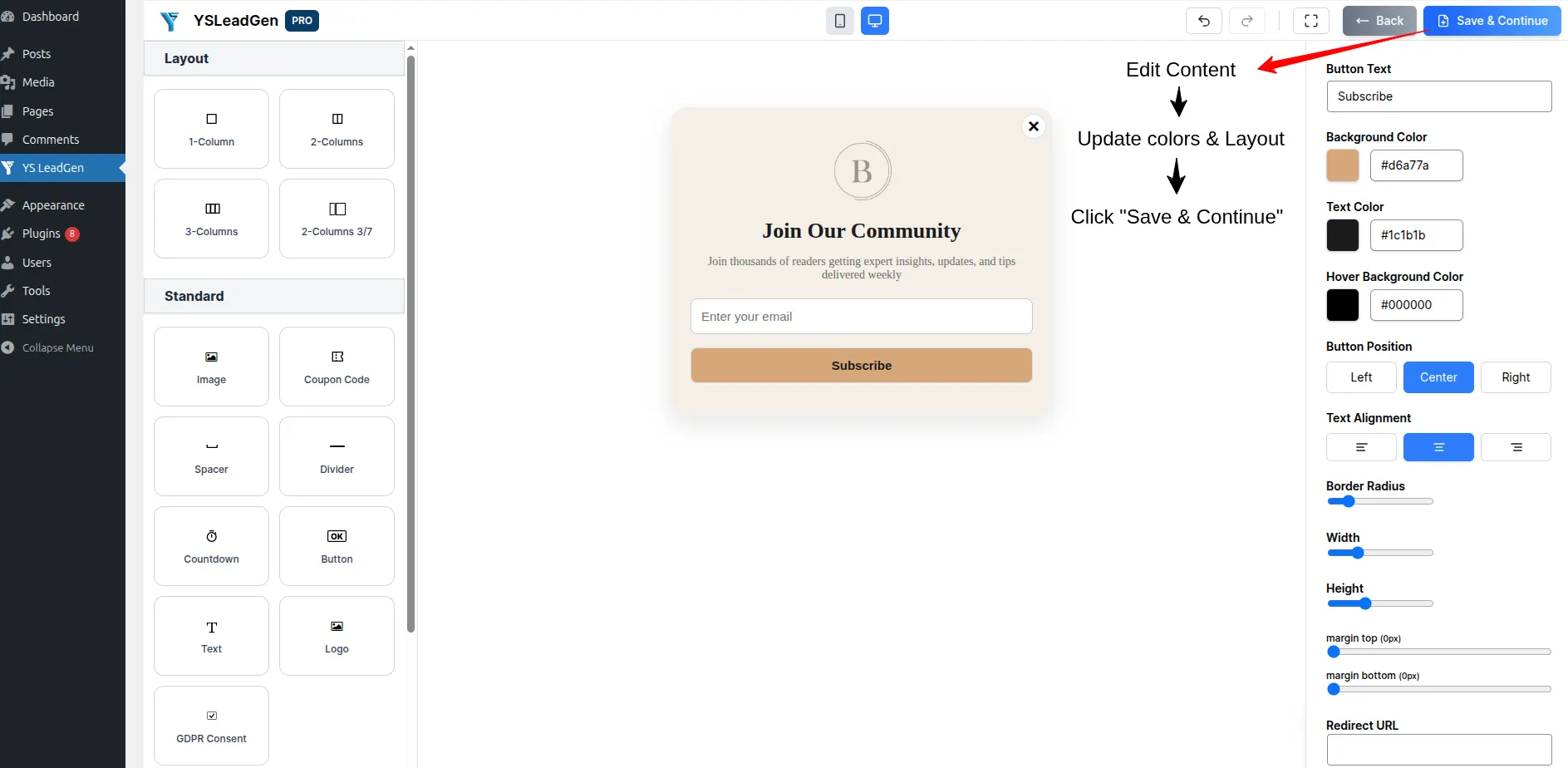
After selecting a template or starting with a blank popup, customize the design so it matches your website and communicates the offer clearly.
Inside the popup editor, you can adjust the main elements of the campaign, including the headline, supporting text, coupon code, CTA button, images, colors, typography, background styles, and form fields.
For example, a simple discount popup might use a headline such as:
“Get 15% OFF Today”
Other options could include:
- “Claim Your Exclusive Discount”
- “Unlock Limited-Time Coupon”
- “Special Offer Just for You”
The wording can change depending on the campaign, but visitors should be able to understand the offer quickly. The popup should make three things clear: what the offer is, why the visitor should claim it, and what benefit they will receive.
Keep the Coupon Popup Design Simple
A coupon popup does not need to contain every available design element. The more important task is to make the offer easy to understand and the next action obvious.
Use short and clear copy, give the CTA enough visual prominence, and make the discount or coupon code easy to find. The popup should also use your existing website branding so that it feels like a natural part of the site rather than a separate advertisement.
If you are promoting one particular discount, keep the popup focused on that offer instead of adding multiple promotions to the same screen. A clean layout with a clear message is easier for visitors to understand and interact with.
Add a Lead Generation Form
If your objective is not only to distribute coupons but also to collect leads, you can add a signup form directly inside the popup.
Depending on what your business needs, the form can collect information such as:
- Name
- Email address
- Phone number
For example, you could offer a discount in exchange for an email address:
“Get 15% OFF Your First Order”
Email Address: [____________]
CTA: Get My Coupon
This approach allows the coupon campaign to serve two purposes at the same time: the visitor receives an incentive, while the business can build an email list or generate a new lead for future campaigns.
Keep the form as simple as possible. If an email address is enough to deliver the coupon, there may be little reason to ask for several additional details. The fields you include should have a clear purpose related to the campaign.
Step 5: Configure Display Rules
Once the coupon popup is designed, the next step is deciding where and when it should appear. Display rules are important because a discount that is useful on one page may not make sense on another.
For example, a first-order coupon can work well for new visitors on the homepage, while a cart recovery offer makes more sense when a shopper is close to leaving the checkout process. Similarly, a newsletter discount may be more appropriate on blog content than on a checkout page.
YS LeadGen allows you to configure display rules for different parts of your WordPress website, including:
- Entire website
- Homepage
- Product pages
- Checkout pages
- Landing pages
- Blog posts
- Specific categories
Using these rules allows you to match the coupon campaign with the page the visitor is viewing instead of showing the same offer everywhere.
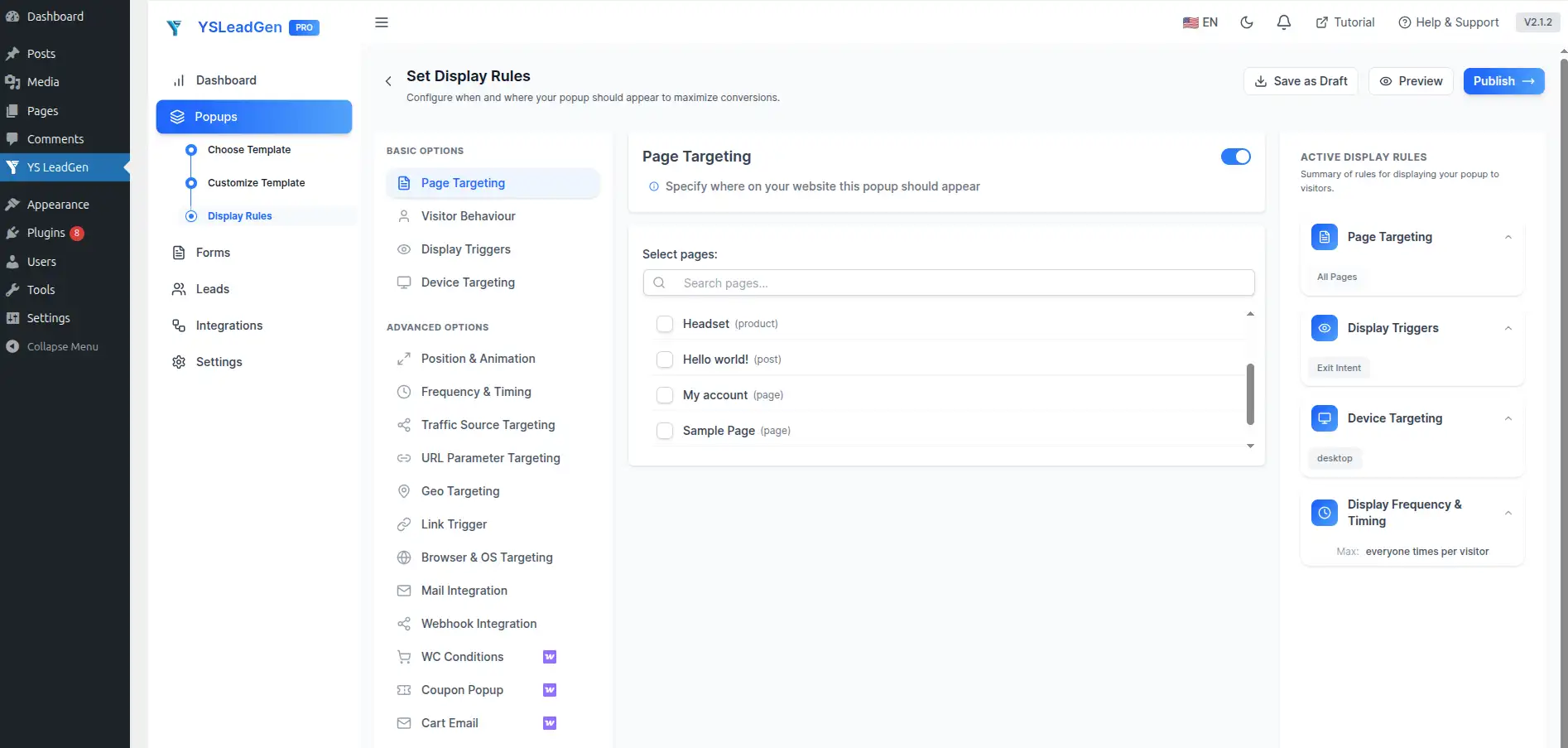
Examples of Smart Coupon Targeting
Different pages can support different coupon strategies. For example, you could show a first-order discount to visitors arriving on the homepage, display a product-specific discount while someone is browsing a product page, or use a cart recovery coupon when a shopper is about to leave during checkout.
A blog visitor could instead see a newsletter signup offer that includes a discount for their first purchase.
This type of targeting makes the campaign more relevant to the visitor’s current activity. Rather than treating every visitor the same way, you can create separate offers based on where they are on the website and what they are likely trying to accomplish.
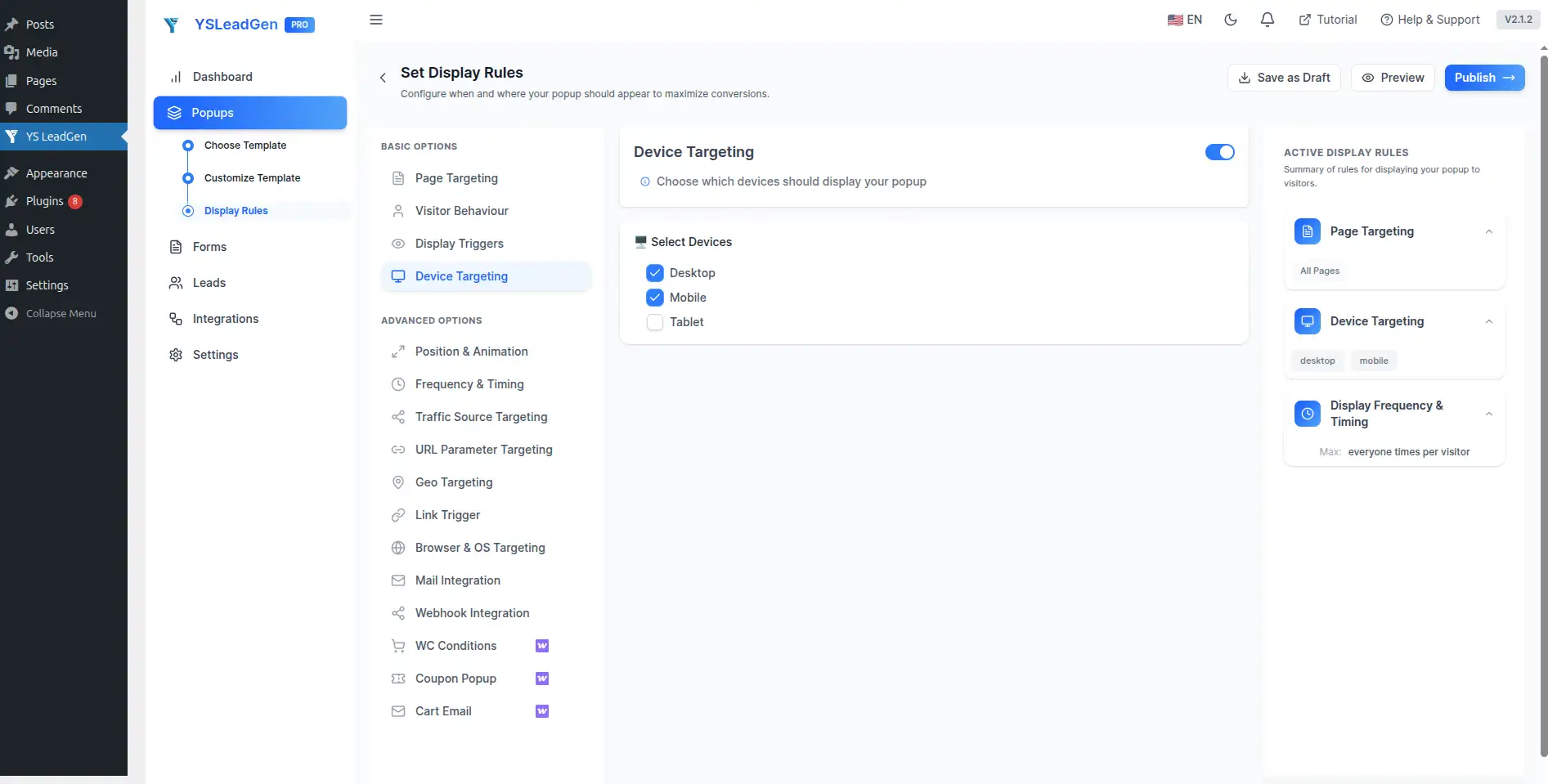
Configure Device Targeting
You can also decide which devices should display the coupon popup. Depending on your campaign, the popup can be configured for:
- Desktop devices
- Mobile devices
- Tablets
Device targeting is useful because the same popup design may not provide the same experience across different screen sizes. A layout that looks balanced on a desktop monitor may require adjustments on a mobile screen.
Make sure the popup remains readable and easy to interact with regardless of the device visitors use to access your website.
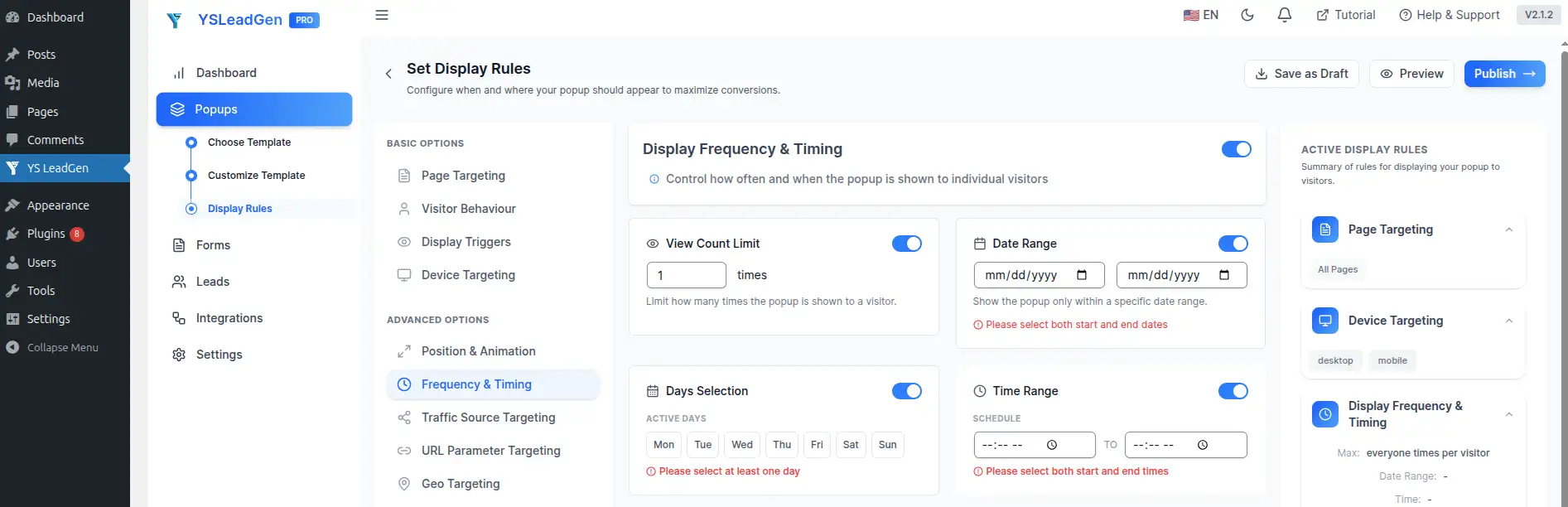
Configure Popup Frequency
Showing the same coupon repeatedly can quickly become frustrating for visitors. Frequency settings allow you to control how often a visitor sees the campaign.
Useful settings can include:
- Show once per session
- Hide after conversion
- Delay repeat display
For example, if a visitor has already claimed the coupon, there is little reason to continue displaying the same offer to them. Similarly, limiting repeated displays can prevent the popup from becoming a distraction during normal browsing.
The aim is to make the coupon available when it is useful without repeatedly interrupting the visitor’s experience.
Step 6: Publish and Test the Coupon Popup
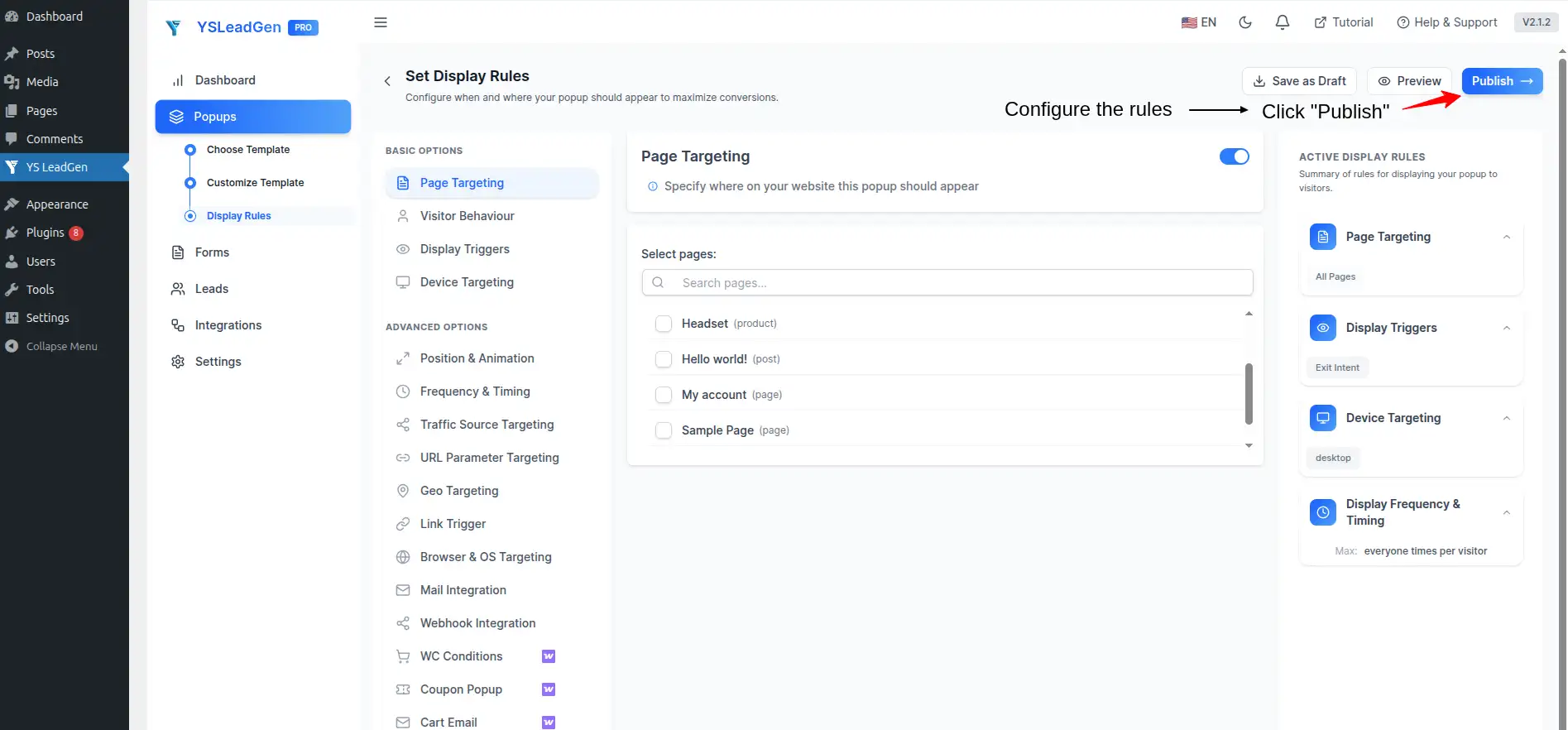
Once your coupon offer, design, display rules, device targeting, and frequency settings are ready, you can publish the campaign.
Click:
Publish
The Coupon Popup will then become active on your WordPress website and will appear according to the display conditions you configured.
However, publishing should not be the end of the setup process. Before relying on the campaign, open your website and test the popup yourself. Go through the experience as a visitor would and make sure the offer is displayed correctly.
Check the following:
- Popup appearance
- Coupon visibility
- Mobile responsiveness
- CTA button functionality
- Form submissions
- Display targeting
If you are collecting email addresses or other lead information, submit the form yourself and confirm that the process works as expected. Also check the popup on different screen sizes to make sure the content does not become difficult to read or interact with.
Testing before promoting the campaign helps identify usability or configuration problems before they affect real visitors.
Tips to Improve Coupon Popup Conversions
Once the popup is working correctly, the next focus should be improving how visitors respond to the offer. Start with the basics: make the discount easy to understand, use a headline that communicates the benefit, and give visitors a clear action to take.
A coupon should provide enough value to make the offer worth considering. At the same time, the popup should not become overloaded with text or unnecessary form fields. Visitors should be able to understand the offer quickly and decide what to do next without having to read a large amount of content.
Mobile optimization is equally important. Make sure the popup is comfortable to use on smaller screens, particularly when visitors need to enter information or tap a CTA.
Some useful CTA examples include:
- Claim Discount
- Unlock Offer
- Get Coupon
- Shop Now
- Redeem Deal
You can also test different headlines, offers, CTA wording, and popup layouts to find which combination works best for your audience. Small changes to the offer or presentation can have a meaningful effect on how visitors interact with the campaign.
Best Practices for High-Converting Coupon Popups
Creating a Coupon Popup is relatively easy. The harder part is creating one that gives visitors a useful reason to act without making the website feel intrusive.
A popup can have a technically correct setup and still perform poorly if the discount is not attractive, the timing is wrong, the message is unclear, or the design does not work well on mobile devices. The most effective campaigns usually keep the experience simple and relevant while giving visitors a clear benefit.
Here are the practices worth following when building and optimizing a Coupon Popup.
1. Offer Real Value
The discount should feel worthwhile to the visitor. A small or unclear incentive may not be enough to change someone’s decision, particularly when they are already comparing products or prices.
Depending on your business, the offer could be a percentage discount, free shipping, a Buy One Get One promotion, or a genuinely limited-time deal.
For example:
- 10% OFF First Order
- Free Shipping
- Buy One Get One
- Limited-Time Discount
The exact offer should depend on your margins, products, audience, and campaign objective. The important point is that the visitor should immediately understand why claiming the coupon is worthwhile.
2. Use a Strong Headline
The headline is usually the first part of the popup visitors notice, so it should communicate the main benefit without making them read a paragraph before understanding the offer.
Examples include:
- “Unlock Your Discount Now”
- “Special Offer Ends Soon”
- “Claim Your Coupon Today”
A good headline makes the offer immediately understandable and gives the visitor a reason to consider the CTA that follows.
3. Keep the Popup Content Simple
Visitors generally decide very quickly whether they want to interact with a popup. If the offer is buried beneath several paragraphs, multiple promotional messages, or unnecessary form fields, the main action can become difficult to find.
A simple Coupon Popup usually needs a clear headline, a short supporting message, one primary CTA, and only the form fields that are genuinely required.
Avoid trying to explain every detail of your promotion inside the popup. The popup should communicate the essential value and guide visitors toward the next action.
4. Use a Strong CTA Button
The CTA should describe what the visitor will accomplish by clicking it. Generic buttons such as “Submit”, “Continue”, or “Click Here” do not communicate much about the actual offer.
Instead, use action-oriented labels such as:
- Claim Discount
- Unlock Offer
- Get Coupon
- Redeem Deal
For an online store, a CTA such as “Get My Coupon” or “Shop Now” can make the next action easier to understand.
The CTA should match the purpose of the campaign and the action visitors are expected to take at that point in the journey.
5. Create Urgency When Appropriate
Urgency can be useful when the promotion genuinely has a deadline. A visitor may be more likely to act when they understand that a discount is available only for a limited period.
You can communicate urgency using:
- Countdown timers
- Limited-time coupons
- Flash-sale messages
- Seasonal offers
For example:
“Offer Ends Today.”
The important part is that the deadline should be real. Urgency works best when it communicates an actual limitation rather than creating artificial pressure around an offer that will simply continue indefinitely.
6. Optimize for Mobile Devices
Your Coupon Popup should provide a usable experience across smartphones, tablets, and mobile devices.
On mobile, make sure the popup fits comfortably within the screen and that visitors can read the headline, see the coupon, enter information, and tap the CTA without difficulty. Use readable font sizes and sufficiently large interactive elements.
It is also worth checking how quickly the popup loads and whether any images or other design elements make the mobile experience unnecessarily heavy.
Always test the finished campaign on multiple devices before considering the design complete.
7. Use Smart Popup Targeting
Not every visitor needs to see the same coupon. A more targeted campaign can make the offer more relevant to the page and the visitor’s current activity.
For example, a fashion store could display a clothing-related discount while visitors are browsing product pages. A WooCommerce store could show a cart recovery offer when a shopper is about to leave, while a blog visitor could receive a newsletter signup discount.
Targeting allows you to create campaigns around specific visitor situations rather than relying on one generic popup across the entire website.
8. Test and Optimize Popup Performance
A popup should not necessarily remain unchanged after it is published. Different audiences may respond differently to the headline, discount, CTA, or overall layout.
Test individual elements such as:
- Headlines
- Offers
- CTA buttons
- Popup layouts
- Coupon designs
For example, you might compare a 10% discount with a free-shipping offer, or test whether “Claim Discount” performs differently from “Get Coupon.”
A/B testing can help you understand which variations perform better instead of relying entirely on assumptions. Over time, these tests can help you refine the campaign around what your visitors actually respond to.
Common Mistakes to Avoid
Coupon Popups can be effective, but the way they are implemented matters just as much as the offer itself. A discount that is poorly timed, difficult to understand, or shown too frequently can make the popup feel more like an interruption than a useful offer.
One common mistake is offering a discount that does not provide enough value to motivate visitors. If the incentive is weak, simply adding a coupon code will not necessarily change the visitor’s decision. Consider whether the offer is meaningful for your particular audience and whether it makes sense for the product or campaign.
Another issue is putting too much information inside the popup. Visitors should not have to read a long block of text before understanding what they are being offered. Keep the layout clean, make the main benefit easy to see, and avoid unnecessary fields or competing messages.
Mobile optimization is another area that is often overlooked. A popup that looks fine on a desktop screen may become difficult to use on a smartphone if the text is too small, the buttons are difficult to tap, or the popup does not fit the available screen space.
Frequency also needs attention. Showing the same coupon repeatedly can frustrate visitors, particularly when they have already dismissed it or completed the desired action. Use frequency controls to create a more reasonable browsing experience.
Finally, do not publish a campaign and assume that the first version will be the best version. Testing different offers, layouts, headlines, and CTA buttons can reveal opportunities to improve the campaign over time.
Advanced Coupon Popup Strategies
Once you are comfortable creating basic Coupon Popups, you can make the campaigns more targeted by combining the offer with visitor behavior, timing, and page context.
Rather than displaying the same discount to everyone, advanced campaigns can combine smart targeting, behavioral triggers, urgency, personalized offers, and conversion optimization. This gives you more control over when the offer appears and who receives it.
1. Combine Coupon Popups With Exit Intent
Exit intent can be particularly useful when you want to make one final offer to a visitor who appears ready to leave the website.
For example, a WooCommerce store could display:
“Wait! Get 15% OFF Before You Leave.”
This approach can be useful for cart abandonment recovery, product page exits, and other situations where a visitor is leaving without completing the intended action.
The idea is to present the coupon at a specific point in the visitor journey rather than displaying it immediately when the page loads.
2. Use Countdown Timers With Coupons
A countdown timer can be combined with a coupon when the promotion has a genuine time limit.
For example:
“Claim Your Coupon Before the Timer Ends.”
The timer gives visitors a visible indication of how long the promotion remains available and can encourage them to make a decision sooner.
This works particularly well for flash sales, limited-time promotions, and other campaigns where the offer actually expires at a defined time.
3. Create First-Order Coupon Campaigns
First-order discounts are commonly used by WooCommerce stores to encourage new visitors to make their first purchase.
A simple offer such as:
“Get 10% OFF on Your First Order.”
can give a new customer an additional reason to complete their first purchase. The campaign can also be connected to an email signup so the business can continue communicating with the customer after the initial interaction.
The source highlights first-order campaigns as a way to support first-time purchases, customer acquisition, and subscriber growth.
4. Personalize Coupon Offers
A single generic coupon may not be equally relevant to every visitor. Where your campaign supports it, consider tailoring the offer based on factors such as the product category being viewed, visitor behavior, landing page, or traffic source.
For example, a visitor browsing a particular product category could receive an offer related to that category rather than a generic site-wide promotion.
The purpose of personalization is to make the offer more closely connected to what the visitor is already interested in, creating a more relevant experience.
5. Use Seasonal Coupon Campaigns
Coupon campaigns can also be adapted around seasonal promotions and major sales periods.
Common examples include:
- Black Friday
- Cyber Monday
- Holiday promotions
- Festival sales
- Summer campaigns
Instead of keeping one generic coupon active throughout the year, seasonal campaigns allow you to update the offer and messaging to match the current promotion.
The source highlights seasonal campaigns as another opportunity to use Coupon Popups when businesses are already running time-specific promotions.
Why YS LeadGen Is Useful for Coupon Popups
Once you move beyond a basic discount message, a Coupon Popup often needs more than a simple popup box. You may want to combine the offer with a signup form, countdown timer, exit-intent trigger, WooCommerce targeting, or different display rules depending on where visitors are on your website.
YS LeadGen is designed to help WordPress website owners create these types of popup campaigns without requiring custom development. You can use it to build Coupon Popups as well as other campaigns such as countdown timer popups, lead-generation forms, exit-intent campaigns, and WooCommerce promotional popups.
Key Features for Coupon Campaigns
For a typical Coupon Popup campaign, YS LeadGen provides tools such as:
- Ready-made popup templates
- Drag-and-drop popup editor
- Smart popup targeting
- Responsive popup designs
- Lead-generation forms
- WooCommerce popup campaigns
- Conversion-focused popup layouts
These features allow you to build the campaign around the offer rather than starting with a completely custom implementation each time.
Beginner-Friendly Popup Builder
A major advantage of using a visual popup builder is that you can manage the campaign from WordPress without needing to write custom code.
You can create a popup campaign, customize its design, add the coupon offer, configure display rules, and publish it from the WordPress dashboard.
This also makes it easier to make changes later. If you want to update the discount, change the CTA, modify the targeting, or launch a new seasonal campaign, you can work from the popup editor rather than rebuilding the campaign from scratch.
WooCommerce-Friendly Coupon Campaigns
Coupon Popups are particularly useful for WooCommerce stores because discounts can be connected directly to common eCommerce marketing campaigns.
For example, a store can use popup campaigns to promote a flash sale, encourage a visitor to complete an abandoned purchase, increase sales during a promotion, or launch a new discount campaign.
The popup can therefore become part of a broader WooCommerce marketing strategy rather than being used only as a standalone promotional message.
Conclusion
Coupon Popups can be a practical way to give website visitors an additional reason to take action. For a WooCommerce store, that might mean encouraging a shopper to complete a purchase or recover an abandoned cart. For another type of website, the same approach can be used to grow an email list, generate leads, or promote a seasonal offer.
The most important part is not simply adding a coupon to a popup. The campaign needs to combine a worthwhile offer with clear messaging, an easy-to-understand CTA, appropriate targeting, and a design that works across devices.
A good Coupon Popup should feel relevant to the visitor rather than appearing as a generic promotion on every page. Using display rules, behavioral triggers, frequency controls, and targeted offers can help create a more useful experience.
With a popup builder such as YS LeadGen, WordPress website owners can create Coupon Popups without coding, customize the design, add promotional elements, and control when and where the campaign appears. With the right strategy and ongoing testing, Coupon Popups can become a useful part of a broader conversion optimization strategy.
Frequently Asked Questions
A Coupon Popup is a website popup that displays a discount, coupon code, or promotional offer to encourage visitors to take a specific action, such as making a purchase or signing up.
Yes. Coupon Popups can be used to encourage WooCommerce visitors to complete purchases by presenting discounts and other promotional offers at appropriate points in the shopping journey.
Yes. Popup builders such as YS LeadGen allow you to create and customize Coupon Popups through the WordPress dashboard without requiring custom coding.
Yes. Coupon Popups can be designed to work across mobile devices, tablets, and desktop computers. However, the finished campaign should always be tested on different screen sizes to make sure the layout and controls remain easy to use.
Common campaign types include first-order discounts, flash sales, seasonal offers, cart recovery coupons, and newsletter signup discounts. The best option depends on your website, audience, and marketing objective.
Coupon Popups give visitors a specific incentive to take action. A relevant discount or promotional offer can encourage a visitor to make a faster purchasing decision or complete another desired conversion.
The source recommends YS LeadGen as a beginner-friendly WordPress popup builder for creating Coupon Popups, lead-generation campaigns, and WooCommerce promotional popups without requiring custom development.