How to Create a Full Screen Popup in WordPress (Step-by-Step Guide)

Most website visitors leave without subscribing, purchasing, or taking any meaningful action. Whether you run a WordPress blog, WooCommerce store, SaaS platform, business website, or landing page, failing to capture visitor attention at the right moment means losing potential leads, subscribers, and customers every single day.
This is why many WordPress website owners use Full Screen Popups to make a bold, undeniable impression before visitors leave the page.
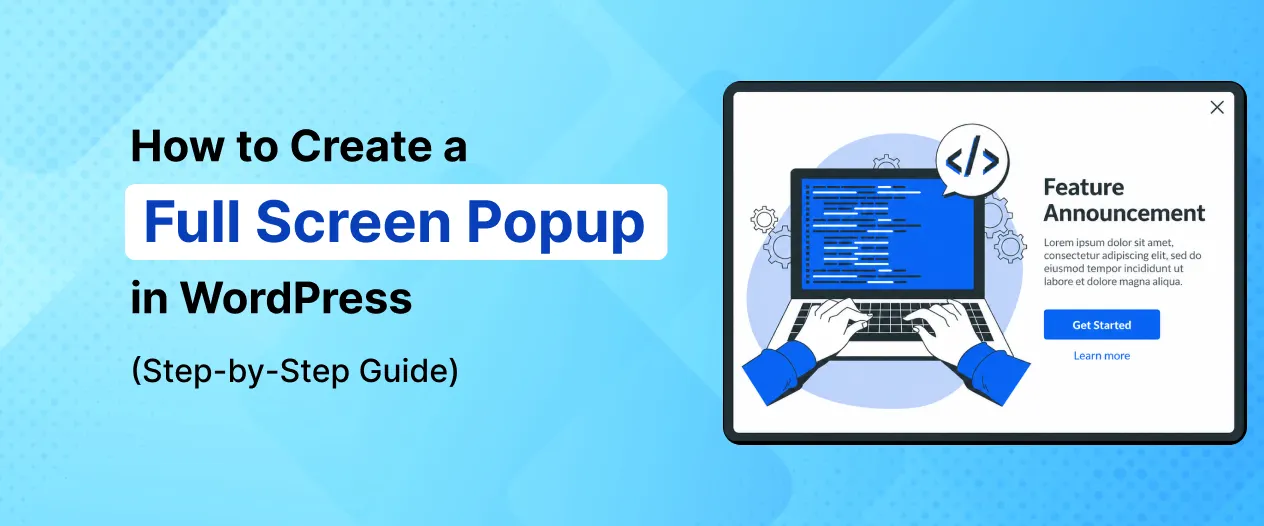
A Full Screen Popup is a powerful overlay popup that covers the entire screen with a focused message and call-to-action. Unlike small corner popups or slide-ins, a Full Screen Popup commands complete visitor attention — making it one of the most effective formats for capturing leads, promoting offers, and driving conversions.
Instead of competing with other on-page content for attention, a Full Screen Popup gives your message the entire screen, allowing you to deliver:
- Welcome messages for new visitors
- Email newsletter signup offers
- Discount and promotional campaigns
- Age verification gates
- Lead generation forms
- Cookie consent overlays
- Announcement banners
- Free resource offers
Today, Full Screen Popups are widely used to:
- Grow email subscriber lists rapidly
- Promote high-priority offers and announcements
- Improve lead generation rates
- Increase WooCommerce sales
- Welcome new visitors with a personalized message
- Boost overall website conversion rates
The best part is that you can create a Full Screen Popup in WordPress without any coding knowledge.
Using popup builder plugins like YS LeadGen, you can easily create professional full screen popups with ready-made templates, responsive overlay designs, smart display rules, and advanced targeting triggers — all from a simple visual editor.
Whether your goal is to:
- Grow your email list faster
- Promote a time-sensitive offer
- Welcome new visitors
- Generate more leads
- Announce an important update
Full Screen Popups can become one of the most impactful conversion tools on your WordPress website.
In this step-by-step beginner guide, you’ll learn:
- What a Full Screen Popup is
- Why Full Screen Popups are important
- How to create a Full Screen Popup in WordPress
- Best practices for higher popup conversions
- Common mistakes to avoid
By the end of this tutorial, you’ll be able to create high-converting Full Screen Popups that capture visitor attention and turn passive visitors into subscribers, leads, and customers.
What is a Full Screen Popup?
A Full Screen Popup is a website overlay that expands to cover the entire browser screen with a focused message, offer, or call-to-action.
Unlike traditional small popups that appear in the center or corner of the screen, a Full Screen Popup occupies 100% of the visible screen area — eliminating all distractions and placing complete visitor focus on the popup content.
Because the visitor’s entire screen is covered, Full Screen Popups are impossible to ignore and create a powerful, immersive experience that maximizes engagement and conversion opportunities.
Full Screen Popups are commonly used for:
- Email newsletter subscription offers
- Welcome messages for new visitors
- Discount and promotion announcements
- Lead generation campaigns
- Age verification gates
- Seasonal sale announcements
- Free resource downloads
- Event registrations
This popup format is widely used by WordPress blogs, WooCommerce stores, SaaS businesses, media websites, and online businesses to capture visitor attention and maximize conversions.
How Full Screen Popups Work
Full Screen Popups work by triggering a full-page overlay that appears above all website content when a specific condition is met.
The overlay covers the entire browser screen and typically includes:
- A compelling headline
- A short description or offer details
- A lead capture form or CTA button
- A close button for visitors who wish to dismiss it
The popup can be triggered by various conditions such as:
- Time delay after page load
- Exit Intent when visitors attempt to leave
- Scroll percentage reached
- Specific page visits
- First-time visitor detection
Because the entire screen is covered, visitors must either engage with the popup or actively close it — which means every visitor sees the message clearly before continuing.
This improves both:
- Message visibility
- Conversion opportunities
Why Businesses Use Full Screen Popups
Standard small popups are easy to overlook, especially when visitors are focused on reading page content.
Full Screen Popups solve this problem by:
- Removing all background distractions
- Making the offer impossible to miss
- Creating a focused, immersive experience
Businesses use Full Screen Popups to:
- Grow email subscriber lists faster
- Promote high-priority campaigns
- Announce important updates
- Generate leads at a higher rate
- Welcome and orient new visitors
- Drive flash sales and promotions
For example:
- A blog may show a full screen newsletter signup overlay to new visitors
- A WooCommerce store may display a full screen flash sale announcement
- A SaaS website may use a full screen free trial offer overlay
- A media website may show a full screen subscription prompt
The full screen format ensures the message receives maximum attention before the visitor continues browsing or leaves the page.
Common Types of Full Screen Popups
Different businesses use different full screen popup strategies depending on their goals.
Popular Full Screen Popup types include:
- Welcome Mat Popups (shown to first-time visitors)
- Email Newsletter Signup Overlays
- Discount and Promotion Announcement Popups
- Lead Generation Form Overlays
- Age Verification Gates
- Flash Sale Announcement Popups
- Free Resource Download Overlays
- Event Registration Popups
Each full screen popup type is designed to capture maximum visitor attention and encourage immediate action.
Benefits of Full Screen Popups
Full Screen Popups are one of the most visually impactful and conversion-focused popup formats available for WordPress websites.
Unlike smaller popups that can be easily overlooked, the full screen overlay format guarantees that every visitor sees the message before engaging with the rest of the page. This creates unmatched visibility for your offer, lead generation form, or announcement.
Whether you run a WordPress blog, WooCommerce store, SaaS platform, agency website, or media site, Full Screen Popups can significantly improve your website’s conversion strategy.
Here are some of the biggest benefits of using Full Screen Popups on your WordPress website.
1. Maximum Visitor Attention and Visibility
The most powerful advantage of Full Screen Popups is their ability to capture 100% of the visitor’s attention.
Because the popup covers the entire screen, there are no competing elements, distracting headlines, or sidebar widgets pulling the visitor’s focus away from the offer.
This means:
- Every visitor sees the popup message clearly
- The offer or CTA is impossible to overlook
- Engagement rates are significantly higher than small popups
For high-priority campaigns, announcements, and lead generation offers, full screen visibility is a major conversion advantage.
2. Grow Email Subscribers Faster
Full Screen Popups are particularly effective for growing email subscriber lists quickly.
Because the signup form takes up the entire screen, visitors cannot miss it. Combined with a compelling incentive, full screen newsletter popups can dramatically increase daily email subscription rates.
Example: “Join 10,000+ Readers — Get Our Weekly Newsletter FREE. Subscribe Now!”
The full screen format removes all distractions, making visitors far more likely to engage with the subscription form before closing the popup.
3. Improve Lead Generation Rates
For businesses that rely on lead generation — such as agencies, SaaS companies, consultants, and service providers — Full Screen Popups can capture significantly more leads compared to smaller popup formats.
The full screen format works well for:
- Contact inquiry forms
- Free consultation booking popups
- Demo request overlays
- Whitepaper and resource download forms
- Webinar registration popups
A full screen lead form commands complete attention and removes all competing elements that might distract the visitor from converting.
4. Promote High-Priority Offers Effectively
Not all promotions deserve a small corner popup.
For high-priority campaigns like:
- Black Friday and Cyber Monday sales
- Seasonal discount promotions
- Product launch announcements
- Flash sale events
- Exclusive member offers
A Full Screen Popup ensures the announcement receives the prominence it deserves.
Full screen promotions are much harder to dismiss without reading, which means your most important offers get seen by virtually every visitor.
5. Create a Powerful First Impression for New Visitors
Full Screen Welcome Popups — also known as Welcome Mats — create a strong first impression by greeting new visitors with a focused message the moment they arrive on your website.
This is a highly effective strategy for:
- Introducing new visitors to your brand
- Highlighting your most important offer upfront
- Directing new visitors to specific pages or content
- Capturing email addresses from first-time visitors immediately
A well-designed welcome overlay sets the tone for the entire visitor experience before they explore the rest of the website.
6. Boost WooCommerce Sales and Promotions
WooCommerce store owners can use Full Screen Popups to dramatically increase the visibility of:
- Flash sale announcements
- Seasonal discount campaigns
- New product launch promotions
- Exclusive member discount offers
- Free shipping threshold announcements
Because the promotion covers the entire screen, shoppers are far more likely to notice and act on the offer compared to a small banner or standard popup.
7. Easy to Create in WordPress
One of the biggest advantages of modern WordPress popup plugins is their simplicity.
Using tools like YS LeadGen, website owners can create professional Full Screen Popups without coding knowledge.
You can:
- Choose full screen popup templates
- Customize overlay designs and content
- Enable smart display triggers
- Configure advanced targeting rules
- Publish full screen popups within minutes
This makes full screen popup marketing accessible even for complete beginners.
How to Create a Full Screen Popup in WordPress
Creating a Full Screen Popup in WordPress is much easier than most beginners think.
With the help of modern WordPress popup builder plugins, you can create professional and high-converting Full Screen Popups without coding knowledge or technical experience.
In this tutorial, we’ll use YS LeadGen to create a Full Screen Popup step-by-step.
Whether your goal is to:
- Grow your email subscriber list
- Promote a flash sale or seasonal offer
- Generate more leads
- Welcome new visitors
- Announce important updates
this guide will help you set up your full screen popup in just a few minutes.
Step 1 – Install the Full Screen Popup Plugin
The first step is installing a WordPress popup plugin that supports full screen overlay popup functionality.
- Login to your WordPress dashboard.
- From the left sidebar, navigate to: Plugins → Add New Plugin
- In the search bar, search for: YS LeadGen
- Click Install Now, Click Activate
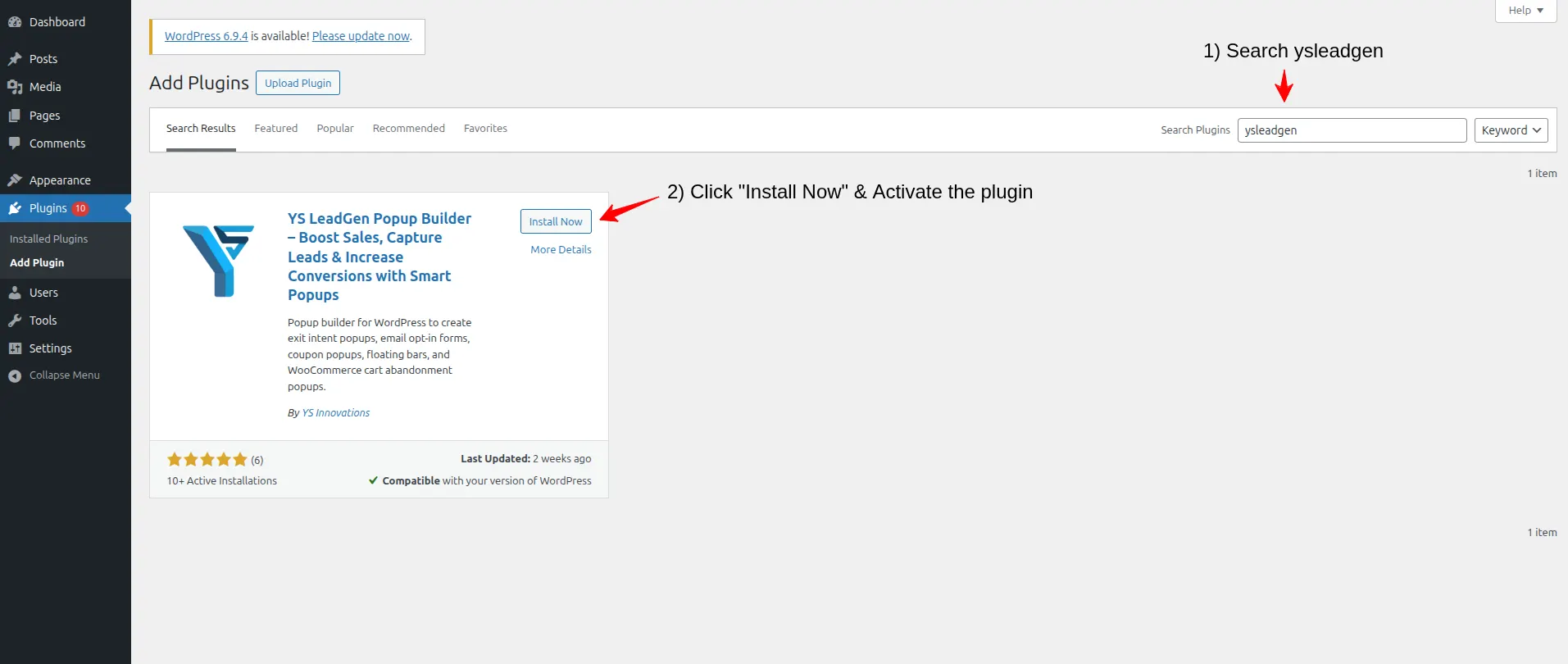
After activating the plugin, you’ll see the YS LeadGen menu added to your WordPress dashboard.
Using a beginner-friendly popup plugin simplifies the full screen popup creation process and helps you launch campaigns faster.
Why Installing the Right Plugin Matters
Not all popup plugins support full screen overlay popup designs.
A good WordPress popup builder for full screen popups should provide:
- Full screen overlay popup format support
- Responsive designs across all devices
- Smart display triggers (Exit Intent, Time Delay, Scroll)
- Advanced display rules and targeting
- Conversion-focused templates
- Easy visual customization
YS LeadGen is designed to help WordPress website owners create professional full screen overlays, lead generation popups, and conversion campaigns easily.
Step 2 – Create a New Popup Campaign
After installing the plugin, the next step is creating your full screen popup campaign.
- Go to: YS LeadGen → New Campaign
- Click: Create a Popup
- Now enter a name for your campaign.
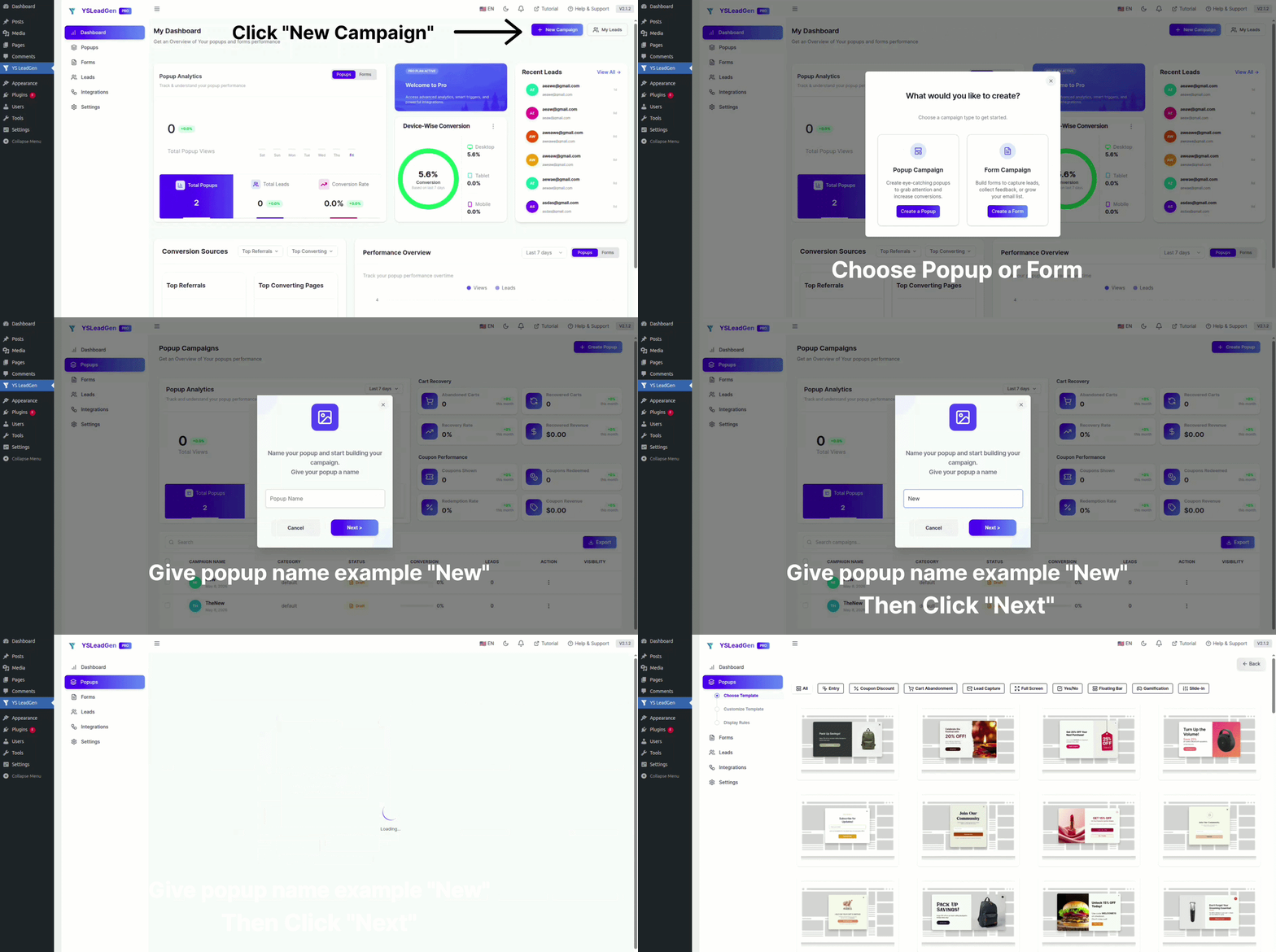
Example campaign names:
- Full Screen Welcome Popup
- Full Screen Newsletter Signup
- Full Screen Flash Sale Announcement
- Full Screen Lead Generation Overlay
- Full Screen Free Resource Offer
Using clear campaign names helps organize and manage multiple popup campaigns more efficiently, especially when running several full screen campaigns for different goals.
Why Campaign Structure is Important
Many WordPress websites run multiple popup campaigns simultaneously for:
- Homepage welcome overlays
- Blog email subscription popups
- WooCommerce sale announcements
- Seasonal promotion campaigns
- Lead generation for specific landing pages
Creating separate popup campaigns helps improve targeting precision and conversion optimization.
Step 3 – Choose a Full Screen Popup Template
Now it’s time to select your popup template.
YS LeadGen provides ready-made popup templates including full screen overlay designs optimized for different marketing goals.When selecting a template, choose a Full Screen layout option to ensure the popup covers the entire browser screen.
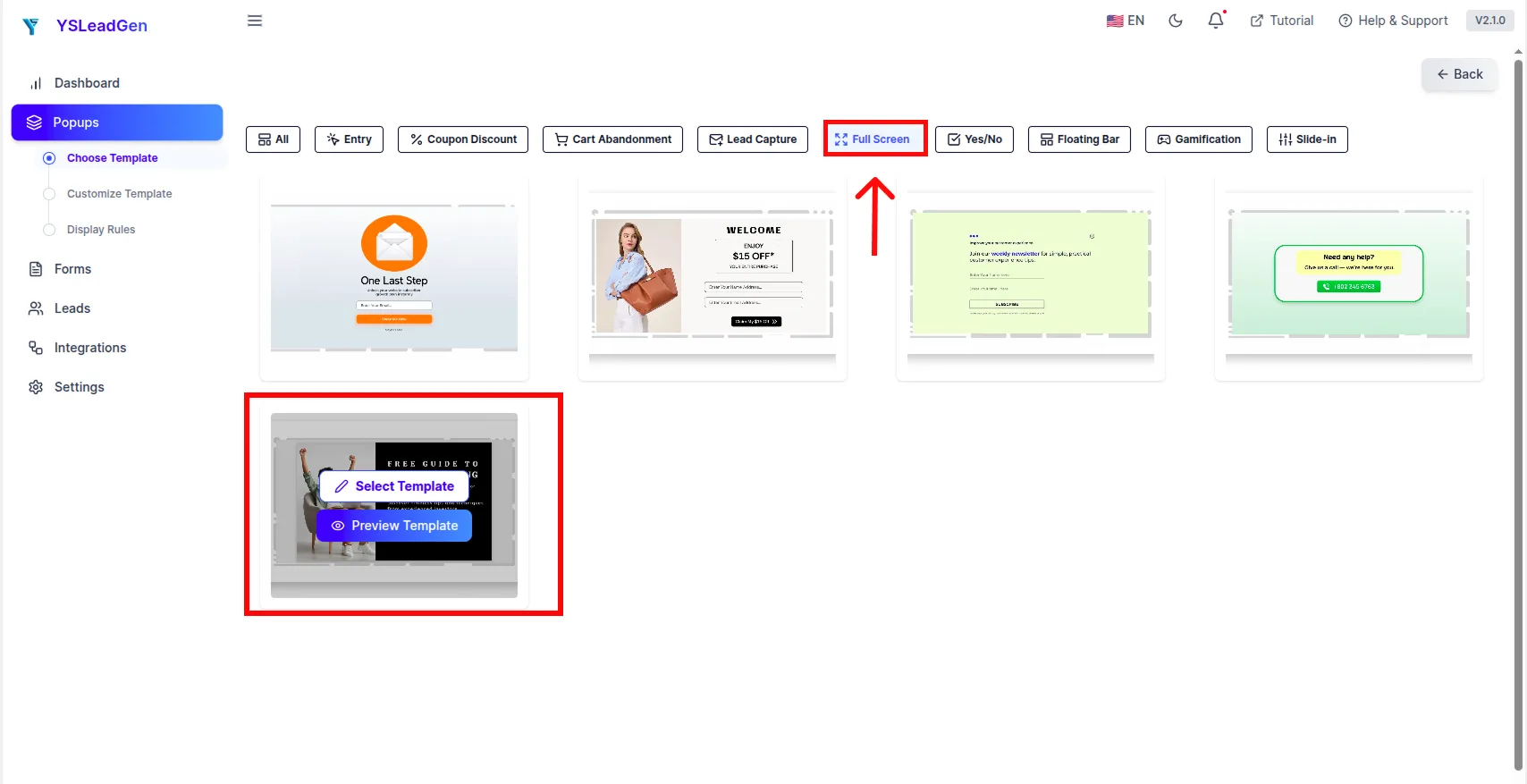
You can choose full screen templates designed for:
- Email newsletter subscriptions
- Welcome messages for new visitors
- Discount and promotional announcements
- Lead generation forms
- Flash sale overlays
- Free resource downloads
- Event registrations
Selecting the right full screen template helps improve:
- Visitor engagement
- Click-through rates
- Overall conversion performance
Tips for Choosing the Best Full Screen Template
For better conversion results with full screen popups:
- Choose clean, uncluttered full screen designs
- Avoid overly complex backgrounds that distract from the offer
- Select a layout that prominently features your CTA or form
- Make sure the template supports the content type you need (form, button, image, etc.)
For example:
- Use a bold headline + form template for email newsletter signups
- Use an image-rich template for flash sale announcements
- Use a minimal clean template for lead generation forms
- Use a branded welcome template for new visitor welcome mats
Matching your template choice to your campaign goal ensures maximum impact.
Step 4 – Customize the Full Screen Popup Design
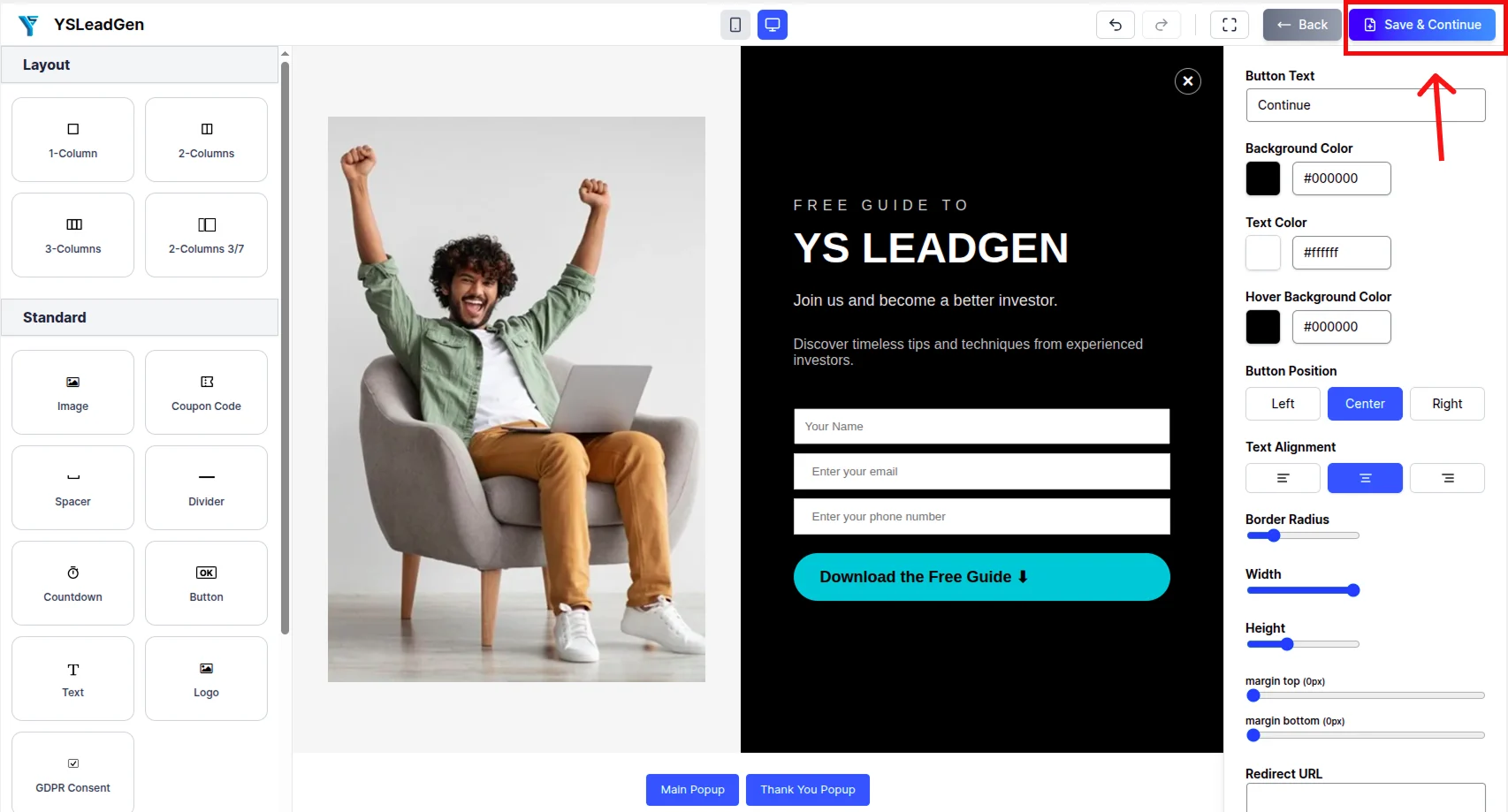
After selecting the template, you can fully customize the full screen popup using the popup editor.
You can edit:
- Full screen background image or color
- Headlines and subheadlines
- Description and offer details
- Lead capture form fields
- CTA buttons
- Typography and fonts
- Close button style and position
- Brand colors and visual identity
Example full screen popup headlines:
- “Welcome! Grab 20% OFF Your First Order — Subscribe Now”
- “Join Our Community — Get Exclusive Content Delivered Weekly”
- “Flash Sale Starts Now — Up to 50% OFF Sitewide!”
- “Download Your FREE Guide — Enter Your Email Below”
- “Don’t Miss Out — Our Biggest Sale of the Year is Live!”
Your full screen popup should clearly communicate:
- Who the popup is for
- What the offer or message is
- Why the visitor should take action now
- What they need to do next
Best Practices for Full Screen Popup Design
A high-converting Full Screen Popup should:
- Use a striking, attention-grabbing headline
- Feature a clean and spacious layout
- Use high-quality background images or brand colors
- Include one clear and prominent CTA button
- Make the close button visible and accessible
- Avoid overcrowding the overlay with too much text
- Match your website’s branding and visual identity
Full screen popups perform best when the design is bold and focused rather than busy and cluttered.
Add a Lead Capture Form
If your goal is email list growth or lead generation, add a signup form to the full screen overlay.
You can collect:
- First name
- Email address
- Phone number
- Company name (for B2B lead generation)
Keep the form as short as possible. For email subscriptions, collecting just the email address alone often generates the highest opt-in rates.
After completing all the design in the editor click on the save & continue button ok .
Many websites use Full Screen Popups specifically for rapid email list building because the format captures far more attention than smaller inline forms or sidebar widgets.
Step 5 – Configure the Display Trigger
This step determines when and how the Full Screen Popup appears to visitors.
Go to: Set Display Rules → Display Trigger
You can choose from multiple trigger options based on your campaign goals:
Enabled the toggle to view the triggers.
- Time Delay Trigger — Show the full screen popup after the visitor has been on the page for a set number of seconds
- Exit Intent Trigger — Show the popup when the visitor is about to leave the page
Scroll Trigger — Show the popup after the visitor scrolls a certain percentage down the page.
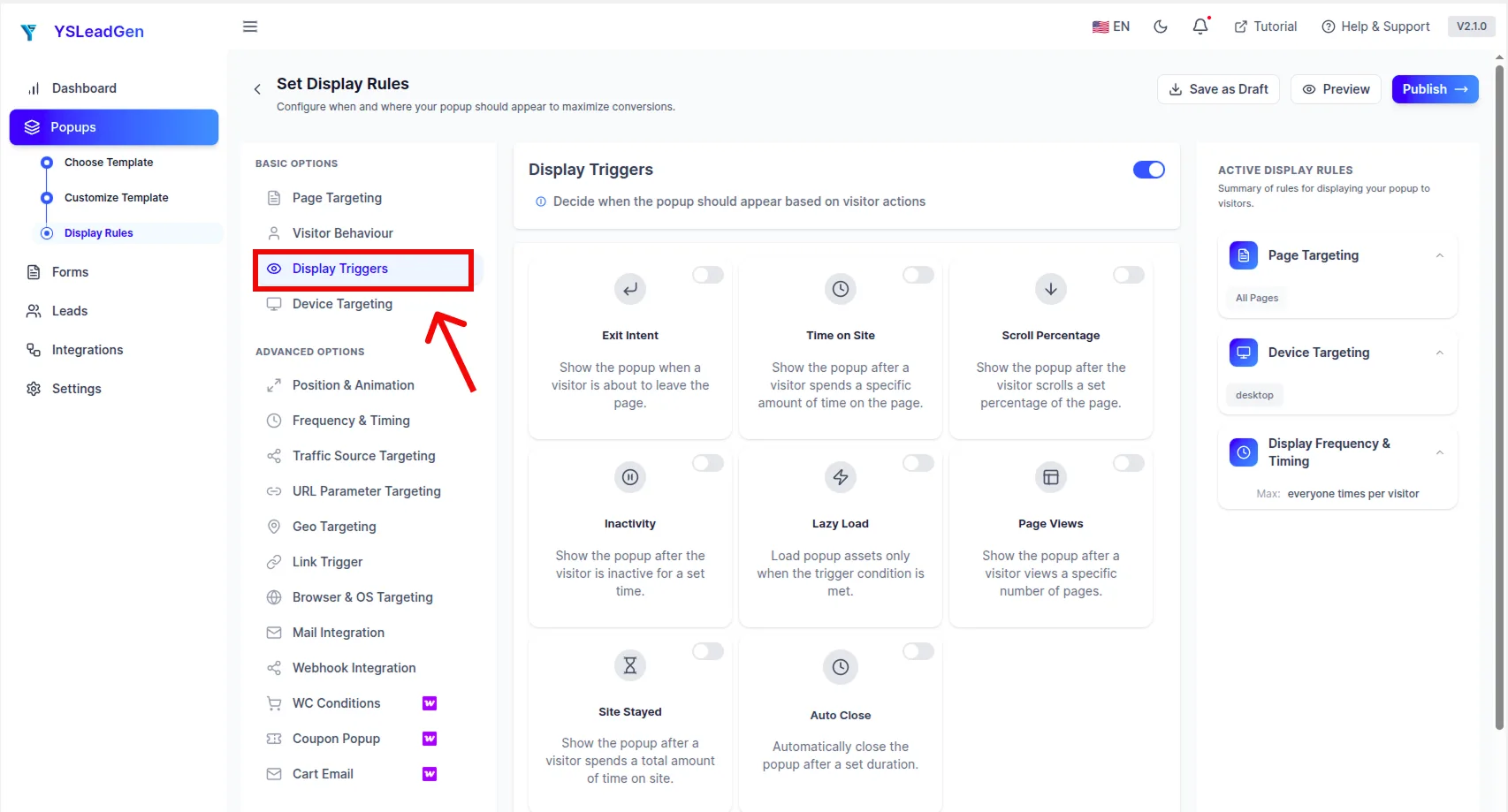
Choosing the Right Trigger for Full Screen Popups
Different trigger types work better depending on your campaign goal:
- Welcome Mat (new visitor overlay) → Use On Page Load or a short Time Delay (3–5 seconds)
- Lead generation popup → Use Scroll Trigger or Time Delay after some engagement
- Exit offer overlay → Use Exit Intent Trigger
- Flash sale announcement → Use On Page Load or Time Delay
Choosing the right trigger ensures the full screen popup appears at the most appropriate moment, improving both user experience and conversion rates.
Why Display Triggers Matter
Choosing the right trigger improves full screen popup performance because it:
- Targets visitors at the right point in their browsing session
- Reduces annoyance by avoiding premature interruptions
- Increases relevance and engagement
A well-timed full screen popup feels less intrusive and generates far better conversion results than one that appears randomly or at the wrong moment.
Step 6 – Configure Display Rules
Now it’s time to configure where and when the full screen popup should appear on your website.
Display rules help you show targeted full screen popups based on visitor behavior, page conditions, and audience segments.
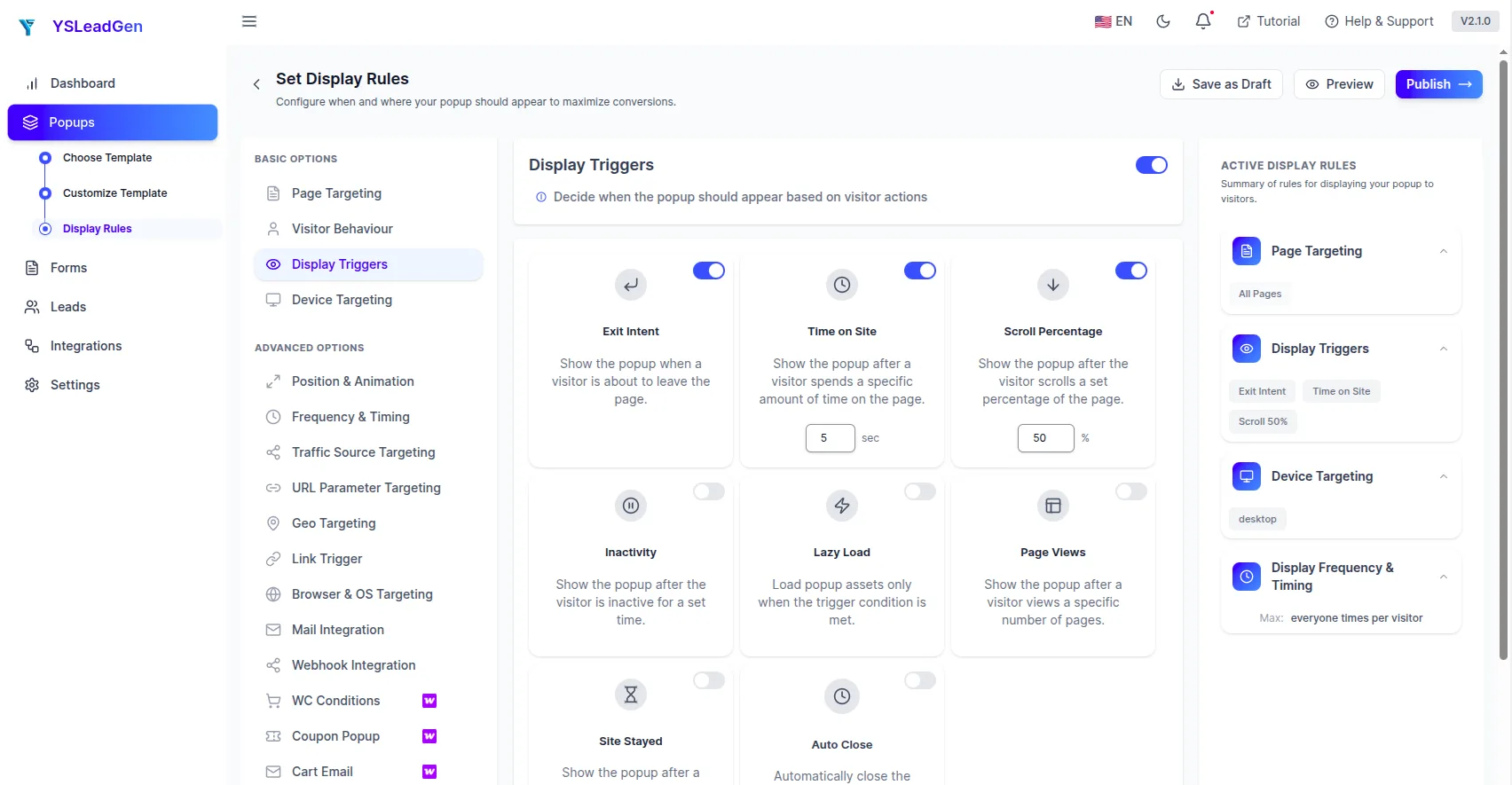
You can display the full screen popup on:
- Entire website
- Homepage only
- Specific blog posts or categories
- Product or landing pages
- WooCommerce store pages
- First-time visitors only
- Returning visitors only
Advanced targeting makes your full screen popups more relevant and improves conversion opportunities significantly.
Examples of Smart Full Screen Popup Targeting
Different pages and visitor types may benefit from different full screen popup strategies.
For example:
- Show a full screen welcome mat to first-time visitors on the homepage
- Show a full screen newsletter popup to engaged blog readers after scrolling 50%
- Show a full screen flash sale overlay on WooCommerce product pages during a promotion
- Show a full screen lead generation form on service or pricing pages
- Show a full screen exit offer to visitors who are about to leave without converting
Personalized full screen popups targeted to specific pages and visitor segments perform significantly better than generic site-wide overlays.
Configure Device Targeting
You can also configure whether the full screen popup appears based on device type.
Display popup on:
- Desktop devices
- Mobile devices
- Tablets
Full screen popups on mobile require special attention. Ensure the overlay is designed to look great on smaller screens and that the close button is easy to tap.
Configure Popup Frequency
Avoid showing full screen popups repeatedly to the same visitor in every session.
Good popup frequency settings include:
- Show once per session
- Show only to first-time visitors
- Hide after the visitor converts
- Delay repeat display for returning visitors
This creates a better browsing experience while still maximizing lead generation and conversion opportunities.
Step 7 – Publish the Full Screen Popup
Once everything is configured, it’s time to publish your Full Screen Popup.
Click: Publish
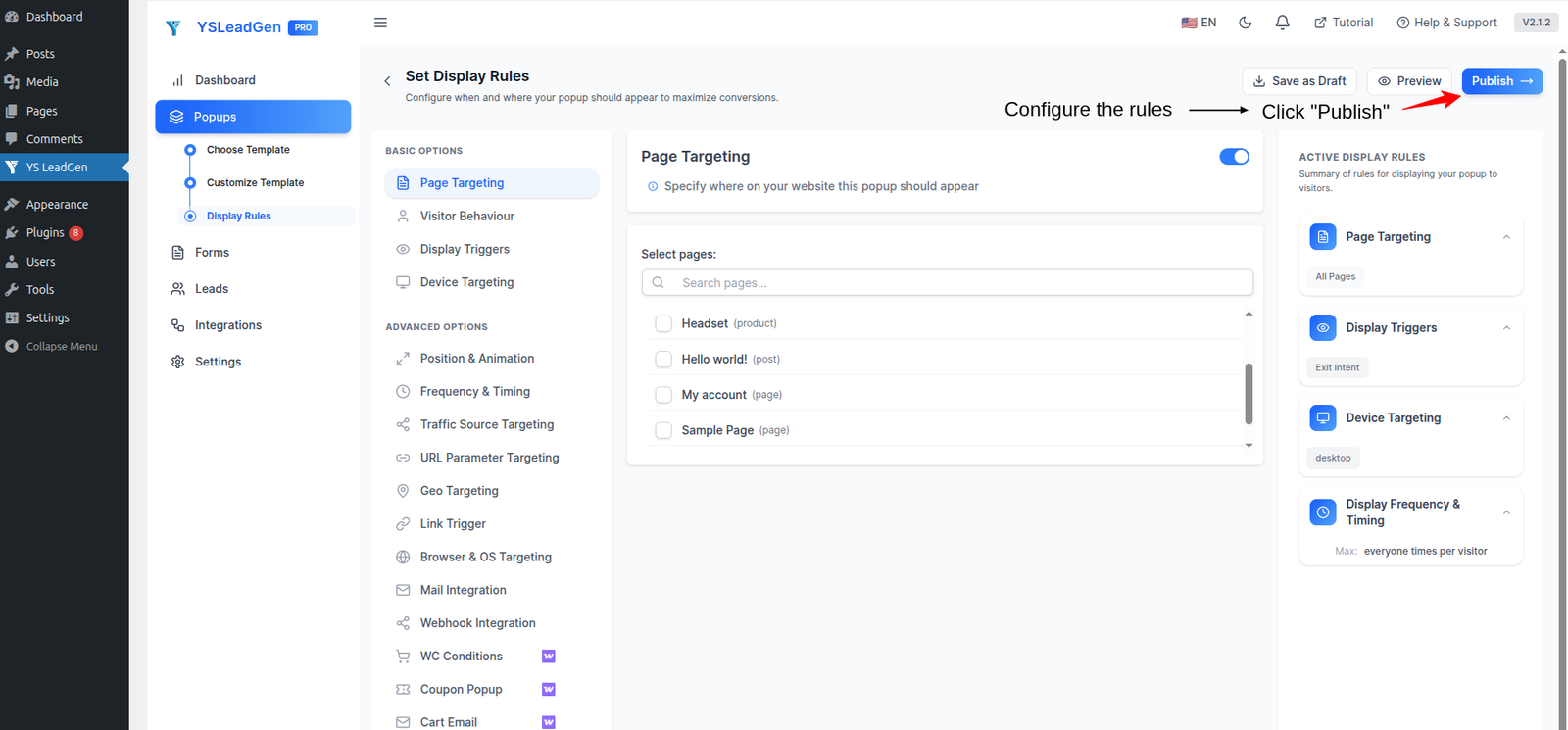
Your full screen popup is now live on your WordPress website.
Visitors will automatically see the full screen overlay popup based on the display trigger and targeting rules you configured.
Test Your Full Screen Popup
After publishing, test the popup manually to ensure everything works correctly.
Check:
- Full screen overlay appearance and coverage
- Popup design and branding consistency
- Mobile responsiveness (ensure the overlay fits all screen sizes)
- CTA button functionality
- Form submission and confirmation
- Close button visibility and functionality
- Display trigger behavior
To test the full screen popup:
- Visit the page where the popup is configured to appear
- Trigger the configured condition (wait for time delay, scroll the page, or use exit intent)
- Verify the full screen overlay appears correctly and covers the entire screen
- Test on both desktop and mobile devices
Testing before going live helps avoid display issues and ensures a smooth visitor experience.
Tips to Improve Full Screen Popup Conversions
To maximize full screen popup performance:
- Use a bold and benefit-focused headline
- Make the offer immediately clear above the fold
- Use high-quality visuals or strong brand colors
- Keep the form or CTA in a prominent position
- Ensure the close button is visible (hidden close buttons frustrate visitors)
- Test popup timing to find the sweet spot between engagement and intrusion
- Optimize the design specifically for mobile screens
Examples of strong full screen CTA buttons:
- Yes, Send Me the Newsletter!
- Claim My Free Guide
- Get My Discount Now
- Join the Community
- Start My Free Trial
Small improvements to your full screen popup can significantly increase subscriber and lead capture rates.
Best Practices for High-Converting Full Screen Popups
Creating a Full Screen Popup is easy, but creating one that genuinely converts visitors into subscribers, leads, and customers requires the right strategy.
Many website owners make common mistakes like:
- Showing the full screen popup too early before the visitor has engaged
- Using a low-quality or unappealing overlay design
- Hiding or making the close button difficult to find
- Offering no real incentive to the visitor
- Displaying the same full screen popup on every single page
As a result, visitors immediately dismiss the popup without engaging — or worse, leave the website entirely out of frustration.
To improve full screen popup conversion rates, your overlay should be:
- Visually stunning and on-brand
- Timed correctly for the visitor’s session
- Focused on one clear offer or message
- Easy to dismiss if the visitor is not interested
- Optimized for all device sizes
Below are the most important best practices for creating high-converting Full Screen Popups on your WordPress website.
1. Make the Close Button Visible and Accessible
One of the most critical elements of a Full Screen Popup is a clearly visible close button.
Hiding the close button or making it difficult to find is one of the quickest ways to frustrate visitors and increase bounce rates.
A good close button should:
- Be clearly visible in the corner of the screen
- Be large enough to click or tap easily on mobile
- Use clear labeling (“✕”, “No Thanks”, “Close”)
- Not be hidden behind content or require scrolling to find
When visitors feel they can easily dismiss the popup if they choose, they are less likely to feel trapped — which paradoxically leads to better engagement and conversion rates.
2. Use a High-Quality, On-Brand Design
Full screen popups take up the entire screen, which means any design flaws are immediately obvious and amplified.
A high-converting full screen popup should:
- Use your brand colors, fonts, and visual identity
- Feature high-quality background images or graphics
- Use clean typography with strong contrast
- Avoid low-resolution images or cluttered layouts
A well-designed full screen overlay creates a positive first impression and builds trust with the visitor — making them more likely to engage with the offer.
3. Offer Something Genuinely Valuable
Visitors need a compelling reason to interact with a full screen popup, especially since it takes up their entire screen.
Instead of generic messages like: “Subscribe to Our Newsletter”
Offer something genuinely useful such as:
- Exclusive discount coupons
- Free ebooks or guides
- Access to premium content
- Early access to new products
- Free consultations or demos
- Exclusive member benefits
Example: “Get Our FREE 30-Page Marketing Guide — Just Enter Your Email Below.”
The stronger the offer, the higher the full screen popup conversion rate.
4. Use a Clear and Compelling Headline
Your popup headline is the first thing visitors read on the full screen overlay.
An effective full screen popup headline should:
- Immediately communicate the value of the offer
- Be large, bold, and easy to read
- Create curiosity or urgency
- Be specific rather than vague
Examples:
- “Exclusive Offer for New Visitors — Save 25% Today Only”
- “Get 5 Free Email Templates Instantly — No Credit Card Required”
- “Our Biggest Sale Ever Starts Now — Don’t Miss Out”
A powerful headline dramatically increases the chances that visitors will read the rest of the popup and take action.
5. Keep the Popup Content Simple and Focused
Because full screen popups take up so much visual space, many website owners make the mistake of filling them with too much content.
Resist the temptation to include everything in a single overlay.
Your full screen popup should include:
- A bold headline
- A short supporting description (1–2 lines)
- A lead capture form or CTA button
- An optional image or background visual
Avoid:
- Multiple offers competing for attention
- Long paragraphs of explanatory text
- Too many form fields
- Competing CTAs
A clean, spacious full screen overlay design always outperforms a cluttered, text-heavy one.
6. Time the Popup Correctly
The timing of your full screen popup has a significant impact on both user experience and conversion rates.
Showing the full screen overlay too early (immediately on page load) can feel intrusive and cause visitors to leave immediately.
Better timing strategies:
- Welcome mats: 3–5 second delay allows the visitor to see where they’ve landed first
- Newsletter popups: Trigger after the visitor has scrolled 50–60% of the page
- Exit overlays: Use Exit Intent to catch visitors before they leave
- Flash sale announcements: Use a short delay of 2–3 seconds for maximum visibility
Finding the right timing balance between engagement and intrusion is essential for maximizing full screen popup performance.
7. Use Smart Targeting to Show Relevant Overlays
Not every visitor should see the same full screen popup.
Smart targeting helps ensure visitors see the most relevant full screen overlay for their situation.
For example:
- Show a welcome mat only to first-time visitors
- Show a newsletter signup overlay to engaged blog readers
- Show a flash sale overlay to WooCommerce shoppers during promotional events
- Show a lead generation overlay on pricing or service pages
Targeted full screen popups create a more personalized experience and generate significantly better conversion rates than one-size-fits-all overlays.
8. Optimize for Mobile Devices
A large percentage of website visitors browse from smartphones and tablets.
Your Full Screen Popup should be fully responsive and optimized for mobile screens, including:
- Properly scaled text that is easy to read
- A close button that is large enough to tap with a finger
- Form fields that are easy to fill on a touchscreen
- Backgrounds and images that scale correctly on smaller screens
A poor mobile experience can dramatically increase bounce rates when a full screen popup is involved, since the overlay covers the entire screen.
Always test your full screen popup on multiple devices before publishing.
9. Use a Benefit-Focused Call-to-Action
Your CTA button should describe the benefit the visitor receives rather than just instructing them to “submit” or “click.”
Weak CTA examples:
- Submit
- Continue
- OK
Better full screen popup CTA examples:
- Send Me the Free Guide
- Yes, I Want 20% OFF
- Join the Newsletter Now
- Start My Free Trial Today
- Get Instant Access
A benefit-focused CTA creates clarity, reduces hesitation, and significantly improves click-through rates on full screen overlays.
10. Test and Optimize Popup Performance
Even small changes to your full screen popup can significantly improve conversion rates.
Test different:
- Headlines and offer descriptions
- CTA button text and colors
- Background images or color schemes
- Form field counts (email only vs. name + email)
- Trigger timing (delay duration, scroll percentage)
- Popup frequency settings
A/B testing helps identify which full screen popup version resonates best with your audience.
Continuous optimization is important for improving long-term popup performance across all your campaigns.
Common Mistakes to Avoid
Full Screen Popups can be incredibly effective for growing email lists, generating leads, and promoting offers — but only when implemented correctly. Many website owners make mistakes that reduce popup performance and create a poor visitor experience.
One of the most damaging mistakes is hiding or making the close button difficult to find. When visitors feel trapped by a full screen overlay with no obvious exit, they often respond by leaving the website entirely. Always make the close button clearly visible and accessible.
Another major mistake is showing the full screen popup immediately on every page load without any delay. Hitting visitors with a full screen overlay before they’ve had a chance to read a single line of content feels aggressive and intrusive. Use a time delay or scroll trigger to give visitors a moment to engage with the page first.
Using a low-quality or poorly designed full screen overlay is also a common issue. Since the popup covers the entire screen, any design flaws are immediately obvious. Invest time in creating a visually polished overlay that matches your brand.
Many website owners also make the mistake of offering no real incentive inside the full screen popup. A generic “Subscribe to Our Newsletter” message is rarely enough to justify the interruption of a full screen overlay. Always include a compelling reason for the visitor to engage.
Showing the same full screen popup to returning visitors who have already dismissed it multiple times is another frequent problem. Configure frequency settings to avoid showing the popup to the same visitor repeatedly across multiple sessions.
Ignoring mobile optimization is another critical error. A poorly optimized full screen overlay on a smartphone can completely block all page content with no obvious way to close it — which creates a terrible user experience and increases bounce rates significantly.
Finally, many website owners fail to test and optimize their full screen popup campaigns over time. A/B testing different headlines, offers, trigger timing, and designs is essential for continuously improving full screen popup performance.
Avoiding these mistakes will help you create more effective Full Screen Popups that impress visitors, build trust, and drive meaningful conversions.
Conclusion
Full Screen Popups are one of the most powerful and visually impactful ways to capture visitor attention, grow your email list, generate leads, and promote important offers on your WordPress website.
Unlike small corner popups that are easy to ignore, full screen overlays command 100% of the visitor’s attention — making them ideal for high-priority campaigns, welcome messages, and conversion-focused offers.
Whether you run a WordPress blog, WooCommerce store, SaaS website, agency site, or media platform, Full Screen Popups can help:
- Grow email subscribers faster
- Improve lead generation rates
- Promote flash sales and seasonal offers
- Welcome and engage new visitors
- Boost overall website conversion rates
The best part is that creating a Full Screen Popup in WordPress is simple and beginner-friendly.
Using popup builder plugins like YS LeadGen, you can quickly create professional Full Screen Popups with ready-made overlay templates, smart display triggers, advanced targeting rules, and fully customizable designs — without any coding knowledge.
By following the strategies and best practices shared in this guide, you can create high-converting Full Screen Popups that turn passive website visitors into engaged subscribers, qualified leads, and paying customers.
Frequently Asked Questions (FAQs)
Are Full Screen Popups bad for user experience?
When implemented correctly — with a visible close button, proper timing, a compelling offer, and mobile-optimized design — Full Screen Popups provide a positive experience. The key is ensuring visitors can easily dismiss the popup if they choose and that the offer is genuinely relevant.
Do Full Screen Popups hurt SEO?
Full Screen Popups implemented correctly do not negatively impact SEO. However, Google recommends that intrusive interstitials that block content on mobile should be avoided. Using time delays, scroll triggers, or Exit Intent — rather than immediate page-load triggers on mobile — helps maintain good SEO standing.
What is a Welcome Mat popup?
A Welcome Mat is a type of Full Screen Popup that appears when a visitor first arrives on a page. It typically greets new visitors with a headline, offer, and signup form — creating a strong first impression and immediately capturing attention.
Can I use a Full Screen Popup to grow my email list?
Yes. Full Screen Popups are one of the most effective formats for growing email subscriber lists because the signup form covers the entire screen, making it impossible for visitors to miss. Combined with a compelling incentive, full screen newsletter popups can dramatically increase opt-in rates.
What is the best trigger for a Full Screen Popup?
The best trigger depends on your campaign goal. Time Delay (3–5 seconds) works well for welcome mats. Scroll Trigger works well for newsletter popups on blog content. Exit Intent works well for conversion recovery overlays. On Page Load works well for urgent flash sale announcements.
Can I create a Full Screen Popup without coding?
Yes. Using WordPress popup builder plugins like YS LeadGen, you can create professional Full Screen Popups without any coding knowledge — simply choose a full screen template, customize the design and content, configure display rules, and publish.
What types of offers work best in Full Screen Popups?
High-converting offers for Full Screen Popups include:
- Discount coupons and promotional codes
- Free ebooks, guides, or resources
- Exclusive member access
- Flash sale announcements
- Free trial offers
- Newsletter subscriptions with a valuable incentive
What is the best WordPress Full Screen Popup plugin?
YS LeadGen is a beginner-friendly WordPress popup plugin that helps create Full Screen Popups, Exit Intent popups, lead generation overlays, and WooCommerce promotional popups easily — with ready-made templates, advanced display rules, and no coding required.
Should I show a Full Screen Popup on mobile devices?
Yes, but with careful optimization. Ensure the full screen popup is fully responsive, that the close button is large and easy to tap, that text is readable on smaller screens, and that the overall design scales correctly across all device sizes. Always test on multiple mobile devices before publishing.
About the author

YSLeadGen Pro - Lifetime Deal
Access to unlimited popups, advanced targeting, event triggers, and premium templates.
14-Days Risk Free Money Back Guarantee