WordPress handles a lot of things well out of the box, but search optimization isn’t really one of them. Left alone, it won’t generate an XML sitemap that search engines can crawl efficiently, won’t add the schema markup that helps a result stand out, and won’t give you any real guidance on whether a specific page is actually optimized for the keyword you’re targeting. That gap is exactly what an SEO plugin exists to fill.
The trouble is that WordPress.org lists dozens of plugins that all claim to solve this, and they’re not interchangeable. Some are built for someone who has never touched SEO before. Others are aimed at agencies running dozens of client sites and need white labeling and bulk controls. A few lean heavily into automation and AI suggestions, while a handful strip everything down to the essentials and prioritize speed above all else.
This guide compares seven of the most established SEO plugins for WordPress, what each one actually does well, where it falls short, and which type of site it fits best, so you can pick based on what your site actually needs rather than which name comes up most often in a search.
What Does an SEO Plugin Actually Do?
An SEO plugin handles the technical and on-page groundwork that WordPress doesn’t manage on its own, including meta titles and descriptions, XML sitemaps, schema markup, canonical URLs, and keyword focused content guidance, so a site is properly structured for search engines without requiring manual code changes.
Without one of these plugins installed, getting a site fully optimized means manually editing theme files to insert meta tags, hand coding structured data for each content type, and generating a sitemap through some other means entirely. That’s realistic for a developer working on a single project, but it doesn’t scale to a site that publishes regularly or to someone managing the content themselves without a coding background.
A good SEO plugin turns all of that into a repeatable workflow: write a page, get real time feedback on whether the title, meta description, and content structure are reasonably optimized, and let the plugin handle the sitemap and schema markup in the background.
How These Plugins Were Compared
Rather than judging these plugins purely on their feature lists, this comparison looked at how each one performs across a few practical categories that matter for real sites.
On-page guidance. Does the plugin give clear, actionable feedback while you’re writing, covering things like title tags, meta descriptions, and content readability, or does it just expose a bunch of settings without much direction?
Technical SEO coverage. Does it handle XML sitemaps, schema markup, canonical URLs, and redirects without needing a second plugin bolted on?
Performance impact. Does the plugin add meaningful overhead to page load times, or does it stay lightweight enough not to work against the very rankings it’s meant to help improve?
Scalability. Does the plugin work for a five page brochure site as well as it does for a large WooCommerce catalog or a multi-author publication, or does it start to strain past a certain size?
Pricing structure. Is the free version genuinely usable on its own, or does it exist mainly to upsell a paid tier that’s required for anything beyond the basics?
Quick Comparison of the Best WordPress SEO Plugins
| Plugin | Best For | Free Version | Standout Strength |
|---|---|---|---|
| Rank Math | All around use, most site types | Yes, feature rich | Schema and keyword tracking included free |
| Yoast SEO | Complete beginners | Yes, limited | Clear, guided on-page feedback |
| All in One SEO | Business and WooCommerce sites | Yes | Strong setup automation and store SEO |
| SEOPress | Agencies and developers | Yes | White labeling and no upsell clutter |
| Squirrly SEO | AI assisted content optimization | Yes, limited | Step by step AI content guidance |
| Slim SEO | Lightweight, hands-off setups | Yes, fully free | Minimal performance overhead |
| The SEO Framework | Automation with minimal interface | Yes | Clean, ad-free, mostly automatic |
7 Best SEO Plugins for WordPress
1. Rank Math: Best All-in-One SEO Plugin
Rank Math built its reputation by putting features into its free tier that many competitors reserve for a paid plan, including schema markup generation, keyword tracking for multiple focus keywords on a single page, and direct Google Search Console integration inside the WordPress dashboard.
The setup wizard walks through the initial configuration in a way that’s approachable for a first time user, while the deeper settings underneath give more experienced users a level of control that’s hard to find in a plugin this broadly accessible. That range is really the plugin’s defining trait: it doesn’t force a choice between beginner friendly and feature rich.

Where it’s strong: the free version alone covers most of what a typical site needs, from sitemaps to schema to a genuinely useful SEO scoring system for individual posts and pages.
Where it falls short: the sheer number of available settings and modules can feel like a lot to take in at first, and some of the more advanced options require a bit of a learning curve before they make sense.
Best for: site owners who want one plugin that covers nearly everything without needing to add a second tool for schema or redirects.
2. Yoast SEO: Best for Beginners
Yoast SEO has been the default recommendation for new WordPress users for a long time, largely because its content analysis feature explains what to fix in plain language rather than just flagging a problem and leaving you to figure out why it matters.
The readability and keyword analysis tools walk through a page as you write it, checking things like sentence length, use of your focus keyword, and internal linking, with color coded feedback that makes it obvious what still needs attention.

Where it’s strong: the guided, educational approach makes it genuinely useful for someone learning SEO for the first time, not just someone who already knows what they’re looking for.
Where it falls short: several of the more advanced technical features that come free in some competing plugins sit behind Yoast’s premium tier, and that premium pricing is on the higher end compared to alternatives with similar functionality.
Best for: bloggers and first time WordPress users who want SEO guidance that explains the reasoning, not just a checklist.
3. All in One SEO: Best for Business and WooCommerce Sites
All in One SEO, often shortened to AIOSEO, is built around scalability, which shows most clearly in its WooCommerce specific SEO tools and its site wide audit checklist that flags issues across an entire catalog rather than one page at a time.
Its setup wizard automatically configures a reasonable baseline for most of the essential settings, which makes the initial setup faster than plugins that expect more manual configuration up front, while still leaving room for more detailed adjustments as a site grows.

Where it’s strong: the combination of strong WooCommerce integration and a genuinely useful bulk audit tool makes it a solid fit for larger, more complex sites.
Where it falls short: the interface can feel a little busier than Rank Math or Yoast, and several of the more advanced features require the paid version.
Best for: growing business sites and WooCommerce stores that need SEO tools built with a larger catalog in mind.
4. SEOPress: Best for Agencies and Developers
SEOPress takes a different approach from most of the plugins on this list by skipping the constant upsell prompts and branding that show up in some competitors’ free versions. The interface stays clean regardless of which tier you’re on.
Its white label option, which lets agencies remove SEOPress branding entirely and present the plugin under their own name, is one of the more practical features for anyone managing SEO across several client sites rather than a single project.
Where it’s strong: advanced metadata controls, full schema and structured data support, and the white label option make it genuinely well suited to professional and agency use.
Where it falls short: it assumes a bit more existing SEO knowledge than Yoast does, and its community and documentation base, while solid, is smaller than the more widely adopted plugins on this list.
Best for: agencies and developers who want full control without their client seeing another company’s branding inside the dashboard.
5. Squirrly SEO: Best for AI-Assisted Content Optimization
Squirrly SEO positions itself less as a settings panel and more as a guided assistant, offering keyword suggestions and content recommendations as you write, based on data about what’s currently working for similar content.
Rather than a static checklist, it behaves more like an ongoing audit tool, tracking how a page’s optimization holds up over time rather than only checking it once at the moment of publishing.
Where it’s strong: the AI driven suggestions and step by step guidance suit content creators who want more active direction than a typical checklist style plugin provides.
Where it falls short: the constant recommendations can feel like a lot to process for a simple site, and the fuller set of tools requires a paid plan.
Best for: content creators and bloggers who want ongoing, data informed suggestions rather than a one time optimization check.
6. Slim SEO: Best Lightweight SEO Plugin
Slim SEO takes the opposite approach from most of the plugins on this list. Instead of a dashboard full of settings, it handles meta tags, sitemaps, schema markup, and breadcrumbs automatically, with very little for the user to configure at all.
That minimalism is the entire point. For a site owner who doesn’t want to spend time tuning SEO settings and just wants reasonable defaults handled correctly, Slim SEO gets out of the way almost entirely after activation.
Where it’s strong: it’s about as lightweight as a full featured SEO plugin gets, with essentially no measurable performance overhead.
Where it falls short: the lack of configuration options that make it fast to set up also means less control for anyone who wants to fine tune specific settings later.
Best for: site owners who want solid default SEO handled automatically without spending time in a settings panel.
7. The SEO Framework: Best for Automation Without Clutter
The SEO Framework sits in a similar space to Slim SEO, favoring automatic configuration over a large settings panel, but with a slightly broader feature set and a longer track record in the plugin directory.
It skips the ads and upsell prompts that show up in some free SEO plugins, and its automated defaults are generally sensible enough that many sites can run it with only minor adjustments after activation.
Where it’s strong: a genuinely clean, ad-free experience paired with automation that doesn’t require much hands-on management.
Where it falls short: its advanced feature set and add-on ecosystem are smaller than Rank Math or AIOSEO, which matters more for larger or more complex sites.
Best for: anyone who wants dependable, automated SEO without navigating a large settings dashboard.
Which SEO Plugin Fits Your Site?

If you’re a beginner or blogger: Yoast SEO remains the most approachable starting point, since its guidance explains the reasoning behind each suggestion rather than just flagging an issue.
If you want one plugin that does nearly everything: Rank Math offers the broadest set of genuinely free features, which makes it a reasonable default for most site types.
If you’re running a business site or WooCommerce store: All in One SEO’s store specific tools and site wide audit checklist are built with that scale in mind.
If you manage multiple client sites: SEOPress’s white label option and clean interface make it a practical choice for agency work.
If you want AI guided content suggestions: Squirrly SEO’s ongoing recommendations suit a content heavy site that wants more active direction.
If speed and simplicity matter most: Slim SEO or The SEO Framework both prioritize automatic configuration and minimal performance overhead over deep customization.
Do You Really Need an SEO Plugin?
Quick answer: Technically no, but in practice, yes for almost every site. WordPress doesn’t generate schema markup, manage canonical URLs, or build an XML sitemap on its own, and handling all of that manually through custom code is realistic only for a developer working on a single, fairly static project.
Without a dedicated plugin, keeping meta tags, structured data, and sitemaps consistent across a growing site becomes a manual, error-prone process that most site owners simply don’t have the time or technical background to maintain. An SEO plugin doesn’t replace good content or a real optimization strategy, but it removes the technical friction that would otherwise make consistent optimization impractical.
Mistakes That Undermine Even a Good SEO Plugin
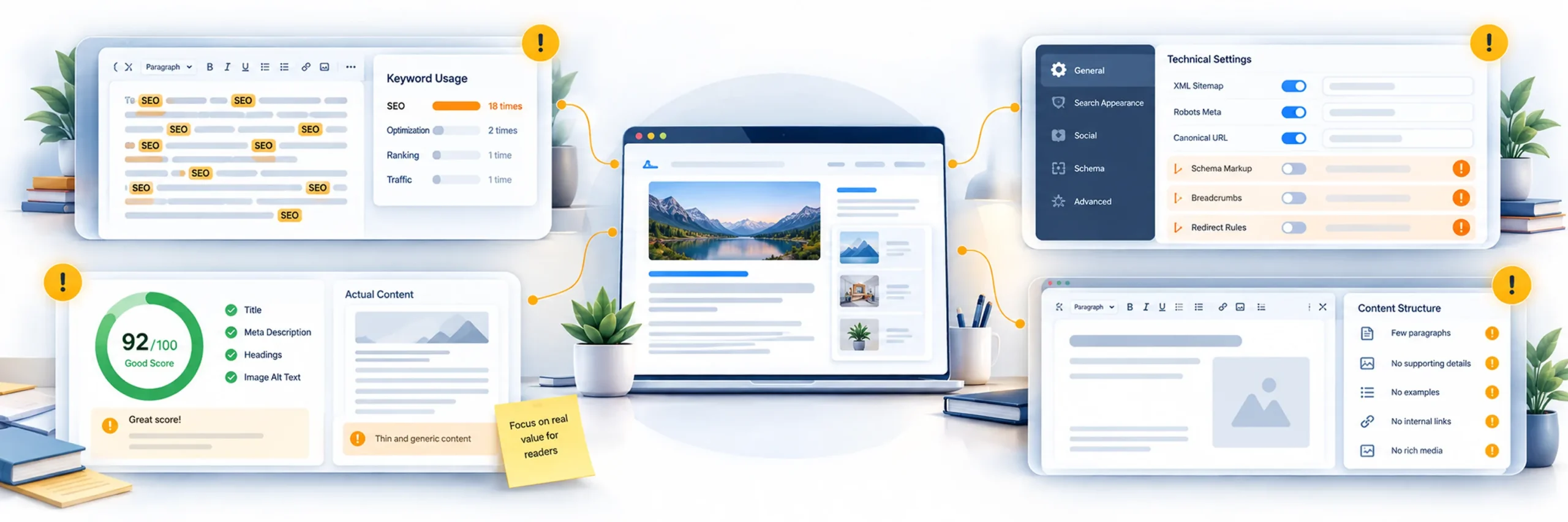
Installing one of these plugins doesn’t guarantee better rankings on its own. A few recurring mistakes limit how much value site owners actually get out of them.
Over-optimizing for a keyword. Repeating a focus keyword unnaturally throughout a page in an attempt to satisfy an SEO score tends to hurt readability more than it helps rankings, and modern search engines are generally good at recognizing the difference between natural writing and keyword stuffing.
Ignoring the technical settings. Sitemaps, canonical URLs, and indexing rules need to actually be configured correctly, not just left at whatever default the plugin assumed during setup.
Treating the SEO score as the goal. A plugin’s built-in score is a helpful guideline, not a guarantee of ranking. Chasing a perfect score at the expense of natural, useful writing tends to backfire.
Assuming the plugin replaces content quality. No SEO plugin can compensate for thin, unhelpful content. The plugin handles structure and technical groundwork. The content still has to genuinely answer what someone searched for.
Frequently Asked Questions
Rank Math is generally considered the strongest all around option, since its free version includes schema markup, multi-keyword tracking, and Search Console integration that many competitors reserve for a paid tier.
Yoast SEO is typically the easiest starting point, since its content analysis explains the reasoning behind each suggestion rather than only flagging an issue without context.
It depends on what you need. Rank Math’s free version includes more advanced features like schema markup and multi-keyword tracking out of the box, while Yoast’s strength is in how clearly it guides a beginner through on-page optimization. Many experienced users prefer Rank Math for its feature depth, while newer users often find Yoast easier to follow at first.
For most sites, a free plugin’s feature set is enough to cover the fundamentals: meta tags, sitemaps, and basic schema. Paid tiers generally add things like advanced schema types, multiple focus keywords, or bulk editing tools, which matter more for larger or more competitive sites than for a small blog or brochure site.
It depends on the plugin. Lightweight options like Slim SEO and The SEO Framework are built specifically to minimize performance impact, while more feature dense plugins can add some overhead, though usually not enough to matter unless a site is already struggling with performance for other reasons.
All in One SEO includes dedicated WooCommerce SEO tools and a site wide audit feature that’s well suited to a larger product catalog, making it one of the stronger options specifically for ecommerce sites.
This is generally not recommended. Running two SEO plugins simultaneously often causes conflicting meta tags, duplicate sitemaps, or duplicate schema markup, which can confuse search engines rather than helping. It’s better to fully commit to one plugin and deactivate any others.
No. An SEO plugin handles the technical and structural groundwork, sitemaps, schema, meta tags, but rankings ultimately depend on content quality, backlinks, site speed, and how well a page actually answers what someone searched for. The plugin is a tool, not a shortcut around the underlying strategy.
Final Thoughts
The right SEO plugin depends far more on what kind of site you’re running than on which name is most recognizable. A beginner building their first blog and an agency managing fifteen client sites have almost nothing in common in terms of what they need from an SEO tool, even though both categories get lumped into the same “best SEO plugin” searches.
Rank Math is a reasonable default for most site types because of how much it includes in its free tier. Yoast remains the most approachable option for someone just starting out. All in One SEO and SEOPress both suit larger or more professional setups, in slightly different ways. Slim SEO and The SEO Framework are worth considering if performance and simplicity matter more to you than deep customization.
Whichever plugin you choose, remember that it’s handling the structural and technical side of optimization, not replacing the actual work of writing content that answers what people are searching for. The plugin builds the foundation. What you publish on top of it is still what determines whether that foundation actually pays off.