Popups are among the most effective tools for capturing attention, growing your email list, promoting offers, and boosting conversions on any WordPress website. When designed and timed properly, a popup can guide visitors toward the right action at the right moment – without interrupting the browsing experience.
Whether you’re trying to collect leads, promote a discount, recover abandoned carts, or simply highlight an important announcement, creating a popup in WordPress is easier than ever. With modern visual popup builders, you can design professional, mobile-friendly popups in minutes – no coding required.
In this guide, you’ll learn how to create a free popup in WordPress using a simple, practical approach that anyone can follow. We’ll walk through design tips, targeting rules, and best practices and use YS LeadGen, a modern WordPress popup plugin, as our example tool.
Quick Answers: Creating Popups in WordPress (2026)
How do I create a popup in WordPress?
You can create a popup in WordPress by installing a popup plugin, choosing a template, customizing the design, setting display triggers, and publishing it.
Can I create a popup in WordPress for free?
Yes. Many WordPress popup plugins, including YS LeadGen, allow you to create free popups without coding.
Do popups hurt SEO?
No. When used correctly and optimized for mobile, popups do not harm SEO and are allowed by Google.
What is the best popup trigger for conversions?
Exit-intent and scroll-based popups usually convert best because they appear at high-intent moments.
Are popups mobile-friendly?
Modern popup plugins support responsive and mobile-optimized popups that work well on all devices.
To create a free popup in WordPress, install a popup plugin, choose a template, customize the design, set display triggers, and publish the popup. Modern plugins like YS LeadGen allow beginners to build mobile-friendly popups without coding.
Here’s a quick overview of how to create a free popup in WordPress:
We’ll explain each step in detail below.
Popups continue to be a powerful part of website strategy because they appear at critical decision-making moments. Instead of relying on static banners or passive forms, popups deliver a message exactly when the user is most likely to take action.
Here’s why they work so well:
Catch attention instantly
A popup places a single message in front of a visitor without clutter or distraction.
Boost conversions effortlessly
A well-timed popup can convert hesitant visitors into subscribers or customers.
Grow your email list faster
Popup forms are proven to capture more sign-ups than embedded forms.
Promote offers effectively
Discounts, limited-time deals, and special announcements get higher visibility in popups.
Reduce cart abandonment
Exit-intent popups remind shoppers of offers or benefits before they leave.
Popups do not replace your content. They enhance the user journey.
WordPress popups are commonly used for different goals, including:
– Email subscription popups
– Discount and coupon popups
– Exit-intent popups
– Announcement popups
– Cart abandonment popups
– Lead generation popups
– Content upgrade popups
Each popup type works best with specific triggers and targeting rules depending on user intent.
The simplest, most beginner-friendly way to create popups in WordPress is by using a dedicated popup builder plugin. These tools allow you to design and publish popups visually, customize layouts, add form fields, and set behavior rules – all without touching code.
Compared to manual coding or complex popup tools, visual popup builders significantly reduce setup time and help avoid common errors, especially for beginners.
For this tutorial, we use YS LeadGen, a lightweight yet powerful WordPress popup plugin known for its clean interface, advanced trigger options, and easy drag-and-drop builder.
If you’re looking for a WordPress popup solution that balances simplicity with performance, YS LeadGen stands out. It’s built to help anyone – beginners, marketers, or store owners – create effective popups without technical complexity.
A modern visual builder
Design popups using an intuitive drag-and-drop editor.
Conversion-ready templates
Choose from templates for newsletters, discounts, exit intent, announcements, and more.
Smart behavior triggers
Show popups on exit intent, scroll, time delay, or button click.
Accurate targeting
Display popups on selected pages, categories, devices, or user types.
Custom form fields
Collect names, emails, phone numbers, and unlimited custom data.
Fast, lightweight performance
Popups load quickly and don’t slow down your site.
YS LeadGen makes popup creation simple yet flexible – ideal for beginners and professionals alike.
Follow these steps to create a fully functional popup in minutes.
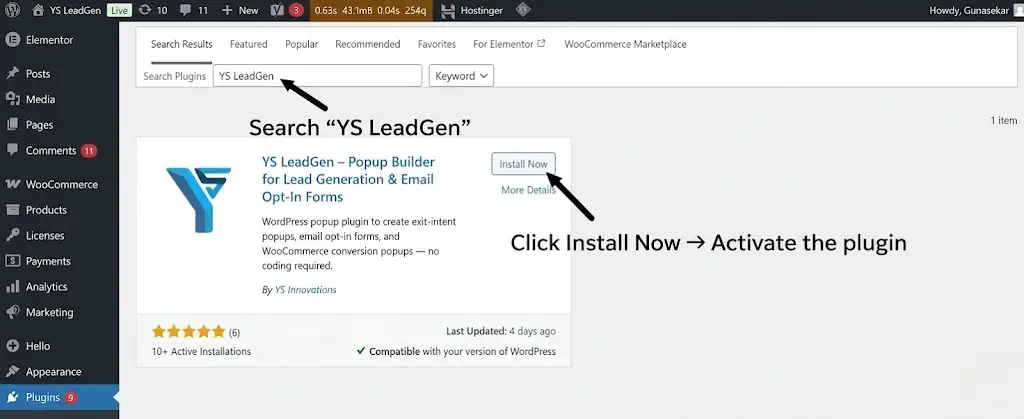
Once activated, YS LeadGen will appear in your WordPress admin menu.
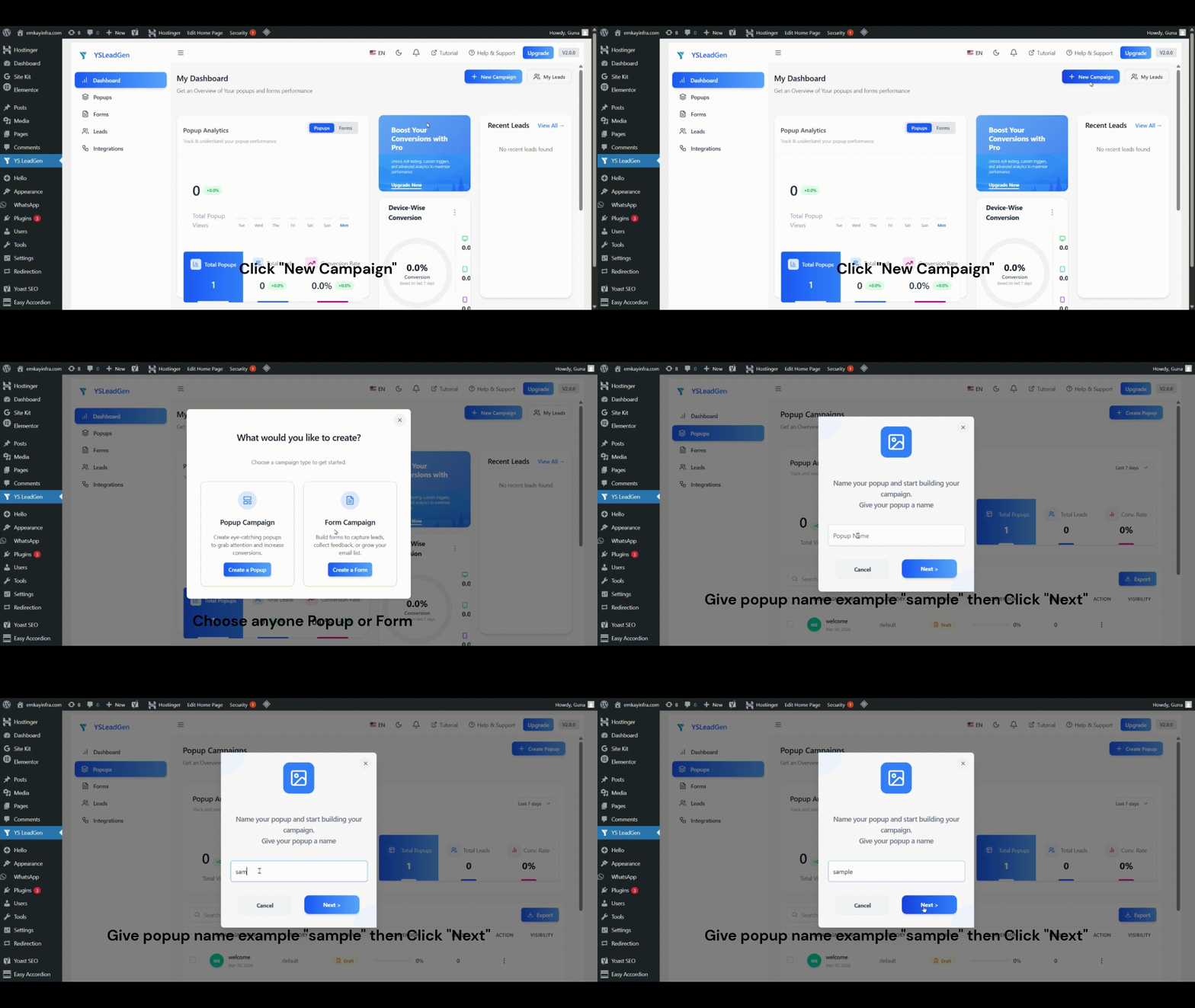
This helps you organize multiple popups easily.
YS LeadGen offers templates designed for specific goals:
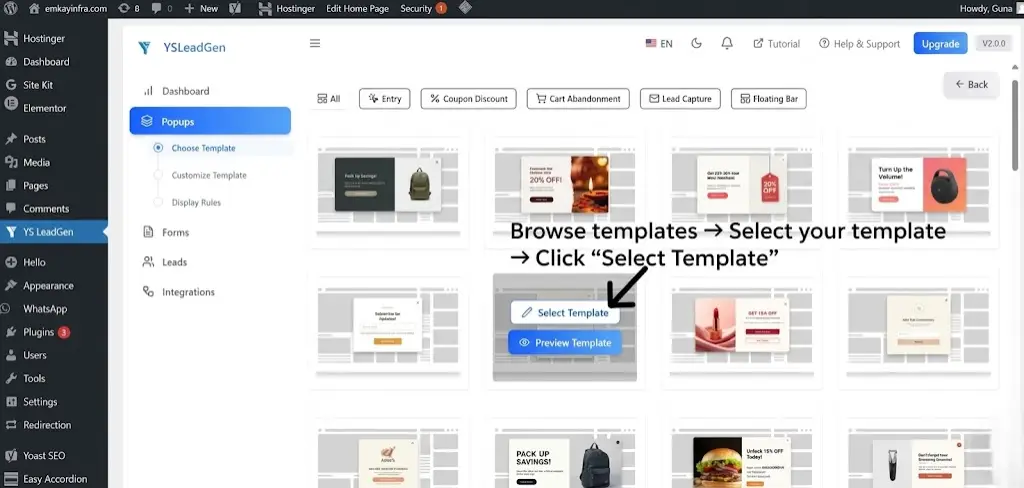
Choose a template that matches the purpose of your popup.
If you want a fast, beginner-friendly way to build high-converting popups, YS LeadGen makes the process simple with ready-made templates and smart triggers.
You’ll enter the drag-and-drop builder, where you can personalize your popup completely.
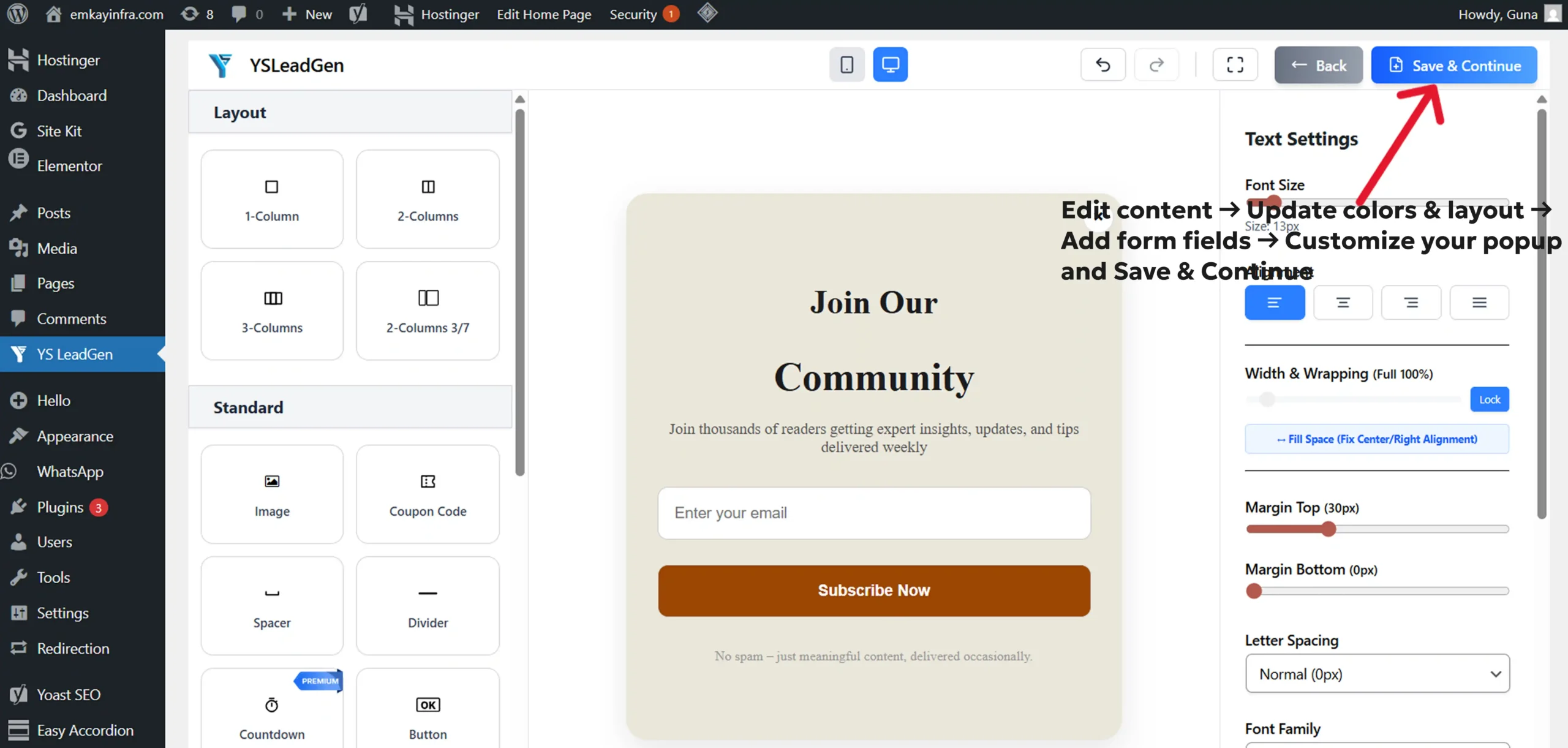
YS LeadGen makes it easy to achieve a clean, modern, conversion-focused design.
Triggers determine when your popup should appear.
Targeting determines who should see it.
Smart targeting ensures your popup reaches the right user at the right time.
Once you’re satisfied with the design and behavior settings:
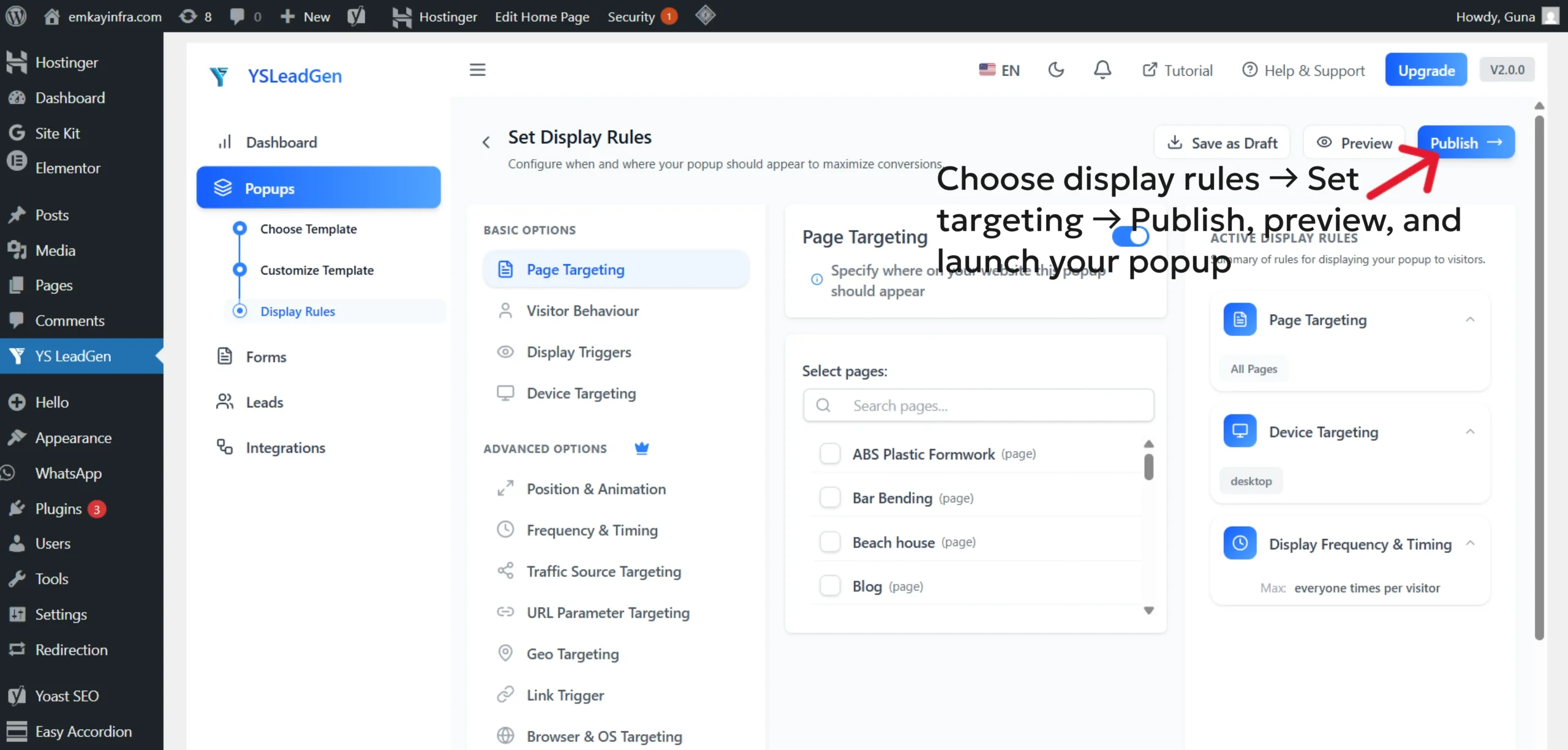
Your popup is now active on your site!
Creating a popup is easy – creating one that converts well requires a few best practices.
1. Use short, clear headlines
Visitors decide within a second whether the message matters.
2. Keep your form simple
More fields = fewer conversions.
Email alone often performs best.
3. Offer real value
Whether it’s a discount, free guide, or insider access – make it worth their time.
4. Match the popup design with your brand
Consistency builds trust.
5. Don’t show popups too early
Let visitors scroll or engage before showing a popup, which aligns with conversion rate optimization best practices.
6. Always test on mobile
Most visitors browse on mobile devices.
7. Use urgency when appropriate
Countdowns work incredibly well for limited-time offers.
Avoid these mistakes, and your popup performance will improve dramatically.
– Popups are effective when timed correctly
– No coding is required with modern popup plugins
– Exit-intent and scroll triggers convert best
– Fewer form fields improve conversions
– Mobile optimization is essential
– Smart targeting improves user experience
– Testing and refinement increase performance
Popups remain one of the most effective conversion tools on any WordPress site – as long as they’re used thoughtfully. With the right messaging, timing, and design, a popup can effortlessly turn visitors into subscribers, leads, or customers.
Using the YS LeadGen WordPress Popup Plugin, you can create beautiful, relevant, and high-converting popups in minutes. The drag-and-drop builder, smart triggers, targeted display rules, and mobile-optimized templates make it easy for anyone – even complete beginners – to build professional pop-ups without technical skills.
If you want to grow your email list, boost engagement, recover lost sales, or highlight your best offers, creating a popup with YS LeadGen is one of the most effective steps you can take today.
Start with one popup, test it, and refine it – and watch how it improves your website performance instantly.
Exit-intent and scroll-based popups work best for collecting emails because they appear when visitors are already engaged with your content.
No. Lightweight and well-optimized popup plugins do not slow down your WordPress site when used correctly and in moderation.
Exit-intent popups usually deliver the highest conversions, followed by scroll-based triggers, as they target users at high-intent moments.
Yes. Most modern WordPress popup plugins allow page-level targeting, so you can display different popups on specific pages, posts, or categories.
A popup should not appear on every visit. Limiting display frequency improves user experience and prevents visitor frustration.
Yes. Popups work very well for WooCommerce stores to promote discounts, recover abandoned carts, collect emails, and highlight special offers.
Yes. Google allows popups as long as they are mobile-friendly, non-intrusive, and do not block the main content immediately after page load.
Yes. Many WordPress popup plugins support integrations with email marketing and CRM tools or allow exporting leads for follow-up campaigns.
A welcome popup with a clear value offer, such as a discount or free resource, works best for first-time visitors when triggered after a scroll or time delay.