How to Create a Time Delay Popup in WordPress (Step-by-Step Guide)

Most website visitors leave without subscribing, purchasing, or taking any meaningful action. Whether you run a WordPress blog, WooCommerce store, SaaS platform, business website, or landing page, showing a popup at the wrong time — either too early or too late — can cost you potential leads, subscribers, and customers every single day.
This is why many WordPress website owners use Time Delay Popups to engage visitors at exactly the right moment during their browsing session.
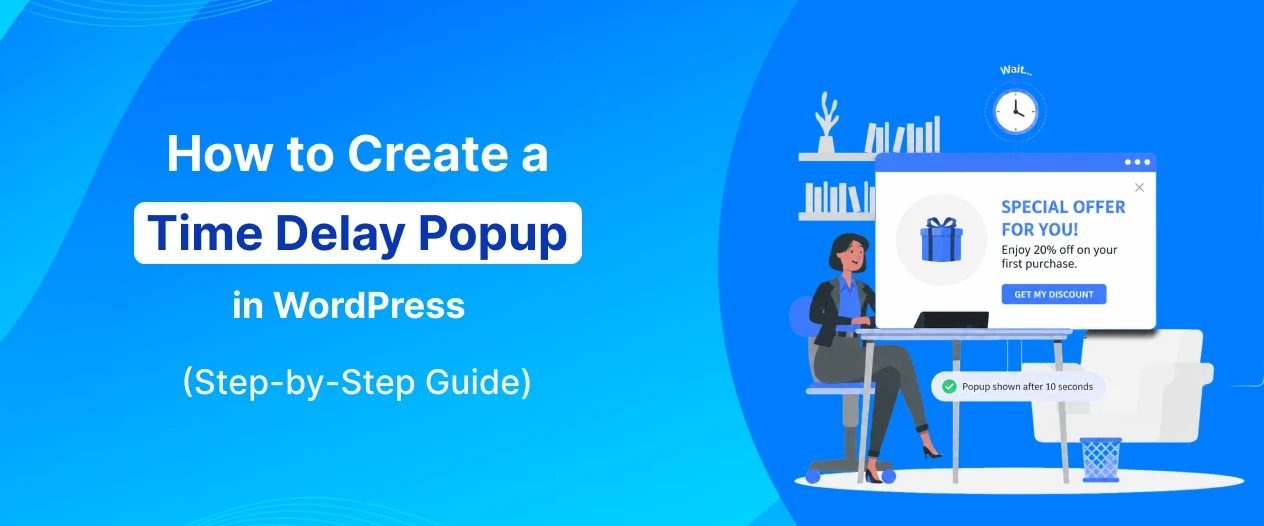
A Time Delay Popup is a smart popup that appears after a visitor has spent a specific amount of time on a page. Instead of interrupting visitors the moment they land on your website, a time delay gives them a chance to engage with your content first — and then presents a relevant offer or message when they are most receptive.
Rather than losing visitors without ever showing them a compelling reason to stay or subscribe, you can use Time Delay Popups to deliver:
- Email newsletter signup offers
- Discount and coupon code promotions
- Lead generation forms
- Free resource download offers
- Limited-time deal announcements
- Free trial invitations
- Webinar registration prompts
Today, Time Delay Popups are widely used to:
- Grow email subscriber lists
- Increase lead generation
- Reduce visitor bounce rates
- Improve WooCommerce conversions
- Promote offers to engaged visitors
- Boost overall website conversion rates
The best part is that you can create a Time Delay Popup in WordPress without any coding knowledge.
Using popup builder plugins like YS LeadGen, you can easily create professional time delay popups with ready-made templates, responsive designs, customizable delay settings, and smart targeting rules — all from a simple visual editor.
Whether your goal is to:
- Grow your email list
- Promote a special offer
- Generate more qualified leads
- Engage visitors who are actively reading your content
- Reduce bounce rates with a well-timed message
Time Delay Popups can become one of the most visitor-friendly and effective conversion tools on your WordPress website.
In this step-by-step beginner guide, you’ll learn:
- What a Time Delay Popup is
- Why Time Delay Popups are important
- How to create a Time Delay Popup in WordPress
- Best practices for higher popup conversions
- Common mistakes to avoid
By the end of this tutorial, you’ll be able to create high-converting Time Delay Popups that engage visitors at the perfect moment and turn them into subscribers, leads, and customers.
What is a Time Delay Popup?
A Time Delay Popup is a website popup that appears after a visitor has spent a predetermined amount of time on a page.
Unlike popups that trigger immediately on page load and interrupt visitors before they have even read a single sentence, a Time Delay Popup waits for a set number of seconds before appearing. This allows visitors to first engage with your content, understand the value your website offers, and become more receptive to the message inside the popup.
For example, a Time Delay Popup may be configured to appear:
- After 5 seconds on the page
- After 10 seconds of browsing
- After 15 or 30 seconds of engagement
- After a specific time threshold that suits your audience
This trigger strategy is widely used by WordPress blogs, WooCommerce stores, SaaS businesses, landing pages, and online businesses to improve popup engagement and conversion rates without frustrating visitors with premature interruptions.
How Time Delay Popups Work
Time Delay Popups use a countdown timer that begins the moment a visitor lands on a page.
When the set delay period expires, the popup automatically triggers and appears to the visitor.
The popup may include:
- Email newsletter signup forms
- Discount coupons or promo codes
- Lead generation forms
- Free resource offers
- Limited-time deal announcements
- Free trial invitations
Because the popup only appears after the visitor has had time to engage with the page content, it feels far less intrusive than immediate popups — resulting in better engagement and higher conversion rates.
This improves both:
- User experience
- Conversion opportunities
Why Businesses Use Time Delay Popups
Popups that appear immediately on page load are one of the leading causes of visitor frustration and increased bounce rates.
Visitors who are instantly greeted by a popup before seeing any content often:
- Close the popup immediately without reading it
- Leave the website out of frustration
- Form a negative first impression of the brand
Time Delay Popups solve this problem by:
- Giving visitors time to engage with the content first
- Appearing when visitors have demonstrated genuine interest by staying on the page
- Delivering the popup message to a warmer and more receptive audience
Businesses use Time Delay Popups to:
- Grow email subscriber lists with better-quality signups
- Promote offers to engaged visitors rather than first-second arrivals
- Generate more qualified leads
- Reduce popup dismissal rates
- Improve overall visitor experience while still driving conversions
For example:
- A blog may show a newsletter signup popup after 10 seconds to readers who are actively engaged with an article
- A WooCommerce store may show a discount popup after 15 seconds to shoppers browsing product pages
- A SaaS website may display a free trial popup after 20 seconds to visitors exploring the features page
- A landing page may trigger a lead form popup after 8 seconds to warm up the visitor before asking for contact details
Showing the right message at the right time — after enough engagement has occurred — significantly improves popup conversion rates.
Common Types of Time Delay Popups
Different businesses use different time delay popup strategies depending on their goals and audience behavior.
Popular Time Delay Popup types include:
- Email Newsletter Signup Popups
- Discount and Coupon Code Popups
- Lead Generation Form Popups
- Free Resource Download Popups
- Free Trial Offer Popups
- Webinar Registration Popups
- Announcement and Promotion Popups
Each popup type benefits from time delay triggering because it ensures the message reaches visitors who are already engaged enough to stay on the page past the delay threshold.
Benefits of Time Delay Popups
Time Delay Popups have become one of the most visitor-friendly and effective conversion tools for modern WordPress websites.
Unlike immediate popups that disrupt the browsing experience from the very first second, Time Delay Popups are designed to work with the visitor’s natural engagement pattern — appearing only after they have had enough time to connect with your content and become genuinely interested in what your website offers.
Whether you run a WordPress blog, WooCommerce store, SaaS platform, agency website, or landing page, Time Delay Popups can significantly improve your website’s conversion strategy while maintaining a positive user experience.
Here are some of the biggest benefits of using Time Delay Popups on your WordPress website.
1. Reach Visitors at the Perfect Moment
The core advantage of Time Delay Popups is their ability to reach visitors at exactly the right point in their browsing session.
Visitors who stay on a page for 10, 15, or 20 seconds have already demonstrated genuine interest in your content. By the time the popup appears, they:
- Have read enough to understand your website’s value
- Are more likely to be receptive to a relevant offer
- Are less likely to dismiss the popup immediately
This means Time Delay Popups consistently reach a warmer and more engaged audience compared to immediate page-load popups — resulting in better conversion rates.
2. Improve User Experience Compared to Immediate Popups
One of the biggest criticisms of website popups is that they interrupt visitors too early and create a poor first impression.
Time Delay Popups solve this problem by:
- Allowing visitors to read and engage with the page content first
- Only appearing after the visitor has had a chance to experience the website’s value
- Reducing the feeling of being ambushed by a popup the moment you arrive
This makes Time Delay Popups one of the most user-friendly popup trigger strategies available — improving the overall visitor experience while still achieving strong conversion results.
3. Grow Email Subscribers with Higher-Quality Signups
Time Delay Popups are particularly effective for growing email subscriber lists because they target visitors who have already shown genuine interest by staying on the page.
Visitors who subscribe after seeing a time-delayed newsletter popup are:
- More likely to be genuinely interested in your content
- More likely to open and engage with your emails
- Less likely to immediately unsubscribe after signing up
This results in a higher-quality email list with better engagement rates — which is far more valuable long-term than a large list of unengaged subscribers captured through aggressive immediate popups.
4. Reduce Popup Dismissal Rates
Immediate popups have notoriously high dismissal rates because most visitors close them reflexively before even reading the message.
Time Delay Popups significantly reduce dismissal rates because:
- Visitors have already engaged with the page before the popup appears
- The offer is more likely to feel relevant to their current interest
- The visitor is in a more receptive state of mind having spent time on the page
Lower dismissal rates translate directly into higher popup engagement and better conversion performance.
5. Generate More Qualified Leads
For businesses that rely on lead generation — such as agencies, SaaS companies, consultants, and service providers — Time Delay Popups help capture higher-quality leads.
Visitors who stay on a pricing, features, or services page long enough to trigger the time delay have already demonstrated meaningful purchase intent. These leads are:
- More familiar with your product or service
- Further along in the consideration stage
- More likely to be genuinely interested in a consultation, demo, or free trial
Time Delay Popups help capture these warmer leads at exactly the right moment in their decision-making process.
6. Promote Offers to Engaged Visitors
Not every visitor is ready to convert the moment they arrive on a page.
Some visitors need time to:
- Read about your product or service
- Understand the value you provide
- Build trust with your brand
Time Delay Popups ensure that promotional offers — such as discounts, free trials, and lead magnets — are shown only to visitors who have already invested enough time to be genuinely interested.
This improves both the relevance and effectiveness of every promotional popup you run.
7. Easy to Set Up and Customize in WordPress
One of the biggest advantages of modern WordPress popup plugins is how simple they make time delay popup configuration.
Using tools like YS LeadGen, website owners can create professional Time Delay Popups without coding knowledge.
You can:
- Choose popup templates
- Customize the popup design and content
- Set a precise time delay in seconds
- Configure smart display rules and targeting
- Publish time delay popups within minutes
This makes time delay popup marketing accessible even for complete beginners with no technical experience.
How to Create a Time Delay Popup in WordPress
Creating a Time Delay Popup in WordPress is much easier than most beginners think.
With the help of modern WordPress popup builder plugins, you can create professional and high-converting Time Delay Popups without coding knowledge or technical experience.
In this tutorial, we’ll use YS LeadGen to create a Time Delay Popup step-by-step.
Whether your goal is to:
- Grow your email subscriber list
- Promote a discount or special offer
- Generate more leads from engaged visitors
- Reduce popup dismissal rates
- Improve the overall visitor experience on your website
this guide will help you set up your time delay popup in just a few minutes.
Step 1 – Install the Time Delay Popup Plugin
The first step is installing a WordPress popup plugin that supports time delay trigger functionality.
- Login to your WordPress dashboard.
- From the left sidebar, navigate to: Plugins → Add New Plugin
- In the search bar, search for: YS LeadGen
- Click Install Now, Click Activate
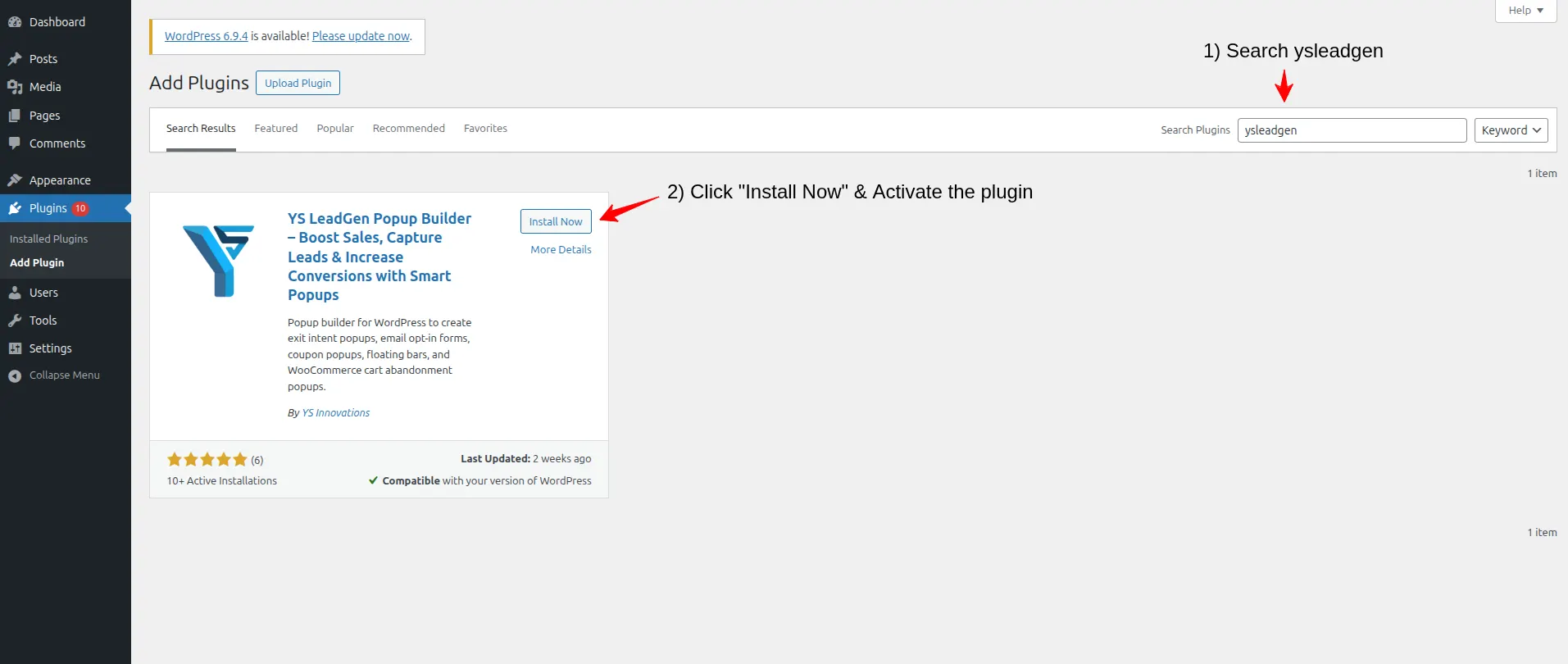
After activating the plugin, you’ll see the YS LeadGen menu added to your WordPress dashboard.
Using a beginner-friendly popup plugin simplifies the entire time delay popup creation process and helps you launch campaigns faster.
Why Installing the Right Plugin Matters
Not all popup plugins offer flexible and customizable time delay trigger settings.
A good WordPress popup builder for time delay popups should provide:
- Precise time delay trigger configuration (seconds)
- Responsive popup designs
- Smart display rules and targeting options
- Conversion-focused templates
- Easy visual customization
- Multiple trigger type support
YS LeadGen is designed to help WordPress website owners create professional time delay popups, lead generation campaigns, and conversion-focused overlays easily.
Step 2 – Create a New Popup Campaign
After installing the plugin, the next step is creating your time delay popup campaign.
- Go to: YS LeadGen → New Campaign
- Click: Create a Popup
- Now enter a name for your campaign.
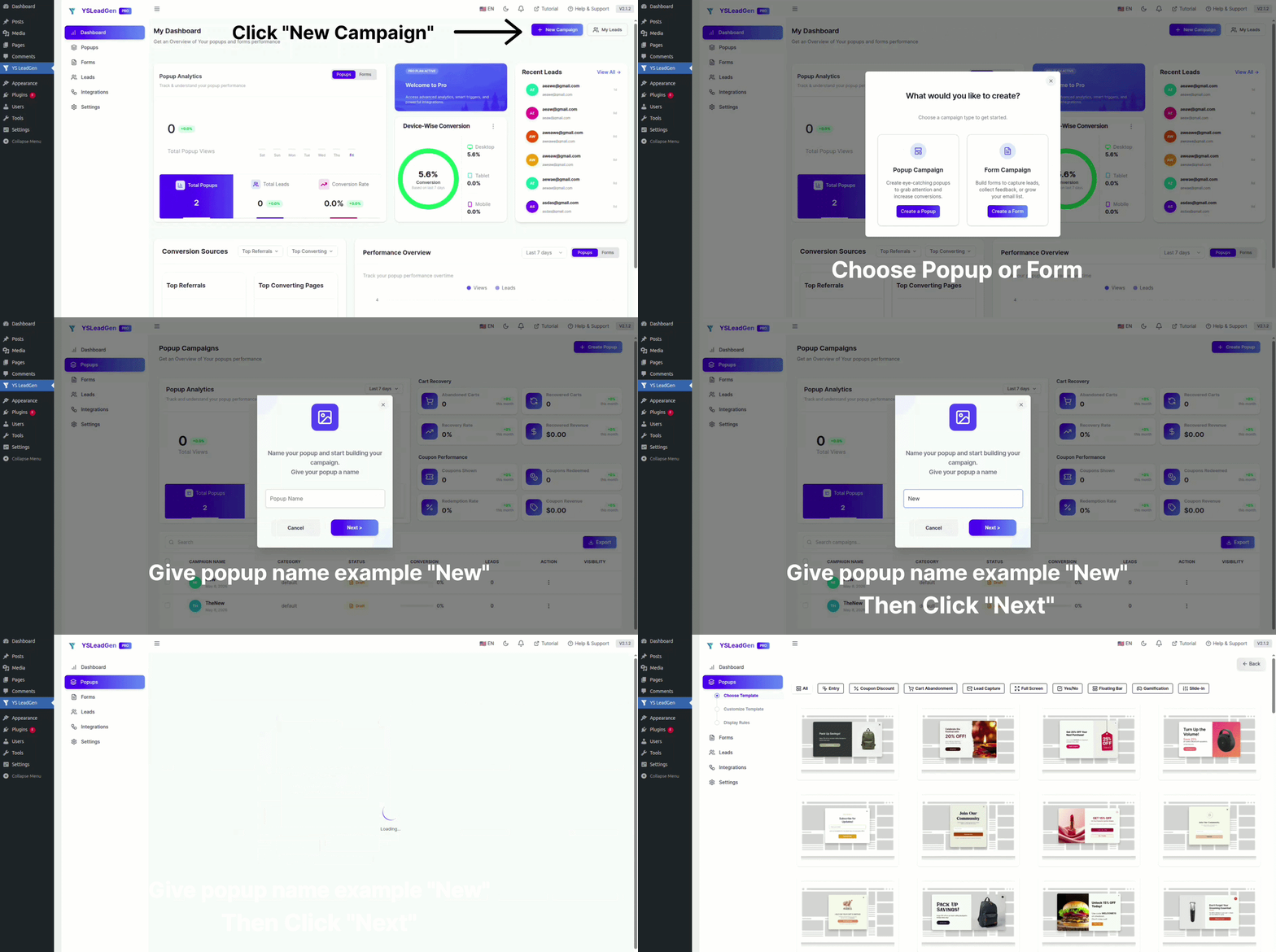
Example campaign names:
- Time Delay Newsletter Signup Popup
- 10-Second Discount Offer Popup
- Engaged Visitor Lead Generation Popup
- Time Delay Free Resource Popup
- Blog Reader Subscription Popup
Using clear and descriptive campaign names helps organize and manage multiple popup campaigns efficiently, especially when running time delay popups with different delay settings across different pages.
Why Campaign Structure is Important
Many WordPress websites run multiple time delay popup campaigns simultaneously for:
- Different delay durations on different page types
- Blog content versus WooCommerce product pages
- Separate campaigns for new versus returning visitors
- Different offers for different audience segments
Creating separate popup campaigns helps improve targeting accuracy and makes it easier to test and optimize each campaign independently.
Step 3 – Choose a Popup Template
Now it’s time to select your popup template.
YS LeadGen provides ready-made popup templates optimized for different marketing goals and popup formats.
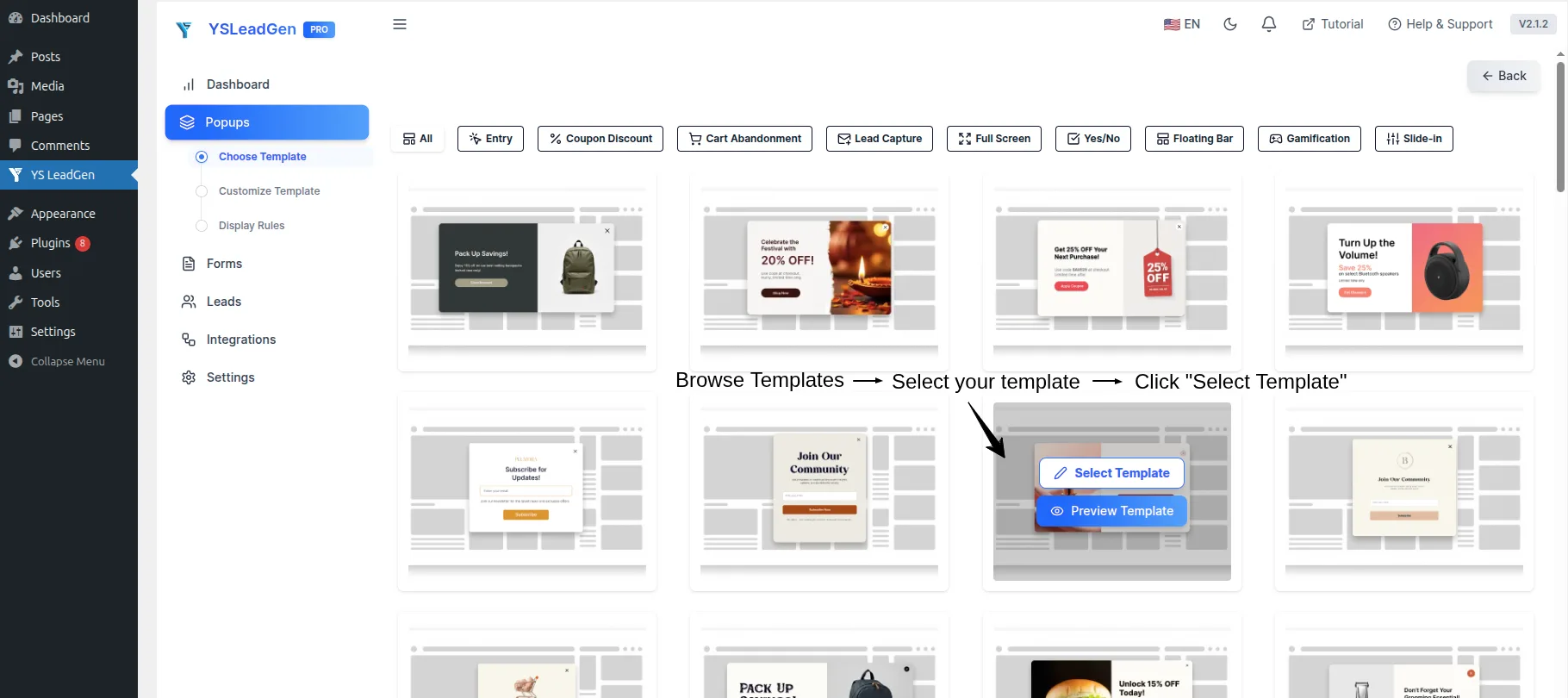
You can choose templates designed for:
- Email newsletter subscriptions
- Discount and coupon promotions
- Lead generation forms
- Free resource downloads
- Free trial offers
- Webinar registrations
- Announcement popups
Selecting the right popup template for your time delay campaign helps improve:
- Visitor engagement
- Click-through rates
- Overall conversion performance
Tips for Choosing the Best Time Delay Popup Template
For better conversion results with time delay popups:
- Use clean, focused popup designs without too many elements
- Choose a layout that prominently features your offer and CTA
- Select a template that matches the tone of the page where the popup will appear
- Avoid overly flashy designs that feel out of place after a calm reading experience
For example:
- Use a clean newsletter template for blog content time delay popups
- Use a discount popup template for WooCommerce product page campaigns
- Use a minimal lead form template for SaaS pricing page time delay popups
- Use a resource download template for educational content pages
Matching the template tone and design to the page context improves the natural feel of the time-delayed popup appearance.
Step 4 – Customize the Popup Design
After selecting the template, you can customize the popup using the popup editor,and click the save & continue button .
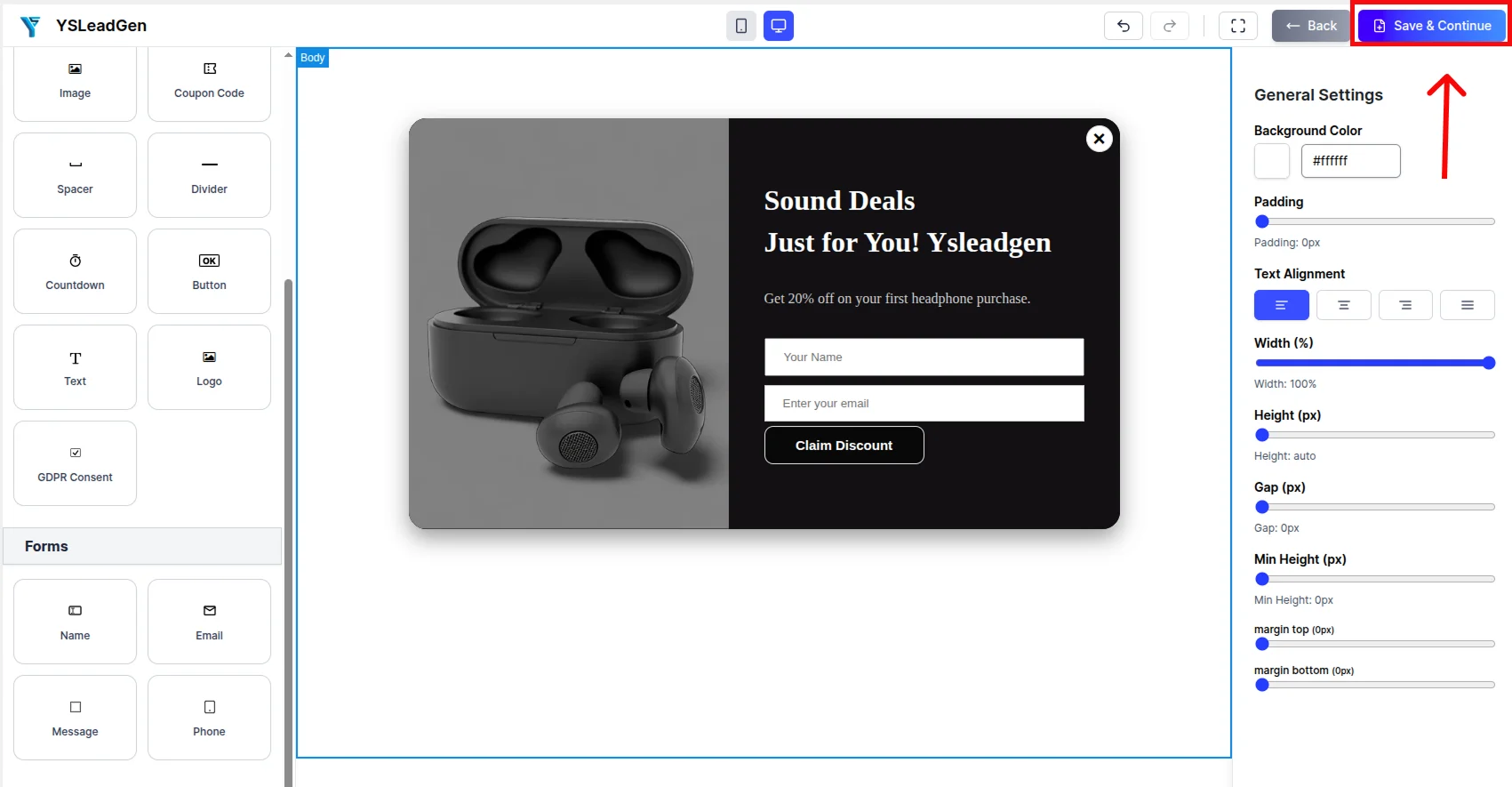
You can edit:
- Headlines and subheadlines
- Description and offer details
- Lead capture form fields
- CTA buttons
- Background colors and images
- Typography and fonts
- Brand colors and visual identity
Example time delay popup headlines:
- “Enjoying This Article? Subscribe for More Every Week”
- “Before You Go — Here’s 15% OFF Your First Order”
- “Get Our FREE Resource Guide — Enter Your Email Below”
- “You’ve Been Here a While — Can We Send You Something Special?”
- “Liked What You’ve Read? Join 5,000+ Subscribers Today”
Your popup should clearly communicate:
- What the offer or message is
- Why the visitor should take action now
- What benefit they receive in return
Best Practices for Time Delay Popup Design
A high-converting Time Delay Popup should:
- Use a conversational and non-aggressive tone
- Match the content type and context of the page
- Include a short, benefit-focused headline
- Feature one clear CTA button
- Keep form fields minimal
- Match your website’s branding
Because time delay popups appear to engaged visitors who have been reading your content, they work best when the design and messaging feel like a natural continuation of the experience — rather than an abrupt interruption.
Add a Lead Capture Form
If your goal is email list growth or lead generation, add a signup form to the popup.
You can collect:
- First name
- Email address
- Phone number
- Company name (for B2B lead generation)
Keep the form short and simple. For email newsletter popups triggered by time delay, collecting just the email address typically generates the highest opt-in rates.
Step 5 – Enable the Time Delay Trigger
This is the most important step in the time delay popup setup process.
Go to: Set Display Rules → Display Trigger
Now select and enable: Time Delay Trigger
Once selected, you will be able to configure the exact delay duration in seconds.
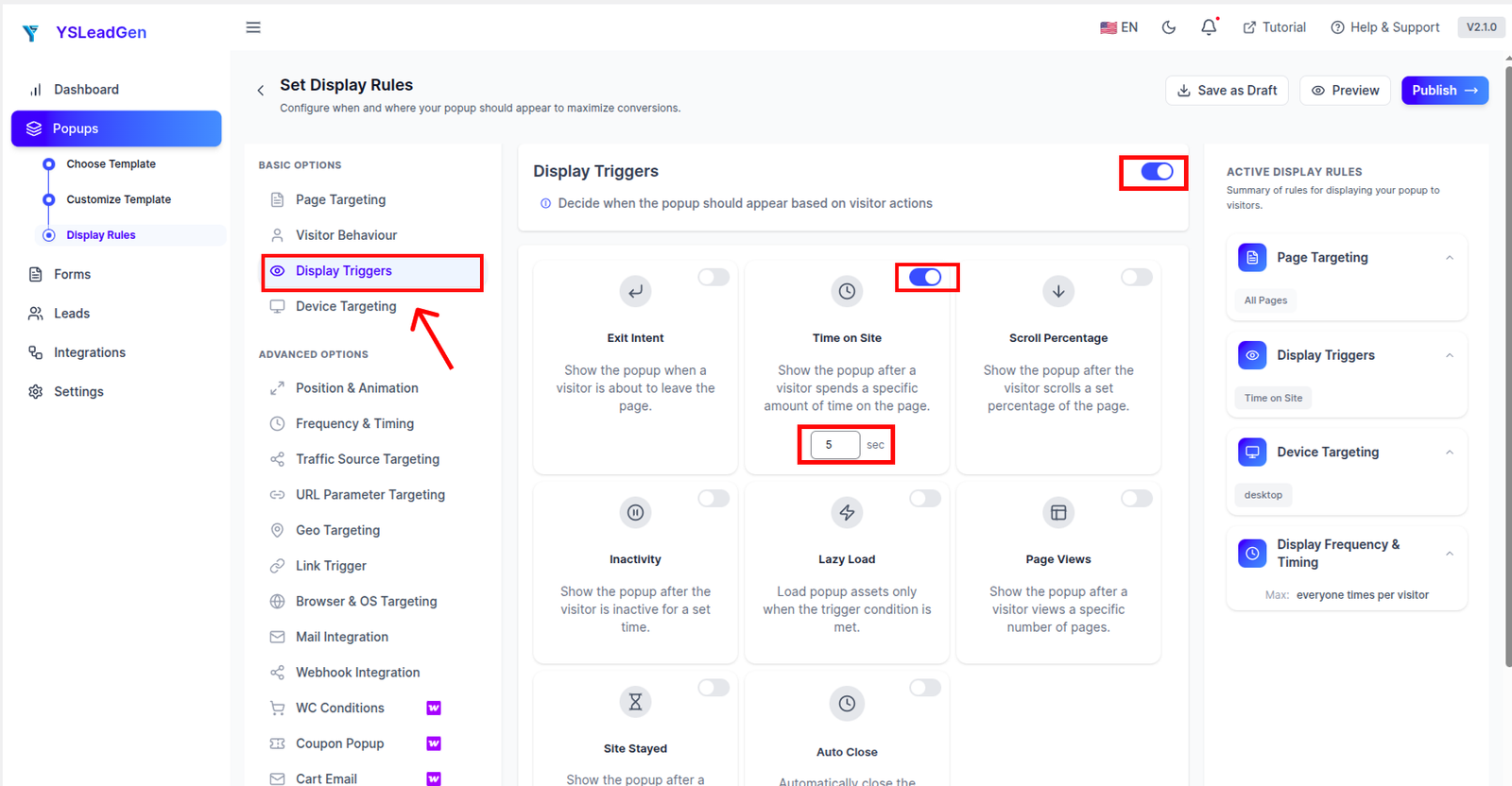
Set your preferred time delay, for example:
- 5 seconds — for high-intent landing pages where quick engagement is expected
- 10 seconds — for blog posts and product pages where visitors need a moment to read
- 15 seconds — for longer-form content where deeper engagement is required
- 20–30 seconds — for detailed service, pricing, or feature pages where visitors take more time to evaluate
Once activated, the popup will automatically appear after the visitor has been on the page for the specified number of seconds.
How to Choose the Right Time Delay
Choosing the correct delay duration is critical for balancing user experience with conversion performance.
General guidelines:
- Too short (under 3 seconds): Behaves similarly to an immediate popup — visitors haven’t had enough time to engage and will likely dismiss it reflexively
- 5–10 seconds: Works well for most pages — enough time for visitors to begin engaging without waiting so long that many have already left
- 10–20 seconds: Works best for long-form content pages where visitors are reading in depth
- 20–30 seconds: Ideal for high-consideration pages like pricing, comparison, or feature pages
The best delay duration for your website will depend on your average session duration and your audience’s typical browsing behavior. Testing different delay settings is the most reliable way to find the optimal timing.
Why the Time Delay Trigger Matters
The Time Delay trigger is one of the most important improvements you can make to popup performance compared to immediate page-load popups.
Time delay popups improve results because they:
- Target visitors who have already demonstrated engagement
- Reduce the abrupt, intrusive feeling of immediate popups
- Deliver the popup message to a warmer and more receptive audience
- Lower popup dismissal rates significantly
- Improve overall user experience while still driving conversions
As a result, Time Delay Popups consistently generate better engagement and conversion rates compared to popups that fire the instant a visitor arrives.
Step 6 – Configure Display Rules
Now it’s time to configure where and when the time delay popup should appear on your website.
Display rules help you show targeted popups to the right visitors on the right pages — making the time delay popup more relevant and effective.
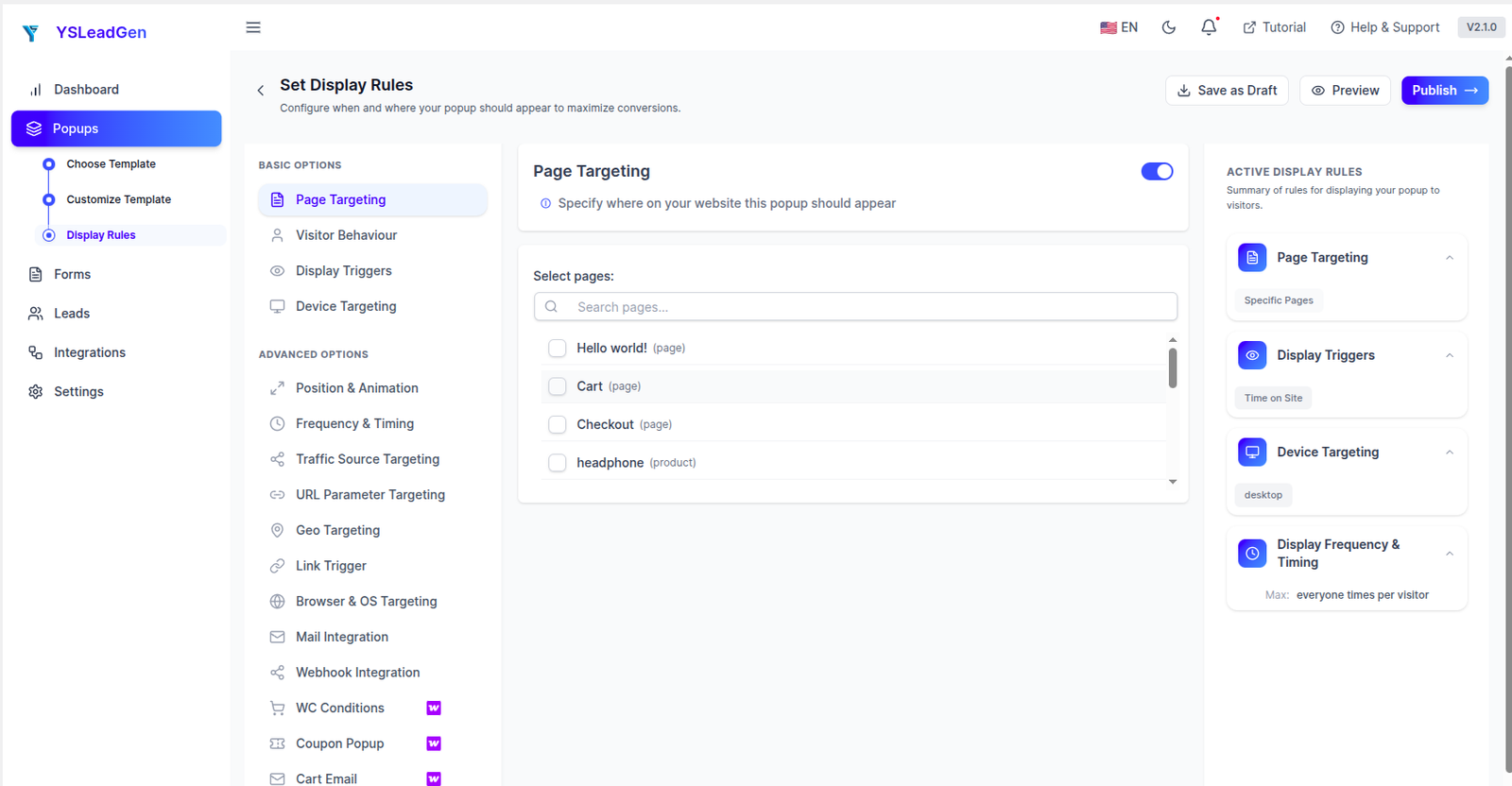
You can display the popup on:
- Entire website
- Homepage only
- Specific blog posts or categories
- WooCommerce product pages
- Pricing or service pages
- Landing pages
- Specific page URLs
Advanced targeting ensures your time delay popups are shown only where they make the most sense — improving both relevance and conversion rates.
Examples of Smart Time Delay Popup Targeting
Different pages benefit from different time delay popup strategies.
For example:
- Show a newsletter signup popup after 10 seconds on blog posts and articles
- Show a discount popup after 15 seconds on WooCommerce product pages
- Show a lead generation form popup after 20 seconds on pricing or service pages
- Show a free trial popup after 15 seconds on SaaS features pages
- Show a free resource download popup after 10 seconds on educational content pages
Matching the popup offer to the page topic and showing it only after a relevant delay makes the popup feel natural and increases visitor receptiveness.
Configure Device Targeting
You can also configure whether the time delay popup appears based on device type.
Display popup on:
- Desktop devices
- Mobile devices
- Tablets
Since mobile users typically have shorter browsing sessions, consider using a slightly shorter time delay for mobile visitors compared to desktop visitors.
Configure Popup Frequency
Avoid showing time delay popups repeatedly to the same visitor across multiple sessions.
Good popup frequency settings include:
- Show once per session
- Hide after the visitor converts or subscribes
- Delay repeat display for returning visitors by several days
This creates a better browsing experience while still maximizing lead generation and conversion opportunities over time.
Step 7 – Publish the Popup
Once everything is configured, it’s time to publish your Time Delay Popup.
Click: Publish
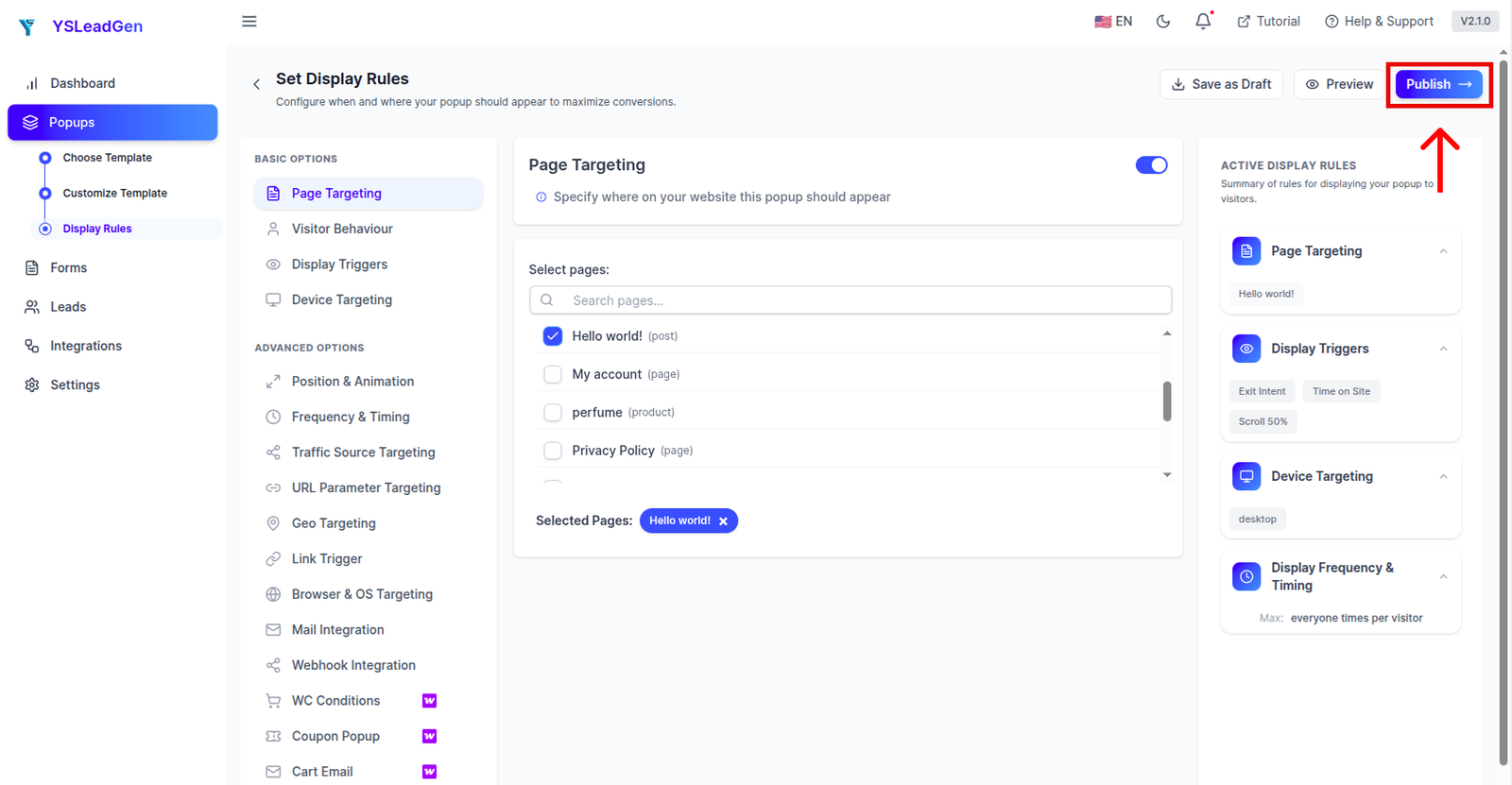
Your time delay popup is now live on your WordPress website.
Visitors will automatically see the popup after spending the configured amount of time on the designated pages — based on the display rules you set up.
Test Your Time Delay Popup
After publishing, test the popup manually to ensure everything works correctly.
Check:
- Popup appearance and design
- Time delay trigger accuracy (does it appear at the correct time?)
- Mobile responsiveness
- CTA button functionality
- Form submission and confirmation
- Display rules (does it appear only on the correct pages?)
To test the time delay trigger:
- Visit the page where the popup is configured to appear
- Stay on the page for the configured delay duration
- Verify the popup appears at the correct time
- Test on both desktop and mobile devices
Testing before going live ensures the popup timing is accurate and the visitor experience is smooth.
Tips to Improve Time Delay Popup Conversions
To maximize time delay popup performance:
- Match the popup offer to the content the visitor is currently reading
- Use a conversational tone that feels like a natural follow-up to the page content
- Make the offer compelling and immediately clear
- Keep the form or CTA simple and easy to complete
- Test multiple delay durations to find the optimal timing for your audience
Examples of strong time delay popup CTA buttons:
- Yes, Send Me the Weekly Newsletter
- Claim My Discount Now
- Get the Free Guide
- Start My Free Trial
- Yes, I Want This Offer
Small improvements to timing, messaging, and design can significantly increase time delay popup conversion rates.
Best Practices for High-Converting Time Delay Popups
Creating a Time Delay Popup is easy, but creating one that consistently converts engaged visitors into subscribers, leads, and customers requires the right strategy.
Many website owners make common mistakes like:
- Setting the time delay too short and defeating the purpose of the trigger
- Using the same generic popup offer across all pages regardless of content
- Ignoring the tone mismatch between calm reading content and aggressive popup copy
- Repeating the popup to the same visitor every session
- Neglecting mobile optimization
As a result, visitors dismiss the popup without engaging — wasting the opportunity created by their genuine page engagement.
To improve time delay popup conversion rates, your popup should be:
- Contextually relevant to the page content
- Timed correctly for the page’s average engagement duration
- Conversational and non-aggressive in tone
- Simple and easy to act on
- Designed to feel like a natural extension of the visitor’s experience
Below are the most important best practices for creating high-converting Time Delay Popups on your WordPress website.
1. Match the Delay Duration to Your Page’s Engagement Pattern
The most important variable in time delay popup performance is the delay duration itself.
A delay that is too short defeats the purpose of the time delay trigger — the visitor hasn’t had enough time to engage meaningfully. A delay that is too long may mean many visitors have already left before the popup fires.
General delay duration guidelines:
- Short-form content pages (blog previews, landing pages): 5–8 seconds
- Medium-form content pages (standard blog posts, product pages): 10–15 seconds
- Long-form content pages (guides, tutorials, detailed articles): 15–25 seconds
- High-consideration pages (pricing, comparison, features): 20–30 seconds
Analyze your website’s average session duration on key pages and calibrate your time delay to appear before most visitors typically leave — but after they’ve had enough time to genuinely engage.
2. Make the Popup Offer Contextually Relevant
The most effective time delay popups feel like a natural continuation of the visitor’s current experience.
For example:
- On a blog post about email marketing, a popup offering a free email marketing guide feels highly relevant
- On a WooCommerce product page, a popup offering a discount on that product category is perfectly timed
- On a SaaS features page, a popup offering a free trial invitation aligns with the visitor’s evaluation intent
Generic, one-size-fits-all popup offers underperform significantly on pages where a more targeted offer would be far more compelling.
Use display rules to show different popup offers on different page types for maximum relevance.
3. Use a Conversational and Friendly Tone
Because time delay popups appear to visitors who have been quietly reading or browsing your content, the popup messaging should feel like a friendly, natural follow-up — not an aggressive sales push.
Avoid urgent or pushy language like:
- “ACT NOW OR MISS OUT FOREVER!”
- “LIMITED OFFER — BUY NOW!”
Instead, use conversational and benefit-focused language:
- “Enjoying This Article? We Have a Lot More Where That Came From.”
- “You’ve Been Exploring — Can We Help You Take the Next Step?”
- “Looks Like You’re Interested — Here’s Something That Might Help.”
A friendly tone that matches the visitor’s current engagement state generates significantly better results with time delay popups.
4. Offer Something Genuinely Valuable
Visitors who have stayed on your page long enough to see the time delay popup have already demonstrated interest. Honor that interest with a genuinely compelling offer.
Instead of generic messages, offer something meaningful such as:
- Exclusive blog content or newsletter digests
- Discount coupons or promotional codes
- Free ebooks, guides, or checklists
- Free trials or product demos
- Exclusive early access offers
Example: “You’re Reading Our Best Content — Get More Delivered to Your Inbox Every Week.”
The more aligned the offer is with the visitor’s demonstrated interest, the higher the conversion rate.
5. Keep the Popup Simple and Easy to Act On
Time delay popups should not overwhelm visitors with too much information or too many choices.
Your popup should include:
- A short, engaging headline
- A brief description of the benefit
- One simple form field or CTA button
- A clear and easy-to-find close button
Avoid:
- Multiple competing offers
- Long explanatory paragraphs
- Complex multi-field forms
- Too many buttons or links
Simple, clean popup designs that respect the visitor’s time and attention always outperform cluttered ones.
6. Avoid Showing the Same Popup Repeatedly
Nothing damages the visitor experience faster than seeing the same popup every time they visit your website.
Configure your popup frequency settings to:
- Show once per session
- Hide permanently after the visitor subscribes or converts
- Suppress the popup for returning visitors for a set number of days
This ensures the time delay popup adds value rather than becoming an annoying recurring interruption.
7. Combine Time Delay with Exit Intent for Maximum Coverage
For the best conversion results, consider running both a Time Delay Popup and an Exit Intent Popup as separate campaigns.
- The Time Delay Popup captures engaged visitors who are actively reading your content
- The Exit Intent Popup catches visitors who are about to leave without converting
Together, these two popup trigger strategies cover the full spectrum of visitor behavior — reaching both engaged browsers and departing visitors with targeted offers.
8. Optimize for Mobile Devices
A large percentage of website traffic comes from mobile users, and mobile browsing sessions tend to be shorter than desktop sessions.
Your Time Delay Popup should be fully responsive and optimized for mobile screens, including:
- Properly scaled text and visuals
- Easy-to-tap CTA buttons
- Minimal form fields
- A clearly visible close button
Also consider using a slightly shorter time delay for mobile visitors to account for their typically shorter session durations.
Always test your time delay popup on multiple devices before publishing.
9. Use a Strong and Benefit-Focused CTA
Your CTA button should communicate the value the visitor receives rather than just instructing them what to do.
Weak CTA examples:
- Submit
- OK
- Continue
Better time delay popup CTA examples:
- Send Me the Free Guide
- Yes, I Want the Discount
- Subscribe to the Newsletter
- Start My Free Trial Now
- Get Instant Access
A benefit-focused CTA creates clarity and reduces hesitation — especially important for time delay popups where the visitor is mid-session and may be reluctant to pause their browsing.
10. Test and Optimize Continuously
Even small improvements to your time delay popup can significantly increase conversion rates over time.
Test different:
- Time delay durations (5s vs 10s vs 15s vs 20s)
- Headlines and offer descriptions
- CTA button text and colors
- Popup designs and layouts
- Offers (discount vs free resource vs newsletter)
- Page-specific targeting
A/B testing different delay settings and popup designs helps identify what works best for your specific audience and content type.
Continuous optimization is essential for maximizing the long-term performance of your time delay popup campaigns.
Common Mistakes to Avoid
Time Delay Popups can dramatically improve lead generation, email subscriptions, and WooCommerce conversions when implemented correctly. However, many website owners make mistakes that reduce popup performance and negatively affect the visitor experience.
One of the most common mistakes is setting the time delay too short. A delay of only 1–2 seconds provides almost no benefit over an immediate page-load popup. Visitors need enough time to genuinely engage with the page content before the popup appears. Always set the delay to a duration that matches your page’s natural engagement pattern.
Another major mistake is using a generic, one-size-fits-all popup offer across the entire website regardless of what the visitor is reading. A newsletter popup about cooking recipes on a technology blog makes no sense. Always use display rules to show contextually relevant offers on the right pages.
Using aggressive or pushy popup copy is also a frequent issue with time delay popups. Because time delay popups appear to engaged visitors who are calmly reading your content, overly salesy or urgent messaging feels jarring and out of place. Use a conversational, friendly tone that matches the visitor’s current browsing state.
Many website owners also show the same time delay popup to the same visitor on every single session without any frequency capping. This quickly turns a helpful reminder into an annoying recurring interruption. Always configure frequency settings to prevent the popup from appearing more than necessary.
Ignoring mobile optimization is another critical mistake. Mobile visitors have shorter average session durations, which means using the same long delay settings as desktop can result in the popup never firing before the visitor leaves. Always test your popup timing separately for mobile users.
Finally, many website owners set up a time delay popup and never revisit it to test and optimize performance. A/B testing different delay durations, headlines, and offers over time is essential for continuously improving your time delay popup conversion rates.
Avoiding these mistakes will help you create more effective Time Delay Popups that feel natural, respect the visitor experience, and consistently drive conversions.
Conclusion
Time Delay Popups are one of the most visitor-friendly and effective ways to engage website visitors, grow your email list, generate leads, and promote offers at exactly the right moment.
Unlike immediate page-load popups that interrupt visitors before they’ve had a chance to engage, Time Delay Popups wait until the visitor has demonstrated genuine interest by staying on the page — delivering the popup message to a warmer, more receptive audience.
Whether you run a WordPress blog, WooCommerce store, SaaS website, business site, or landing page, Time Delay Popups can help:
- Grow your email subscriber list with higher-quality signups
- Reduce popup dismissal rates
- Generate more qualified leads
- Promote offers to genuinely engaged visitors
- Boost overall website conversion rates
The best part is that creating a Time Delay Popup in WordPress is simple and beginner-friendly.
Using popup builder plugins like YS LeadGen, you can quickly create professional Time Delay Popups with ready-made templates, precise delay trigger configuration, smart display rules, and fully customizable designs — without any coding knowledge.
By following the strategies and best practices shared in this guide, you can create high-converting Time Delay Popups that reach visitors at exactly the right moment and turn engaged browsers into subscribers, leads, and paying customers.
Frequently Asked Questions (FAQs)
How long should I set my time delay?
The ideal delay depends on your page type and audience. A general guideline is 5–10 seconds for most pages, 10–15 seconds for blog content, and 15–30 seconds for longer-form or high-consideration pages like pricing or feature pages. Testing different delay durations is the best way to find the optimal timing for your specific audience.
Are Time Delay Popups better than immediate popups?
Yes, in most cases. Time Delay Popups consistently outperform immediate page-load popups because they target visitors who have already demonstrated genuine engagement by staying on the page — resulting in lower dismissal rates and higher conversion rates.
Can I use a Time Delay Popup to grow my email list?
Yes. Time Delay Popups are one of the most effective formats for growing email subscriber lists because they reach visitors who are already engaged with your content — making them more receptive to a newsletter signup offer. This typically results in higher-quality subscribers with better long-term engagement rates.
Do Time Delay Popups affect SEO?
Time Delay Popups generally do not negatively affect SEO when implemented correctly. Using a time delay rather than an immediate page-load trigger is actually a more SEO-friendly approach, as it reduces the likelihood of popups being flagged as intrusive interstitials.
What is the difference between a Time Delay Popup and an Exit Intent Popup?
A Time Delay Popup appears after a visitor has spent a set amount of time on the page — targeting engaged visitors mid-session. An Exit Intent Popup appears when a visitor is about to leave the page — targeting visitors at the moment of departure. Both can be used together to cover the full range of visitor behavior.
Can I set different time delays for different pages?
Yes. Using display rules in YS LeadGen, you can create separate popup campaigns with different delay durations for different pages. For example, you might use a 10-second delay on blog posts and a 20-second delay on pricing pages.
Can I create a Time Delay Popup without coding?
Yes. Using WordPress popup builder plugins like YS LeadGen, you can create professional Time Delay Popups without any coding knowledge — simply choose a template, customize the design, set your delay duration, configure display rules, and publish.
What offers work best in Time Delay Popups?
High-converting offers for Time Delay Popups include:
- Email newsletter subscriptions with a valuable incentive
- Discount coupons and promotional codes
- Free ebooks, guides, or checklists
- Free trial invitations
- Webinar registration prompts
- Free consultation bookings
What is the best WordPress Time Delay Popup plugin?
YS LeadGen is a beginner-friendly WordPress popup plugin that helps create Time Delay Popups, Exit Intent popups, full screen overlays, and lead generation forms easily — with precise delay trigger configuration, smart display rules, ready-made templates, and no coding required.
About the author

YSLeadGen Pro - Lifetime Deal
Access to unlimited popups, advanced targeting, event triggers, and premium templates.
14-Days Risk Free Money Back Guarantee