Most website visitors scroll past important announcements, miss ongoing promotions, and leave without noticing your best offers — simply because those messages are buried somewhere on the page and disappear from view the moment the visitor starts scrolling.
Whether you run a WordPress blog, WooCommerce store, SaaS platform, business website, or landing page, losing visitor attention to key promotions and calls-to-action can directly impact your conversions, sales, and subscriber growth every single day.
This is why many smart WordPress website owners use a Sticky Floating Header Bar to keep their most important message permanently visible at the top of the screen — no matter how far down the visitor scrolls.
A Sticky Floating Header Bar is a slim, persistent notification bar that stays fixed at the top of the browser window as visitors scroll through your website. Unlike standard page content that disappears as users scroll, a sticky header bar remains constantly visible — ensuring your most important message, offer, or call-to-action is always in front of every visitor throughout their entire browsing session.
Instead of losing visitors to important announcements they never saw, you can use a Sticky Floating Header Bar to continuously promote:
- Flash sale and discount announcements
- Free shipping threshold offers
- Email newsletter signup prompts
- Seasonal and holiday promotions
- New product or feature launch announcements
- Countdown timer offers and deadlines
- Important website notices and updates
- Webinar and event registration reminders
Today, Sticky Floating Header Bars are widely used to:
- Promote ongoing sales and discounts permanently
- Grow email subscriber lists with persistent CTAs
- Announce free shipping offers to WooCommerce shoppers
- Drive traffic to specific landing pages or product collections
- Communicate important updates to all visitors
- Boost overall website conversion rates
The best part is that you can create a Sticky Floating Header Bar in WordPress without any coding knowledge.
Using popup builder plugins like YS LeadGen, you can easily create professional sticky header bars with ready-made templates, responsive designs, customizable content, countdown timers, and smart display rules — all from a simple visual editor.
Whether your goal is to:
- Announce a flash sale or seasonal promotion
- Grow your email newsletter list
- Promote free shipping on WooCommerce
- Drive visitors to a key landing page
- Keep an important message permanently visible
A Sticky Floating Header Bar can become one of the most consistently effective and least intrusive conversion tools on your WordPress website.
In this step-by-step beginner guide, you’ll learn:
- What a Sticky Floating Header Bar is
- Why Sticky Floating Header Bars are important
- How to create a Sticky Floating Header Bar in WordPress
- Best practices for higher header bar conversions
- Common mistakes to avoid
By the end of this tutorial, you’ll be able to create a high-converting Sticky Floating Header Bar that keeps your most important message visible to every visitor — from their first scroll to their last.
What is a Sticky Floating Header Bar?
A Sticky Floating Header Bar — also known as a notification bar, announcement bar, or hello bar — is a slim, horizontal banner that is fixed to the top of the browser window and remains persistently visible as visitors scroll through your website.
Unlike standard page content that moves up and out of view as visitors scroll down, a Sticky Floating Header Bar stays anchored at the very top of the screen at all times. This means every visitor sees your message — whether they are reading the introduction of a blog post, browsing a product category, or halfway through the checkout process.
Sticky Header Bars are deliberately designed to be slim and non-intrusive. They typically occupy only 40–60 pixels of vertical screen space — just enough to display a short message and a call-to-action button without blocking the main page content or disrupting the browsing experience.
Sticky Floating Header Bars are commonly used for:
- Flash sale and discount code announcements
- Free shipping threshold promotions
- Email newsletter signup invitations
- Countdown timer deadline reminders
- New product or content launch announcements
- Important website notices and policy updates
- Event and webinar registration reminders
- Seasonal promotional campaigns
This format is widely used by WordPress blogs, WooCommerce stores, SaaS businesses, agency websites, and online businesses to keep their most important message permanently visible throughout the visitor’s entire session.
How Sticky Floating Header Bars Work
A Sticky Floating Header Bar is displayed as a fixed-position HTML element that remains anchored to the top of the browser viewport regardless of how far the visitor scrolls down the page.
When a visitor arrives on your website, they immediately see the header bar at the very top of the screen. As they scroll through the page content, the header bar stays fixed in place — maintaining constant visibility throughout the entire browsing session.
The header bar typically includes:
- A short, concise message or announcement
- A call-to-action button or link
- An optional countdown timer for urgency
- A close button for visitors who wish to dismiss it
Because the bar is always visible without taking up significant screen space, it delivers persistent promotional impact while maintaining a smooth and uninterrupted browsing experience.
This provides both:
- Continuous promotional visibility
- Minimal disruption to the visitor experience
Why Businesses Use Sticky Floating Header Bars
Standard page banners and promotional sections are only visible when the visitor is at a specific point on the page.
The moment the visitor scrolls past a promotional banner, that message is gone — and the opportunity to convert is lost.
Sticky Floating Header Bars solve this problem by:
- Keeping promotional messages visible at all times
- Ensuring every visitor sees the CTA regardless of where they are on the page
- Creating a persistent conversion opportunity throughout the entire session
Businesses use Sticky Floating Header Bars to:
- Permanently promote flash sales and seasonal discounts
- Announce free shipping thresholds to WooCommerce shoppers
- Drive newsletter signups with a visible persistent CTA
- Communicate important announcements to all visitors
- Reduce bounce rates by keeping engagement opportunities constantly visible
For example:
- A WooCommerce store may display “FREE Shipping on Orders Over $50 — Shop Now!” in a sticky bar
- A blog may show “Join 8,000+ Subscribers — Get Our Weekly Newsletter FREE” at the top of every page
- A SaaS company may announce “🚀 New Feature Launch — Try It Free Today!” across the entire website
- An eCommerce store may run “Summer Sale — Up to 40% OFF Sitewide | Ends Sunday” in a countdown bar
Because the message is always visible, sticky header bars generate consistent, ongoing conversion opportunities with minimal setup effort.
Common Types of Sticky Floating Header Bars
Different businesses use different sticky header bar strategies depending on their goals.
Popular Sticky Floating Header Bar types include:
- Flash Sale Announcement Bars
- Free Shipping Promotion Bars
- Countdown Timer Urgency Bars
- Email Newsletter Signup Bars
- New Product or Feature Announcement Bars
- Event and Webinar Registration Bars
- Important Notice and Update Bars
- Seasonal Promotion Bars
Each header bar type is designed to keep a specific, high-priority message permanently visible to every website visitor throughout their session.
Benefits of Sticky Floating Header Bars
Sticky Floating Header Bars have become one of the most consistently effective and least intrusive conversion tools available for WordPress websites and WooCommerce stores.
Unlike popups that appear once and disappear after being dismissed, a Sticky Floating Header Bar maintains a permanent, non-disruptive presence throughout the visitor’s entire session — creating continuous conversion opportunities without interrupting the browsing experience.
Whether you run a WordPress blog, WooCommerce store, SaaS platform, agency website, or media site, a Sticky Floating Header Bar can significantly improve your website’s conversion strategy with minimal setup and zero visitor frustration.
Here are some of the biggest benefits of using a Sticky Floating Header Bar on your WordPress website.
1. Keep Your Most Important Message Always Visible
The most powerful benefit of a Sticky Floating Header Bar is persistent, guaranteed visibility.
Unlike standard page banners that disappear when the visitor scrolls, a sticky header bar remains fixed at the top of the screen throughout the entire browsing session.
This means:
- Every visitor sees your promotional message regardless of where they are on the page
- Key offers and CTAs are always just a glance away
- Important announcements cannot be accidentally missed
- Your most valuable message gets maximum exposure with every page visit
For high-priority campaigns — such as flash sales, free shipping offers, and important announcements — this level of persistent visibility is invaluable.
2. Promote Flash Sales and Discounts Continuously
Sticky Floating Header Bars are one of the most effective ways to promote time-sensitive sales and discount campaigns.
Because the promotional message is always visible at the top of the screen, shoppers are constantly reminded of the ongoing sale — whether they are browsing the homepage, reading a blog post, or exploring product categories.
This continuous reminder effect:
- Keeps the sale top of mind throughout the shopping session
- Reduces the chance of shoppers forgetting about the promotion
- Creates a persistent sense of urgency that drives purchase decisions
- Improves click-through rates to sale and promotion landing pages
Example: “🔥 Flash Sale — 30% OFF Sitewide! Use Code FLASH30 at Checkout | Ends Tonight”
3. Announce Free Shipping to WooCommerce Shoppers
Free shipping is one of the most powerful purchase motivators in eCommerce. However, if shoppers do not know about your free shipping offer, it cannot influence their buying decision.
A Sticky Floating Header Bar ensures that every WooCommerce shopper sees your free shipping offer — regardless of which page they are browsing.
Example: “🚚 FREE Shipping on All Orders Over $40 — Shop Now!”
Constantly reminding shoppers about free shipping thresholds can significantly increase average order values as customers add more products to qualify for the offer.
4. Grow Email Subscribers with a Persistent CTA
For WordPress blogs and content websites, a Sticky Floating Header Bar is one of the most effective tools for growing an email subscriber list without using intrusive popups.
Because the newsletter signup invitation is always visible at the top of the page, visitors are continuously exposed to the CTA throughout their reading session — significantly increasing the chances of them clicking through to subscribe.
Example: “📧 Join 12,000+ Readers — Get Our Best Content Every Week. Subscribe FREE →”
Unlike a popup that appears once and disappears, a sticky newsletter bar gives visitors multiple opportunities to decide to subscribe throughout their session.
5. Create Urgency with a Countdown Timer Bar
Combining a Sticky Floating Header Bar with a countdown timer creates one of the most effective urgency tools available for WordPress websites.
A countdown timer sticky bar:
- Keeps the offer deadline permanently visible throughout the browsing session
- Creates continuous urgency that builds as the timer counts down
- Motivates visitors to act sooner rather than later
- Drives significantly higher click-through rates on time-sensitive offers
Example: “⏰ Summer Sale Ends in 02:14:35 — Get 25% OFF Now!”
The combination of persistent visibility and live countdown makes this one of the highest-converting sticky bar configurations available.
6. Non-Intrusive and Visitor-Friendly Format
One of the biggest advantages of Sticky Floating Header Bars compared to popups is their non-intrusive nature.
Because the bar is slim and positioned at the very top of the screen:
- It never blocks page content
- Visitors can browse normally without dismissing anything
- The message is visible without feeling aggressive or interruptive
- It adds value to the browsing experience rather than disrupting it
This makes Sticky Floating Header Bars one of the most visitor-friendly conversion tools available — particularly valuable for websites that want to drive conversions without the risk of visitor frustration associated with aggressive popups.
7. Easy to Create in WordPress
One of the biggest advantages of modern WordPress notification bar plugins is how simple they make header bar creation.
Using tools like YS LeadGen, website owners can create professional Sticky Floating Header Bars without coding knowledge.
You can:
- Choose ready-made header bar templates
- Customize the message, colors, and CTA
- Add a countdown timer for urgency
- Configure smart display rules and targeting
- Publish the sticky bar within minutes
This makes sticky floating header bar marketing accessible even for complete beginners with no technical or design experience.
How to Create a Sticky Floating Header Bar in WordPress
Creating a Sticky Floating Header Bar in WordPress is much easier than most beginners think.
With the help of modern WordPress popup builder plugins, you can create professional and high-converting Sticky Floating Header Bars without coding knowledge or technical experience.
In this tutorial, we’ll use YS LeadGen to create a Sticky Floating Header Bar step-by-step.
Whether your goal is to:
- Announce a flash sale or seasonal promotion
- Promote free shipping on your WooCommerce store
- Grow your email newsletter list
- Create urgency with a countdown timer bar
- Keep an important announcement always visible
this guide will help you set up your sticky floating header bar in just a few minutes.
Step 1 – Install the Sticky Header Bar Plugin
The first step is installing a WordPress popup and notification bar plugin that supports sticky floating header bar functionality.
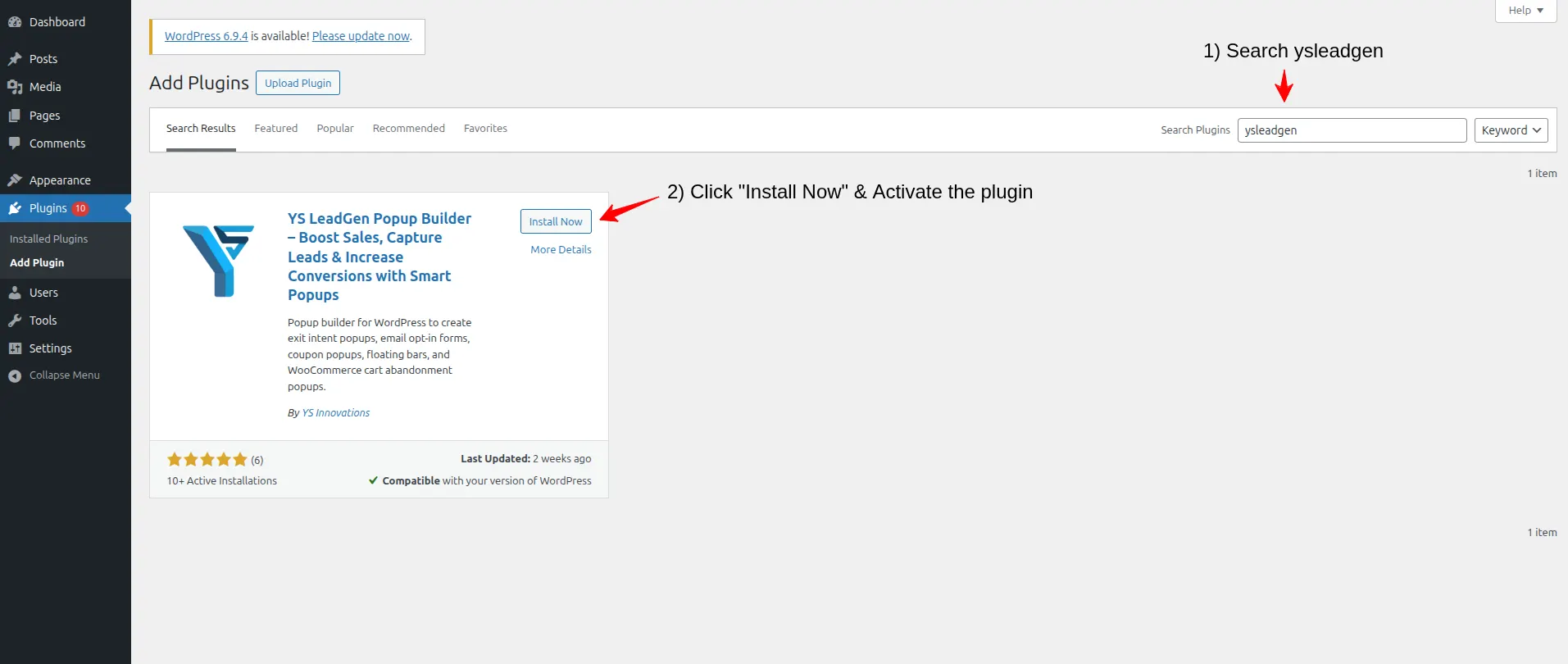
- Login to your WordPress dashboard.
- From the left sidebar, navigate to: Plugins → Add New Plugin
- In the search bar, search for: YS LeadGen
- Click Install Now, Click Activate

After activating the plugin, you’ll see the YS LeadGen menu added to your WordPress dashboard.
Using a beginner-friendly plugin that supports sticky header bar formats simplifies the entire creation process and helps you launch campaigns faster.
Why Installing the Right Plugin Matters
Not all popup plugins support sticky floating header bar functionality.
A good WordPress plugin for sticky header bars should provide:
- Sticky floating header bar format support
- Fixed top-of-screen positioning
- Countdown timer integration
- Responsive designs across all devices
- Smart display rules and targeting options
- Easy visual customization
- Close button support for visitor control
YS LeadGen is designed to help WordPress website owners create professional sticky floating header bars, notification bars, and conversion-focused campaigns easily.
Step 2 – Create a New Campaign
After installing the plugin, the next step is creating your sticky floating header bar campaign.
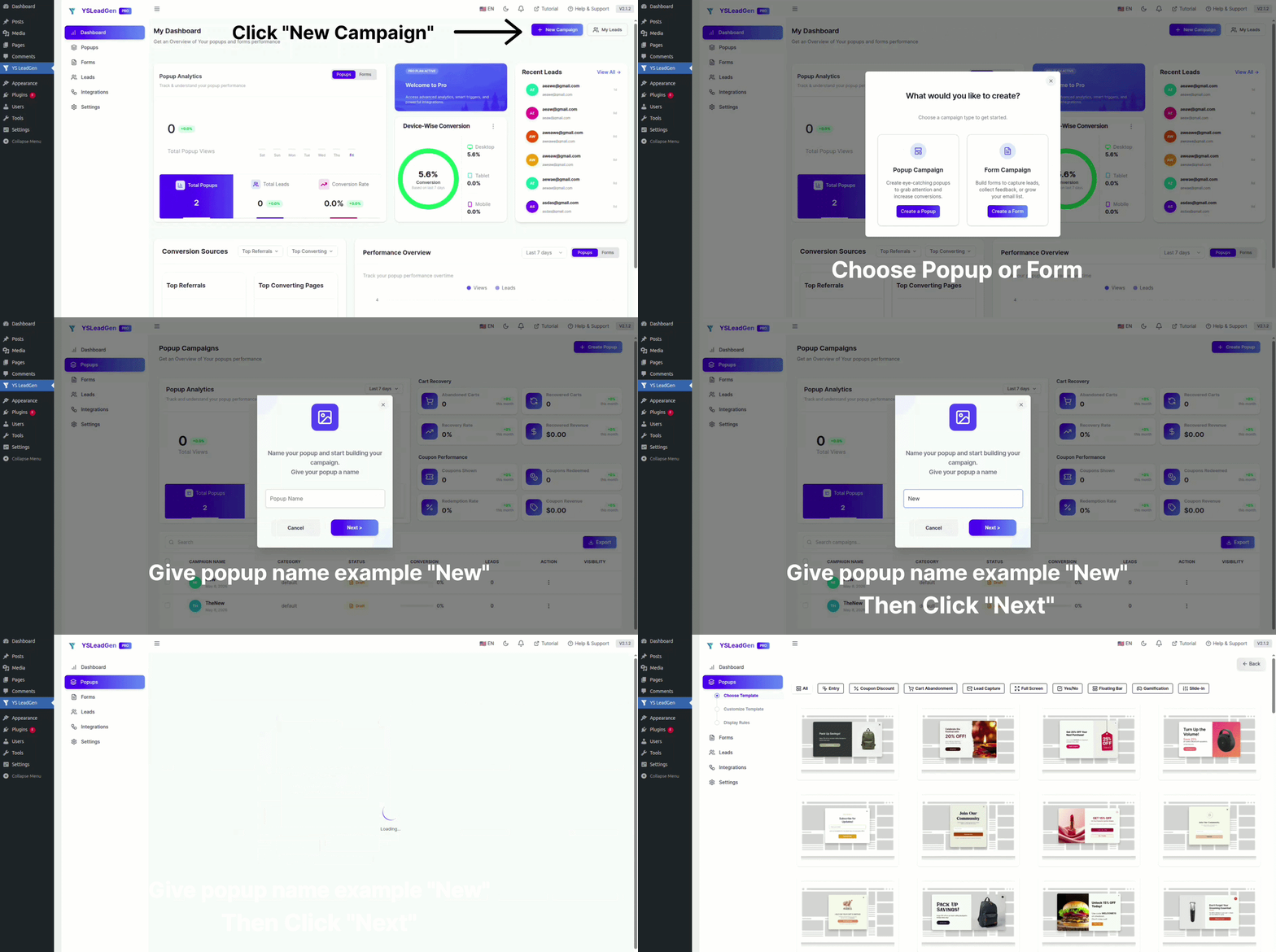
- Go to: YS LeadGen → New Campaign
- Click: Create a Popup
- Now enter a name for your campaign.
- Click next

Example campaign names:
- Flash Sale Sticky Header Bar
- Free Shipping Announcement Bar
- Newsletter Signup Header Bar
- Countdown Timer Promotion Bar
- New Product Launch Announcement Bar
- Summer Sale Sticky Notification Bar
Using clear and descriptive campaign names helps organize and manage multiple header bar campaigns efficiently — especially when running different sticky bars for different seasons, promotions, or pages.
Why Campaign Structure is Important
Many WordPress websites run multiple sticky header bar campaigns simultaneously for:
- Different seasonal promotions (Black Friday, Christmas, Summer Sale)
- Ongoing free shipping announcements for the WooCommerce store
- Newsletter subscription CTAs for the blog
- Product launch announcements for specific landing pages
- Countdown timer bars for flash sale events
Creating separate campaigns for each initiative helps you target the right message to the right visitors on the right pages.
Step 3 – Choose a Sticky Header Bar Template
Now it’s time to select your template.
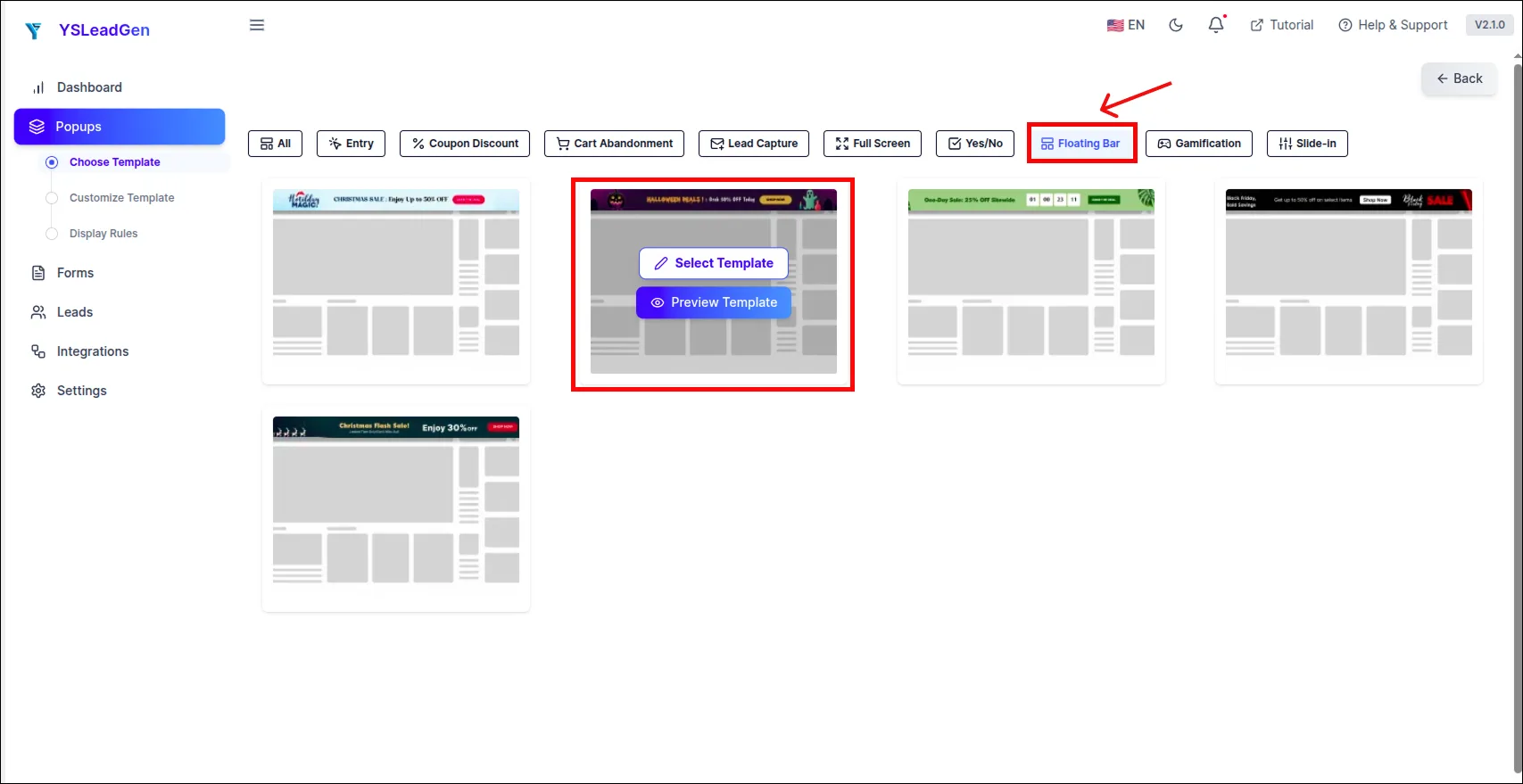
YS LeadGen provides ready-made templates including sticky notification bar and header bar designs optimized for different marketing goals.When selecting a template, choose a Notification Bar or Header Bar layout to ensure the campaign is formatted as a slim, fixed-position bar at the top of the screen rather than a traditional popup overlay.

Click the select template.
You can choose header bar templates designed for:
- Flash sale and discount announcements
- Free shipping promotion bars
- Email newsletter signup bars
- Countdown timer urgency bars
- New product or feature announcement bars
- Event and webinar registration bars
- General notice and update bars
Tips for Choosing the Best Header Bar Template
For better conversion results with sticky header bars:
- Choose a clean, simple bar template that fits within a slim horizontal layout
- Select a template with high color contrast so the message stands out against the page
- Ensure the template includes a clear CTA button or link
- Choose a template that supports a countdown timer if you are running a time-sensitive campaign
For example:
- Use a bold, high-contrast color bar for flash sale announcements
- Use a clean, minimal bar for newsletter signup campaigns
- Use a countdown timer bar template for deadline-driven promotions
- Use a branded announcement bar for new product or feature launches
Matching the header bar template to your campaign goal ensures maximum visibility and click-through performance.
Step 4 – Customize the Sticky Header Bar Design
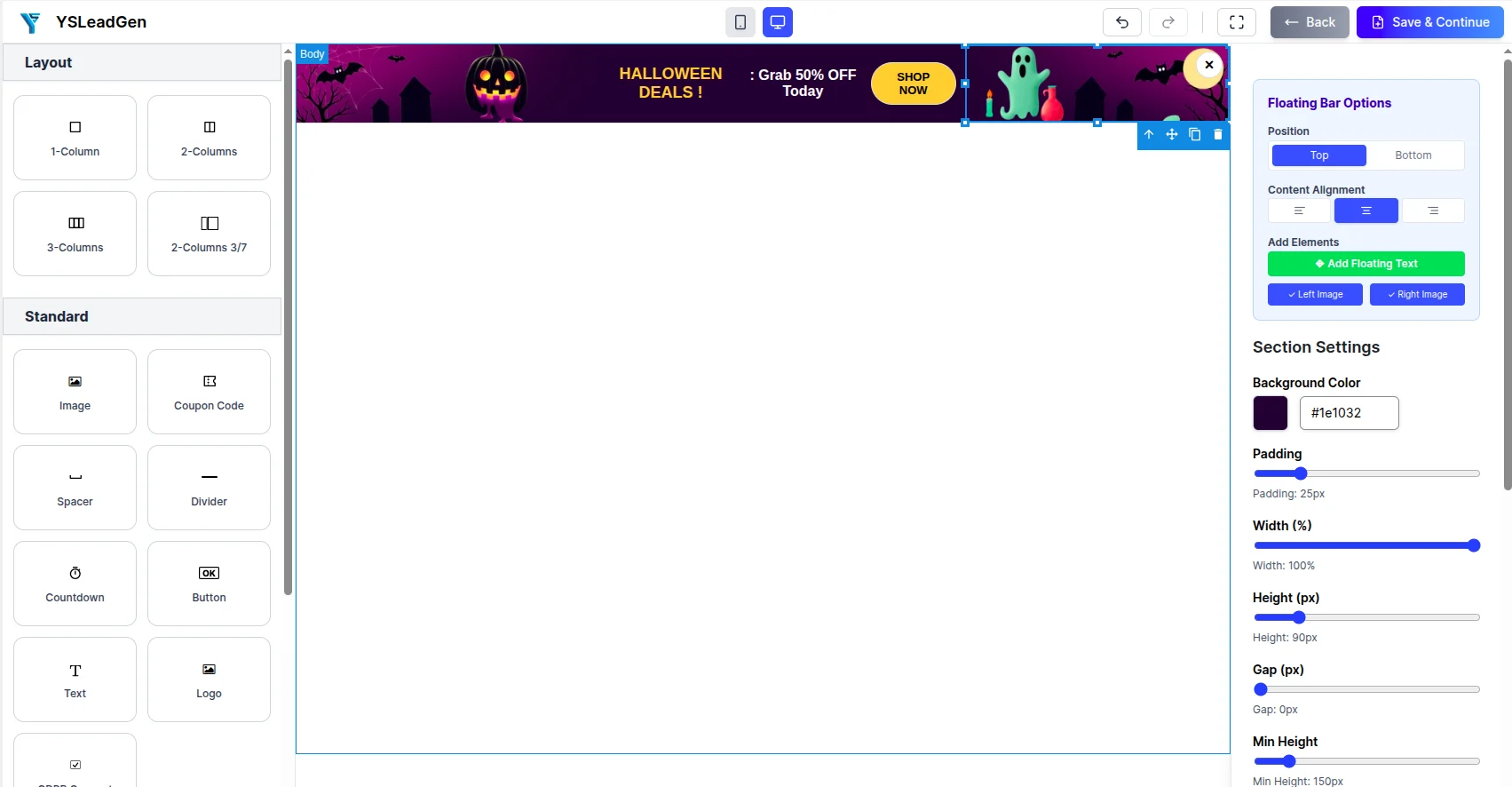
After selecting the template, you can fully customize the sticky header bar using the editor.
You can edit:
- Announcement message and text
- CTA button text and link destination
- Bar background color
- Text color and font size
- Close button style and visibility
- Countdown timer (if applicable)
- Emoji or icon elements
- Bar height and padding
- Brand colors and visual identity.

Example sticky header bar messages:
- “🔥 Flash Sale — 25% OFF Everything | Use Code SAVE25 at Checkout | Shop Now →”
- “🚚 FREE Shipping on All Orders Over $35 — Shop the Store →”
- “📧 Join 10,000+ Subscribers — Get Our Weekly Newsletter FREE | Subscribe Now →”
- “⏰ Summer Sale Ends in [TIMER] — Grab Your Discount Before It’s Gone →”
- “🚀 New Feature Alert — Try Our Latest Update Free Today | Learn More →”
Best Practices for Header Bar Content
A high-converting Sticky Floating Header Bar should:
- Use a very short, punchy message — ideally under 10 words for the core message
- Include one clear CTA button or link
- Use brand-consistent colors that stand out from the page header
- Use emojis sparingly to add visual interest and draw the eye
- Keep the bar slim so it does not feel like a banner ad
Because the header bar is always visible, visitors will read it multiple times during their session. Clear, concise messaging works far better than long, detailed text.
Add a Countdown Timer to the Header Bar
For time-sensitive promotions, adding a countdown timer directly inside the sticky header bar is one of the highest-converting configurations available.
The countdown timer:
- Creates continuous urgency throughout the browsing session
- Motivates visitors to click through and act before the deadline
- Makes the promotional offer feel more exclusive and time-sensitive
- Drives significantly higher click-through rates on sale and promotion campaigns
Example with countdown timer:
“⏰ Black Friday Sale Ends in 04:32:17 — Save 30% OFF Sitewide | Shop Now →”
If your campaign involves a genuine deadline, always add a countdown timer to your sticky header bar for maximum conversion impact.
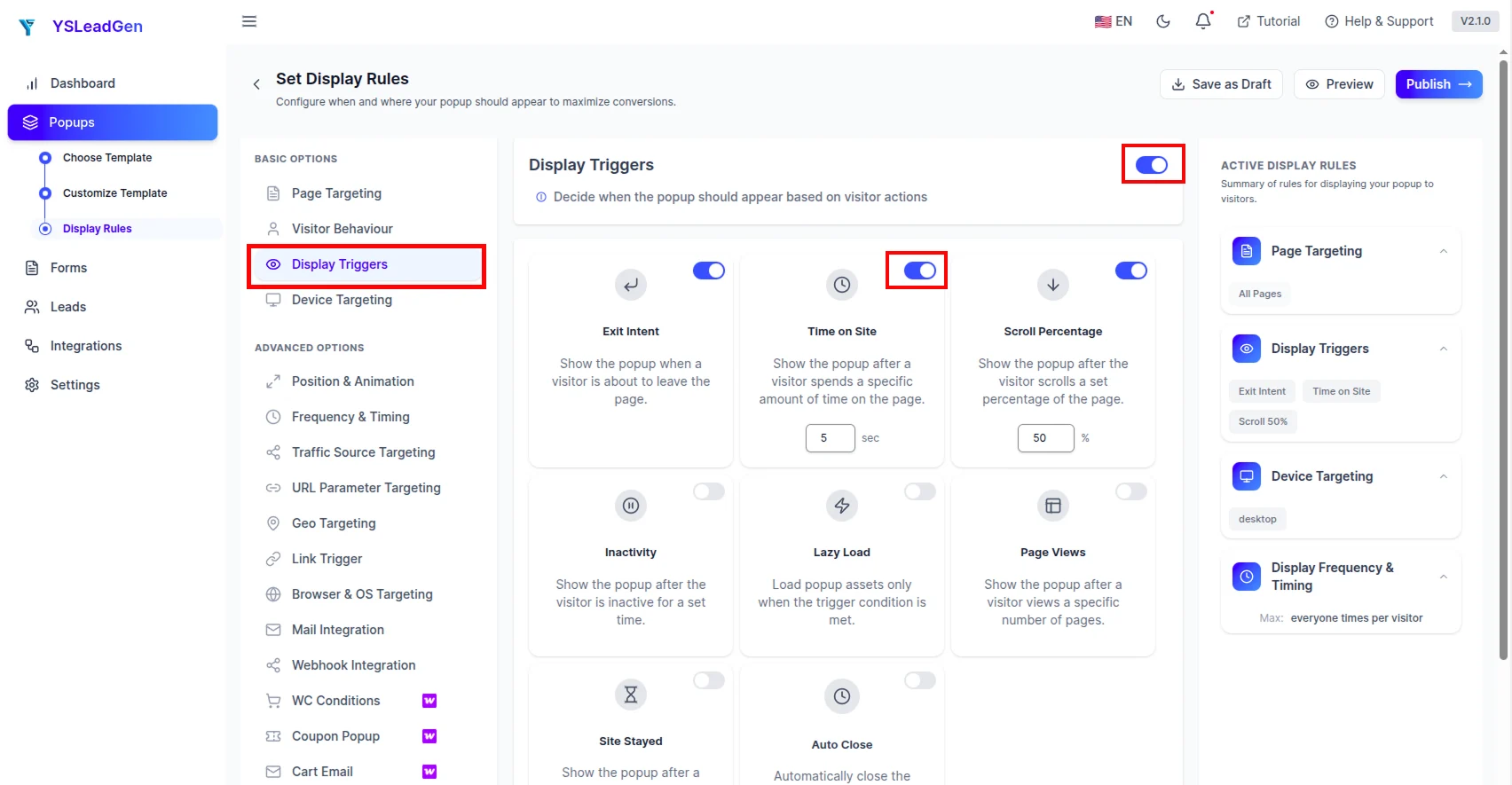
Step 5 – Configure the Display Trigger
This step determines when and how the Sticky Floating Header Bar appears to your visitors.
Go to: Set Display Rules → Display Trigger

For Sticky Floating Header Bars, the recommended trigger options are:
- On Page Load — The header bar appears immediately or within 1–2 seconds of the page loading (recommended for announcements, flash sales, and free shipping bars that should be visible from the very start of the session)
- Time Delay Trigger — The header bar appears after the visitor has been on the page for a set number of seconds (useful for newsletter signup bars where you want to give visitors a moment to engage with the content first)
Why On Page Load Works Best for Header Bars
Unlike popups that can feel intrusive when they appear immediately, Sticky Floating Header Bars are slim and non-blocking — which means showing them immediately on page load is perfectly acceptable and even preferred in most cases.
Because the header bar does not block any page content, visitors can:
- Read the promotional message immediately
- Continue browsing without being interrupted
- Return to the sticky bar and click the CTA at any point during their session
Immediate visibility is a core advantage of the sticky header bar format — do not delay this unnecessarily for most campaign types.
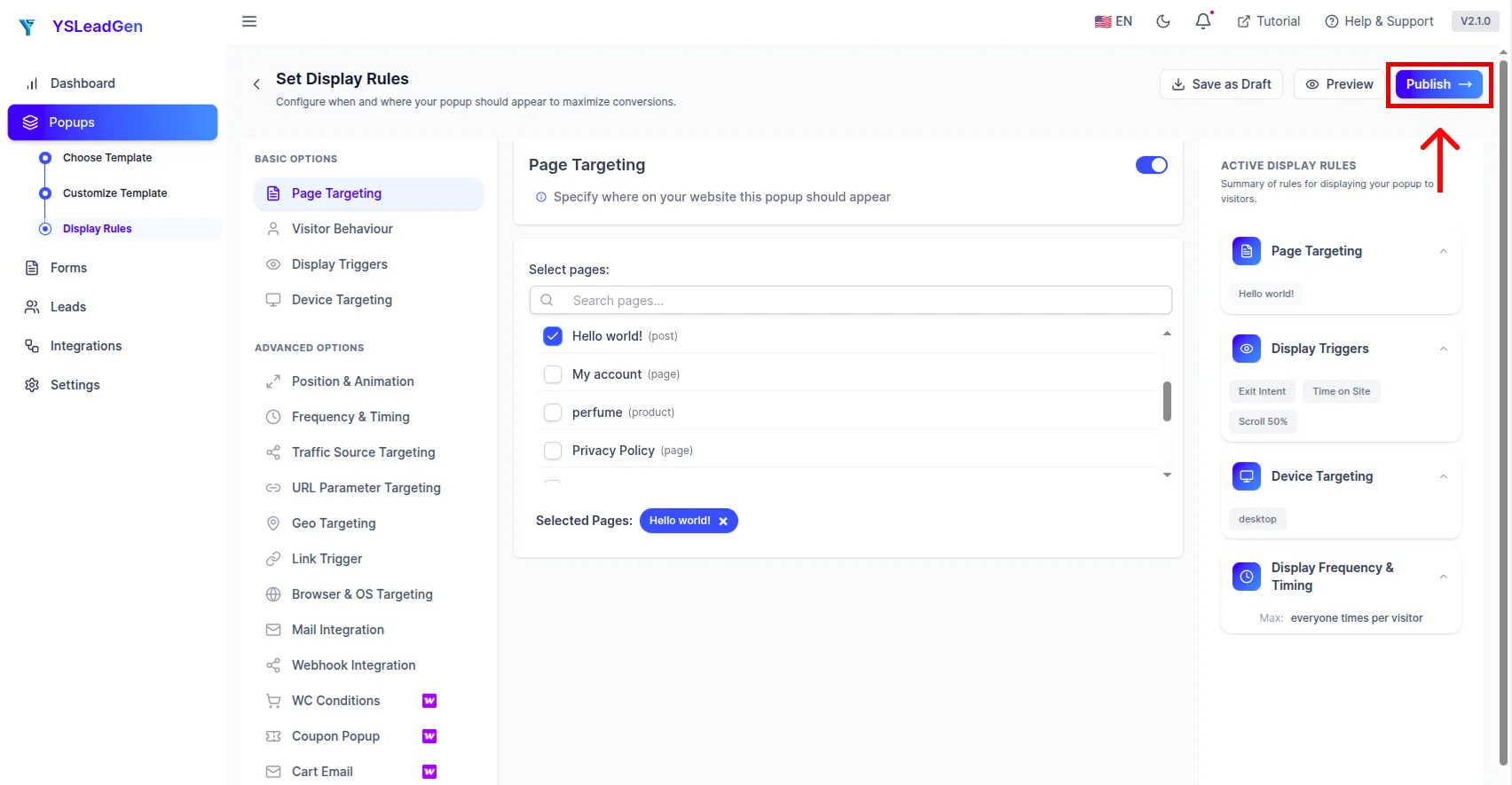
Step 6 – Configure Display Rules
Now it’s time to configure exactly where the Sticky Floating Header Bar should appear on your WordPress website.
Display rules allow you to show specific header bars on specific pages — ensuring the right promotional message is visible to the right visitors in the right context.

You can display the sticky header bar on:
- Entire website (all pages)
- Homepage only
- WooCommerce store pages (shop, product, cart, checkout)
- Blog posts and article pages
- Specific landing pages
- Specific product category pages
- Specific page URLs
Targeted display rules ensure your header bar message is always relevant to the page the visitor is currently browsing.
Examples of Smart Sticky Header Bar Targeting
Different pages benefit from different sticky header bar messages.
For example:
- Show a free shipping announcement bar across all WooCommerce store, product, and checkout pages
- Show a flash sale countdown bar on the homepage, product pages, and category pages during a promotional event
- Show a newsletter signup bar on all blog posts and content pages
- Show a new product launch bar specifically on the homepage and product category pages
- Show a webinar registration bar only on blog posts and the homepage during the registration period
Running different header bars on different sections of your website ensures that every visitor always sees the most relevant promotional message for the page they are currently viewing.
Configure Device Targeting
You can also configure whether the sticky header bar appears based on device type.
Display bar on:
- Desktop devices
- Mobile devices
- Tablets
On mobile devices, the sticky header bar should be tested carefully to ensure:
- The text is readable at mobile font sizes
- The CTA button is easy to tap
- The bar does not overlap with the mobile browser’s native UI elements
- The close button is accessible on smaller screens
Configure Bar Frequency and Dismissal Behavior
For Sticky Floating Header Bars, you have several options for how the bar behaves after a visitor dismisses it:
- Dismiss for session — The bar disappears for the current session but returns on the next visit
- Dismiss permanently — Once closed, the bar never appears again for that visitor
- Always visible — The close button is hidden and the bar is always visible (suitable for critical announcements)
For promotional campaigns, allowing the bar to reappear on new sessions ensures returning visitors are consistently reminded of ongoing offers.
Step 7 – Publish the Sticky Floating Header Bar
Once everything is configured, it’s time to publish your Sticky Floating Header Bar.
Click: Publish

Your sticky floating header bar is now live on your WordPress website.
Visitors will automatically see the bar fixed at the top of their screen from the moment they arrive on the configured pages — and it will remain visible throughout their entire browsing session.
Test Your Sticky Floating Header Bar
After publishing, test the bar manually to ensure everything works correctly.
Check:
- Bar appearance and positioning (fixed at top of screen)
- Sticky behavior (remains visible when scrolling)
- Countdown timer functionality (if included)
- CTA button link destination
- Mobile responsiveness and readability
- Close button functionality
- Display rule accuracy (appears on correct pages only)
To test the sticky header bar:
- Visit the page where the bar is configured to appear
- Verify the bar appears immediately at the top of the screen
- Scroll down the page and confirm the bar remains fixed and visible
- Click the CTA button and confirm it goes to the correct destination
- Test on both desktop and mobile devices
Testing before going live ensures the bar is correctly positioned, fully functional, and provides a smooth experience across all devices.
Tips to Improve Sticky Header Bar Conversions
To maximize sticky header bar performance:
- Keep the message short, punchy, and immediately clear
- Use high-contrast colors that make the bar stand out
- Include a clear and action-oriented CTA button
- Add a countdown timer for time-sensitive promotions
- Use emojis to draw attention to the key message
- Ensure the bar is visible on mobile without overlapping content
- Test different messages and CTA button texts regularly
Examples of strong sticky header bar CTA buttons:
- Shop the Sale →
- Claim Free Shipping →
- Subscribe Now →
- Get the Deal →
- Learn More →
- Register Free →
Even small improvements to messaging, color, and CTA text can significantly increase header bar click-through rates.
Best Practices for High-Converting Sticky Floating Header Bars
Creating a Sticky Floating Header Bar is easy, but creating one that consistently drives clicks, conversions, and engagement requires the right strategy and design approach.
Many website owners make common mistakes like:
- Writing bar messages that are too long and get cut off on smaller screens
- Using bar colors that blend into the website’s existing header design
- Forgetting to update the sticky bar after a promotion ends
- Showing the same promotional bar to every visitor regardless of page context
- Ignoring mobile optimization for the bar’s text and CTA
As a result, the header bar becomes invisible to visitors — either because it blends into the background, the message is unclear, or the offer is no longer relevant.
To maximize sticky header bar performance, your bar should be:
- Short, clear, and immediately compelling
- Visually distinct from the rest of the page header
- Always up-to-date with current offers and promotions
- Targeted to the right visitors on the right pages
- Fully optimized for mobile and desktop viewing
Below are the most important best practices for creating high-converting Sticky Floating Header Bars on your WordPress website.
1. Keep the Message Extremely Short and Clear
The Sticky Floating Header Bar has very limited horizontal space — especially on mobile screens.
Your bar message must communicate the core offer in as few words as possible.
Aim for a maximum of 10–12 words for the main message, followed by a short CTA button.
Weak bar message examples:
- “We are currently running a special promotional offer that gives you a significant discount if you use our coupon code at checkout today.”
Strong bar message examples:
- “🔥 Flash Sale — 30% OFF Today Only | Shop Now →”
- “🚚 Free Shipping on Orders Over $50 | Shop Now →”
- “📧 Subscribe & Get 15% OFF Your First Order →”
Short, punchy messages outperform long sentences every time — especially in the compact header bar format.
2. Use High-Contrast Colors That Stand Out
Your sticky header bar should be immediately visible and distinguishable from the rest of your website design.
Avoid colors that are:
- Too similar to your website’s existing header or navigation bar
- Low contrast against your body content background
- Generic white or grey that blends into the page
Instead, use:
- Bold, brand-consistent colors with high text contrast
- Colors that complement but stand out from your header design
- Classic high-visibility combinations like dark text on a bright background or light text on a deep color
A sticky bar that blends invisibly into the page design defeats its own purpose — make it clearly and intentionally distinguishable.
3. Include One Clear and Action-Oriented CTA
Every Sticky Floating Header Bar should include exactly one call-to-action — a button or link that tells visitors precisely what to do next.
Avoid:
- Multiple competing links within the same bar
- Vague CTAs like “Click Here” or “Learn More” with no context
- No CTA at all — just a message with nowhere to go
Strong header bar CTA examples:
- Shop the Sale →
- Get Free Shipping →
- Subscribe Now →
- Register Free →
- Claim My Discount →
A single, clear, action-oriented CTA makes it easy for visitors to respond to the bar message immediately.
4. Add a Countdown Timer for Time-Sensitive Campaigns
For any promotional campaign with a genuine deadline — such as a flash sale, seasonal discount, or limited-time offer — always add a countdown timer to your sticky header bar.
The countdown timer:
- Creates ongoing urgency throughout the entire browsing session
- Constantly reminds visitors that the offer has a deadline
- Motivates visitors who have seen the bar multiple times during their session to finally click through and act
- Dramatically improves click-through rates on deadline-driven campaigns
Example: “⏰ Cyber Monday Sale Ends in 01:42:08 — 35% OFF Sitewide | Shop Now →”
The combination of persistent visibility and a live countdown is one of the most powerful conversion configurations available for sticky header bars.
5. Always Update or Remove Expired Promotions
One of the most damaging mistakes for website credibility is leaving an outdated promotional bar running after the campaign has ended.
Visitors who see a sticky bar announcing “Flash Sale — 50% OFF Today Only!” and then visit the store to find no active discount will feel misled — damaging trust in your brand.
Always:
- Set a clear campaign end date and deactivate the bar when the promotion ends
- Update the bar message when the offer changes
- Replace expired promotional bars with a new relevant offer immediately
- Never leave an outdated or inaccurate sticky bar running on your website
Keeping your sticky header bar up-to-date is essential for maintaining visitor trust and brand credibility.
6. Use Different Bars for Different Page Sections
A single sticky header bar message is rarely equally relevant for every page of your website.
Using display rules to show different sticky bars on different page sections significantly improves relevance and click-through rates.
For example:
- Show a free shipping bar specifically on WooCommerce product and cart pages
- Show a newsletter signup bar only on blog posts and content pages
- Show a flash sale bar on the homepage, category pages, and product pages during a promotional event
- Show a webinar registration bar on blog posts and the homepage during the registration period
Contextually relevant sticky bars always outperform generic site-wide bars.
7. Make the Close Button Accessible
While you want the sticky header bar to remain visible, it is important to give visitors the option to dismiss it if they choose.
A clearly visible close button:
- Respects visitor autonomy and reduces frustration
- Prevents the bar from feeling forced or aggressive
- Improves the overall perception of the bar as helpful rather than intrusive
Never hide the close button or make it difficult to find — particularly on mobile devices where accidental taps are already common.
8. Optimize for Mobile Devices
A significant percentage of your website traffic comes from mobile users, and sticky header bars on mobile require careful optimization.
On mobile screens:
- The bar occupies a proportionally larger portion of the visible screen area
- Text that looks fine on desktop can become cramped and unreadable on mobile
- CTA buttons must be large enough to tap accurately with a finger
- The close button must be easily accessible
Always test your sticky header bar on multiple mobile device sizes before publishing to ensure it looks great and functions correctly across all screen widths.
9. Match the Bar Color to Your Campaign Type
Using color intentionally in your sticky header bar can significantly improve its visual impact and click-through rate.
Color psychology guidelines for header bars:
- Red / Orange — Creates urgency and excitement; ideal for flash sales and limited-time offers
- Green — Communicates positivity and value; works well for free shipping and discount bars
- Blue — Builds trust and credibility; suitable for announcements and newsletter signups
- Purple — Suggests exclusivity and premium value; works for VIP and membership campaigns
- Yellow / Gold — Eye-catching and energetic; great for seasonal promotions and new launches
Matching your bar color to the emotional intent of the campaign message improves both visual impact and conversion performance.
10. Test and Optimize Continuously
Even small changes to your sticky header bar can significantly improve click-through rates over time.
Test different:
- Bar message copy and headline text
- CTA button text and color
- Bar background colors
- With and without countdown timers
- With and without emojis
- Display targeting (site-wide vs page-specific)
- Dismissal behavior settings
A/B testing different header bar configurations helps identify which combination of message, design, and targeting performs best for your specific audience and campaign goals.
Continuous optimization is essential for maximizing the long-term performance of your sticky floating header bar campaigns.
Common Mistakes to Avoid
Sticky Floating Header Bars can consistently drive conversions, grow email lists, and promote offers with minimal visitor disruption — but several common mistakes can significantly reduce their effectiveness or damage the visitor experience.
One of the most common mistakes is writing a bar message that is too long. Header bars have very limited horizontal space, and long messages get cut off on mobile screens — leaving visitors seeing an incomplete and confusing message. Always keep the bar message short, punchy, and under 12 words where possible.
Another major mistake is choosing a bar color that blends into the existing website header design. If visitors cannot immediately distinguish the sticky bar from the rest of the navigation, they will not notice the promotional message. Always use a color that is visually distinct from your header and page background.
Leaving an outdated promotional bar running after a campaign has ended is one of the most damaging credibility mistakes a website owner can make. Visitors who click a bar advertising a 40% OFF sale only to find the discount no longer exists will feel misled and lose trust in your brand. Always deactivate or update bars when promotions expire.
Showing the same promotional bar to every single visitor regardless of page context is another missed opportunity. A free shipping promotion bar on a blog post is far less relevant than on a WooCommerce product page. Always use display rules to show the most relevant bar message on each section of your website.
Many website owners also hide or remove the close button from their sticky header bar in an attempt to keep it permanently visible. This approach backfires — visitors who cannot dismiss an unwanted bar become frustrated and may leave the website entirely. Always provide a visible and accessible close button.
Ignoring mobile optimization is another critical error. A sticky bar that looks great on desktop can appear cramped, unreadable, or difficult to dismiss on a smartphone. Always test on multiple device sizes before publishing.
Finally, many website owners set up a sticky floating header bar and never revisit it to test or optimize performance. A/B testing different messages, colors, CTA texts, and targeting configurations over time is essential for maximizing header bar click-through and conversion rates.
Avoiding these mistakes will help you create Sticky Floating Header Bars that are always relevant, always credible, and consistently drive meaningful conversions throughout every visitor’s session.
Conclusion
Sticky Floating Header Bars are one of the most consistently effective and visitor-friendly conversion tools available for WordPress websites and WooCommerce stores.
Unlike popups that appear once and disappear, a Sticky Floating Header Bar keeps your most important message — whether it is a flash sale announcement, free shipping offer, newsletter signup invitation, or countdown timer promotion — permanently visible at the top of the screen throughout every visitor’s entire browsing session.
Whether you run a WordPress blog, WooCommerce store, SaaS platform, business website, or media site, a Sticky Floating Header Bar can help:
- Keep promotional offers visible throughout every visitor’s session
- Promote flash sales and seasonal discounts continuously
- Announce free shipping to WooCommerce shoppers on every page
- Grow your email newsletter list with a persistent signup CTA
- Create ongoing urgency with a countdown timer bar
- Communicate important announcements and updates to all visitors
- Boost overall website conversion rates with minimal visitor disruption
The best part is that creating a Sticky Floating Header Bar in WordPress is simple and beginner-friendly.
Using popup builder plugins like YS LeadGen, you can quickly create professional Sticky Floating Header Bars with ready-made templates, countdown timer integration, smart display rules, advanced page targeting, and fully customizable designs — without any coding knowledge.
By following the strategies and best practices shared in this guide, you can create high-converting Sticky Floating Header Bars that keep your most important messages in front of every visitor — turning consistent visibility into consistent conversions.
Frequently Asked Questions (FAQs)
What is the difference between a Sticky Header Bar and a regular popup?
A regular popup appears once, overlays the page content, and disappears after being dismissed. A Sticky Floating Header Bar is always visible at the top of the screen throughout the visitor's entire session — it is slim, non-blocking, and does not interrupt the browsing experience.
Can I add a countdown timer to my Sticky Header Bar?
Yes. Adding a countdown timer to a Sticky Floating Header Bar is one of the most effective configurations for time-sensitive promotions. The countdown remains visible throughout the browsing session, creating continuous urgency that drives significantly higher click-through rates.
Will a Sticky Floating Header Bar affect my website's SEO?
No. When implemented correctly, a Sticky Floating Header Bar does not negatively affect SEO. Because the bar is slim and does not block page content, it does not trigger Google's intrusive interstitial guidelines — unlike full-screen overlays.
Can I show different Sticky Header Bars on different pages?
Yes. Using display rules in YS LeadGen, you can configure different sticky header bars for different pages — showing a free shipping bar on WooCommerce product pages, a newsletter bar on blog posts, and a flash sale bar on the homepage simultaneously.
How long should my Sticky Header Bar message be?
Keep your sticky header bar message as short as possible — ideally under 10–12 words for the core message. Long messages get cut off on mobile screens and lose impact even on desktop. Short, punchy messages with a clear CTA consistently outperform longer text.
Should I show a close button on my Sticky Header Bar?
Yes. Always provide a clearly visible close button that allows visitors to dismiss the bar if they choose. Hiding the close button can frustrate visitors and increase bounce rates. Respecting visitor control creates a better experience and ultimately improves the bar's overall credibility.
Can I use a Sticky Floating Header Bar for email signups?
Yes. A Sticky Floating Header Bar is one of the most effective non-intrusive tools for growing an email subscriber list. Because the signup invitation is always visible throughout the browsing session, visitors have multiple opportunities to notice and click through to subscribe.
Can I create a Sticky Floating Header Bar without coding?
Yes. Using WordPress plugins like YS LeadGen, you can create professional Sticky Floating Header Bars without any coding knowledge — simply choose a template, customize the message and design, configure display rules, and publish.
What is the best WordPress Sticky Floating Header Bar plugin?
YS LeadGen is a beginner-friendly WordPress plugin that helps create Sticky Floating Header Bars, notification bars, countdown timer bars, and popup campaigns easily — with ready-made templates, smart display rules, countdown timer support, and no coding required.