Most WordPress sites lose the majority of their traffic without ever asking visitors to take action. Content gets published, SEO improves, ads run, and social channels stay active, yet a large share of visitors still leave without subscribing, buying, or getting in touch.
This guide explains how to add a popup in WordPress using a WordPress popup plugin, with no coding required. Beyond the setup steps, it covers what actually determines whether a popup converts: timing, targeting, form length, and message relevance, based on patterns observed across real WordPress popup campaigns.
Three visitor behaviors show up on almost every site. A blog reader finishes an article but never subscribes. A shopper adds items to cart but abandons checkout. A services page visitor browses but never reaches out. In each case, the visitor showed interest but received no clear, well-timed prompt to act. A properly configured WordPress popup closes that gap.
What Is a WordPress Popup?
A WordPress popup is a small overlay window that appears on top of your website content to capture a visitor’s attention and prompt a specific action: subscribing, buying, downloading, or getting in touch.
Think of it as a polite tap on the shoulder, not a shove.
Unlike a static sidebar widget, a modern WordPress popup plugin responds to visitor behavior. Someone reads 60 percent of your article? Offer a related resource. Someone’s mouse drifts toward the browser’s close button? Show one last offer before they leave.
This behavior-based targeting is what separates a real WordPress popup builder from an old-school “subscribe now” banner. You’re not interrupting, you’re anticipating what the visitor needs and offering it at the right moment.
Common goals for a WordPress popup include:
- Growing an email list
- Generating leads for a service business
- Promoting a discount or limited-time offer
- Reducing shopping cart abandonment
- Announcing a new product or feature
Yes, some people say they hate popups. What they actually hate is bad popups, the kind covered later in this guide.
Types of WordPress Popups (By Design, Trigger, and Goal)
Not every popup looks or behaves the same way, and picking the wrong type for the job is one of the most common reasons a popup underperforms. It helps to know the main categories before you build one.
Popup Types by Design Format
Lightbox popups are centered boxes that appear over a dimmed background, keeping the visitor’s eyes on the message. This is the most common popup format and the default in most WordPress popup builders, including YS LeadGen.
Fullscreen popups, sometimes called welcome mats, cover the entire browser window and block everything underneath until the visitor takes action. These convert well but carry the highest risk of frustrating visitors, especially on mobile, so they need to be used carefully.
Slide-in popups glide in from a corner or edge of the screen without covering the main content. They’re a gentler option for sites that want a lead capture form visible without interrupting reading.
Floating bars are thin strips that stick to the top or bottom of the screen as the visitor scrolls. They work well for short, low-friction messages like a sitewide discount code or an announcement.
Gamified popups turn the opt-in into a small interactive moment, most commonly a spin-to-win wheel. They tend to boost engagement, though they take more setup effort than a standard form.
Popup Types by Trigger Method
Exit-intent popups fire when the visitor’s mouse moves toward the browser’s close button or address bar, catching them right before they leave. This is one of the strongest-performing triggers for recovering an otherwise lost visitor.
Timed or delayed popups appear only after a visitor has stayed on the page for a set number of seconds, giving them a chance to engage with the content first.
Scroll-triggered popups appear once a visitor scrolls past a set percentage of the page, which naturally targets people who are already engaged rather than someone who just landed.
Click-activated popups open only when a visitor clicks a specific button, image, or link, making them useful for intentional, high-interest actions like “See Pricing” or “Download the Guide.”
Popup Types by Goal
Email opt-in and lead magnet popups offer something, a free guide, a discount, a newsletter signup, in exchange for a visitor’s email address.
Cart abandonment popups appear when a shopper tries to leave a page with items still in their cart, usually offering a small discount or a reminder to complete checkout. These are especially common on WooCommerce stores.
Age verification and cookie consent popups are legally required in many regions and ask a visitor to confirm their age or accept cookie usage before browsing further.
Feedback and survey popups ask a short question or two to gather customer satisfaction data rather than pushing an offer.
Knowing which type and trigger fits your goal makes the setup steps below much easier to apply to your own site.
Why Some Popups Convert and Others Get Closed Instantly
Visitors don’t hate popups. They hate popups that are intrusive, irrelevant, or badly timed.
Picture walking into a physical store and being asked for your email address before you’ve looked at a single shelf. Annoying. Now picture that same store handing you a discount coupon on your way to the checkout counter. Suddenly the interruption feels like a favor.
That’s the entire difference, and it comes down to three factors: timing, or when the popup appears; relevance, or whether it matches what the visitor is doing; and value, or whether it’s worth the visitor’s attention.
A generic “Subscribe to our newsletter” popup shown the instant someone lands on your page gets closed in under a second. A targeted offer, like a free checklist shown after thirty seconds of reading, gets clicked.
Best Free WordPress Popup Plugin: Quick Comparison
Quick answer: YS LeadGen is one of the best free WordPress popup plugins available, because its free plan includes unlimited popups, exit-intent triggers, and a visual builder without locking the features you actually need behind a paywall.
WordPress has dozens of popup plugins. Some are bloated with features you’ll never touch. Others are too basic to do the job. Here’s a side-by-side comparison of some of the more popular WordPress popup builders in 2026.
| Plugin | Best For | Key Features | Price |
|---|---|---|---|
| YS LeadGen | Beginners and performance-focused sites | Lightweight, free exit-intent, visual builder, ready-made templates | Free, or $39 year |
| OptinMonster | Advanced marketers and serious list builders | Powerful behavior targeting, analytics, A/B testing | From $9/month |
| Popup Maker | Developers who want full customization | Extensive trigger options, flexible block-based design | Free, or Premium from $47/year |
| WP Popups Lite | Anyone who wants speed and simplicity | Quick setup, drag-and-drop builder | Free, or Pro from $39/year |
For this tutorial, we’ll use YS LeadGen. It’s one of the most beginner-friendly free WordPress popup plugins without sacrificing the features that actually move conversions, and its yearly deal is one of the better-value options in the WordPress plugin ecosystem right now.
The important part: the strategy in this guide, timing, relevance, form length, and triggers, applies no matter which WordPress popup plugin you use.
How to Add a Popup in WordPress: 7 Steps
Quick steps: Go to your WordPress dashboard, click Plugins, then Add New. Search for YS LeadGen, click Install Now, then Activate. Open the YS LeadGen menu in your sidebar and click Create Popup. Choose a template, add your headline and a short form, set a trigger such as scroll or exit-intent, then click Publish.
Here’s the complete step-by-step process using YS LeadGen. The same general flow applies to most WordPress popup builders.
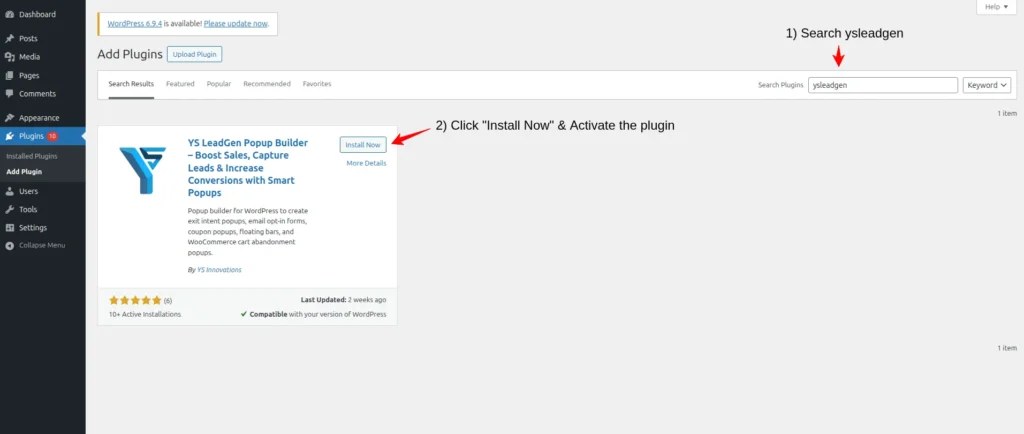
Step 1: Install and Activate a WordPress Popup Plugin
- Log into your WordPress dashboard.
- Go to Plugins, then Add New Plugin.
- Search for “YS LeadGen.”
- Click Install Now, then Activate.
Once activated, a new YS LeadGen menu appears in your dashboard sidebar. If you’ve installed a plugin before, this step takes about two minutes, and it works the same way for nearly every WordPress plugin you’ll ever install.
Step 2: Create Your First Popup Campaign
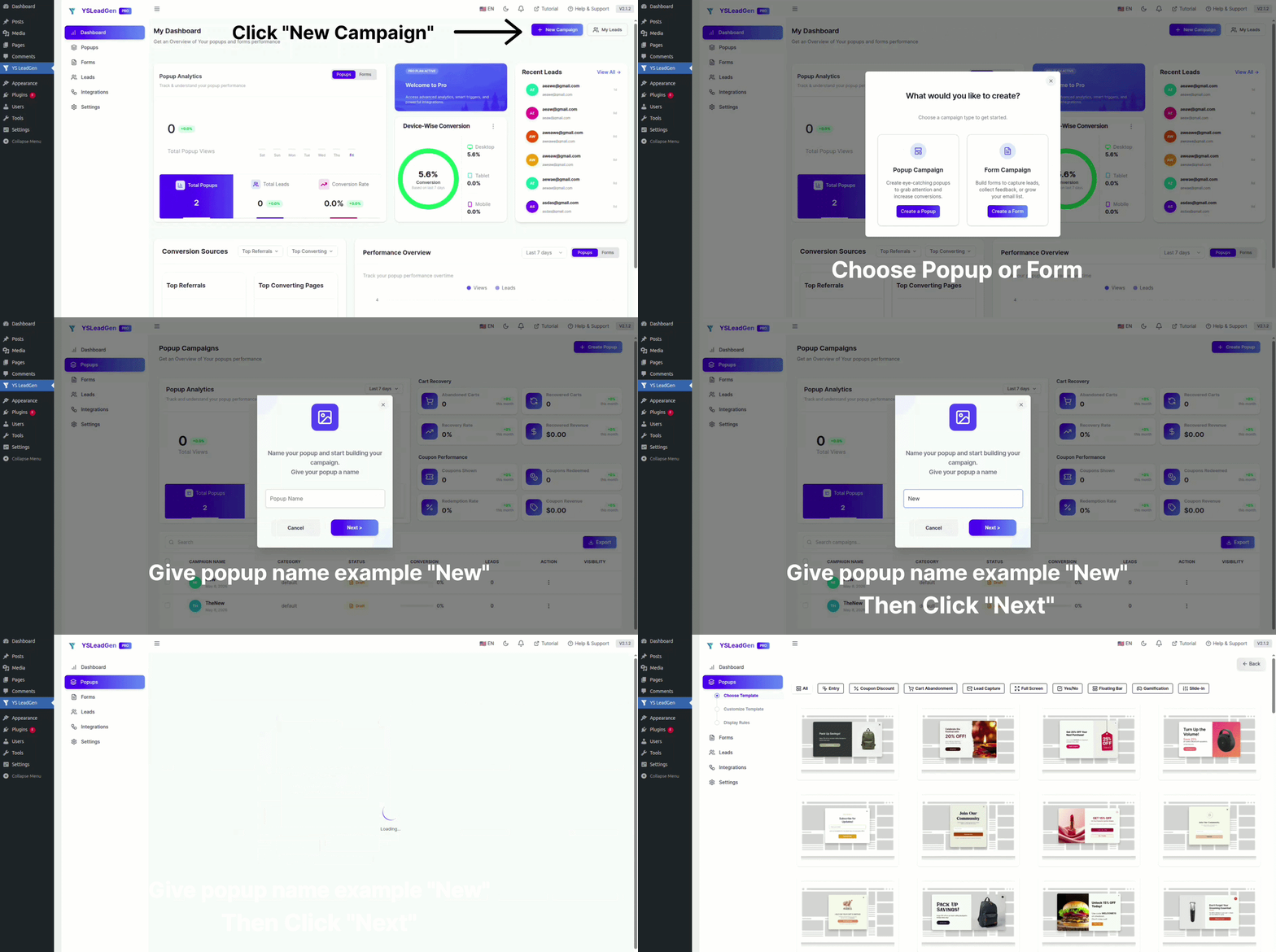
Inside the YS LeadGen dashboard, click Create Popup. You’ll be asked to name the campaign. This is for your internal reference only, visitors never see it. Use a naming convention early, because you’ll likely build several popups over time. For example:
- “Homepage, Newsletter, Time Delay”
- “Blog Post, Content Upgrade, Scroll 60%”
- “Product Page, Discount, Exit Intent”
- “Checkout, Cart Recovery, Exit Intent”
A simple formula like Location, Offer Type, Trigger makes managing multiple campaigns painless.
Step 3: Choose a Popup Template
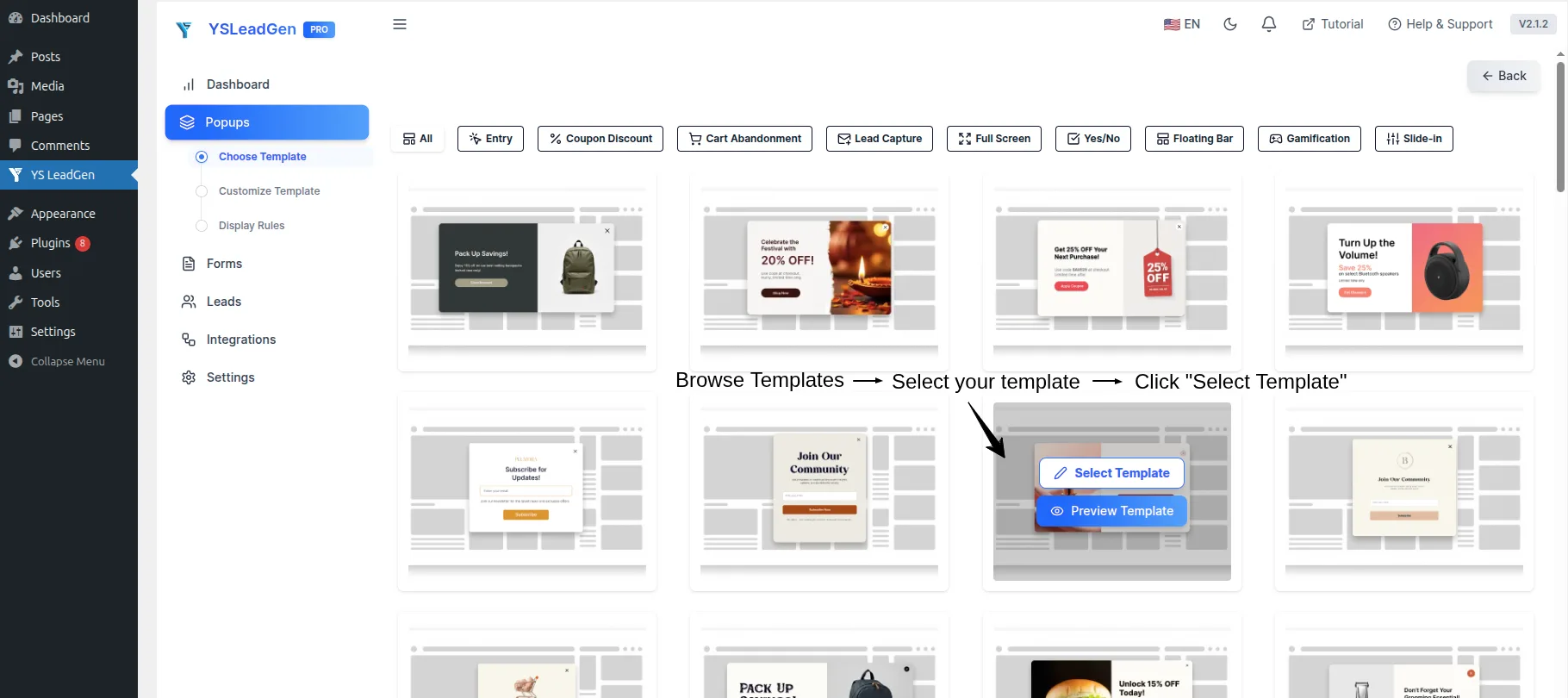
Pick a template based on your goal, not how it looks:
- Email subscriptions: email capture templates
- Lead generation: forms with contact fields
- Promotional offers: templates with strong visual elements
- Announcements: simple, text-focused designs
The most successful popups aren’t the most visually elaborate. They’re the ones that communicate value clearly and make the next action obvious.
Step 4: Write Your Popup Copy
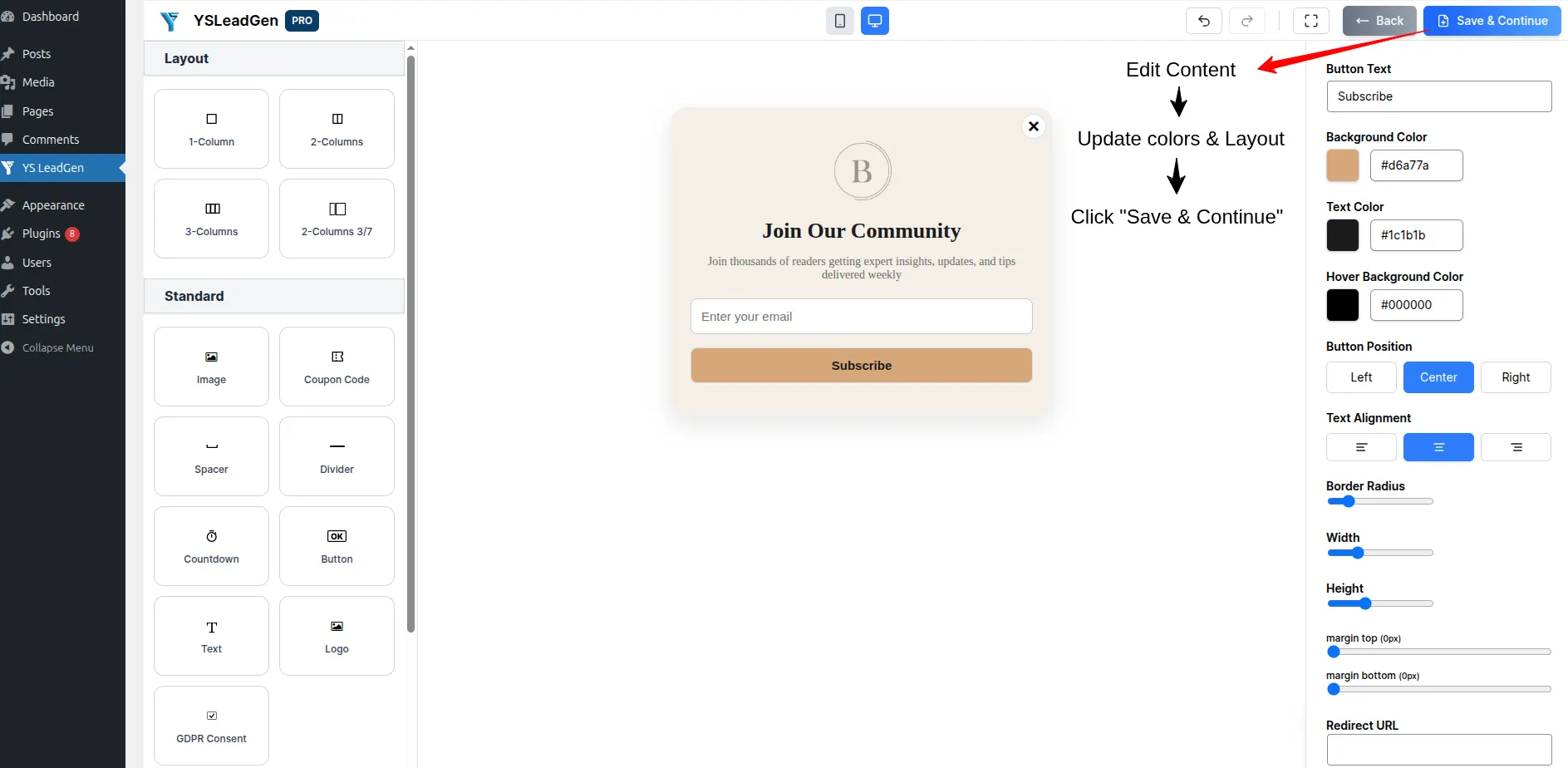
This is the step most beginners rush, and it’s the one that actually determines whether your popup converts.
Start with the headline. It needs to answer one question instantly: why should I care?
| Headline Quality | Example |
|---|---|
| Weak | Subscribe to Our Newsletter |
| Good | Get Weekly WordPress Growth Tips in Your Inbox |
| Great | Join 5,000+ Website Owners Mastering WordPress Marketing |
The “great” version builds social proof, states the benefit, and takes seconds to read.
Follow the headline with one short supporting line, for example: “Subscribe now and get practical WordPress tips and growth strategies every week. No spam, unsubscribe anytime.”
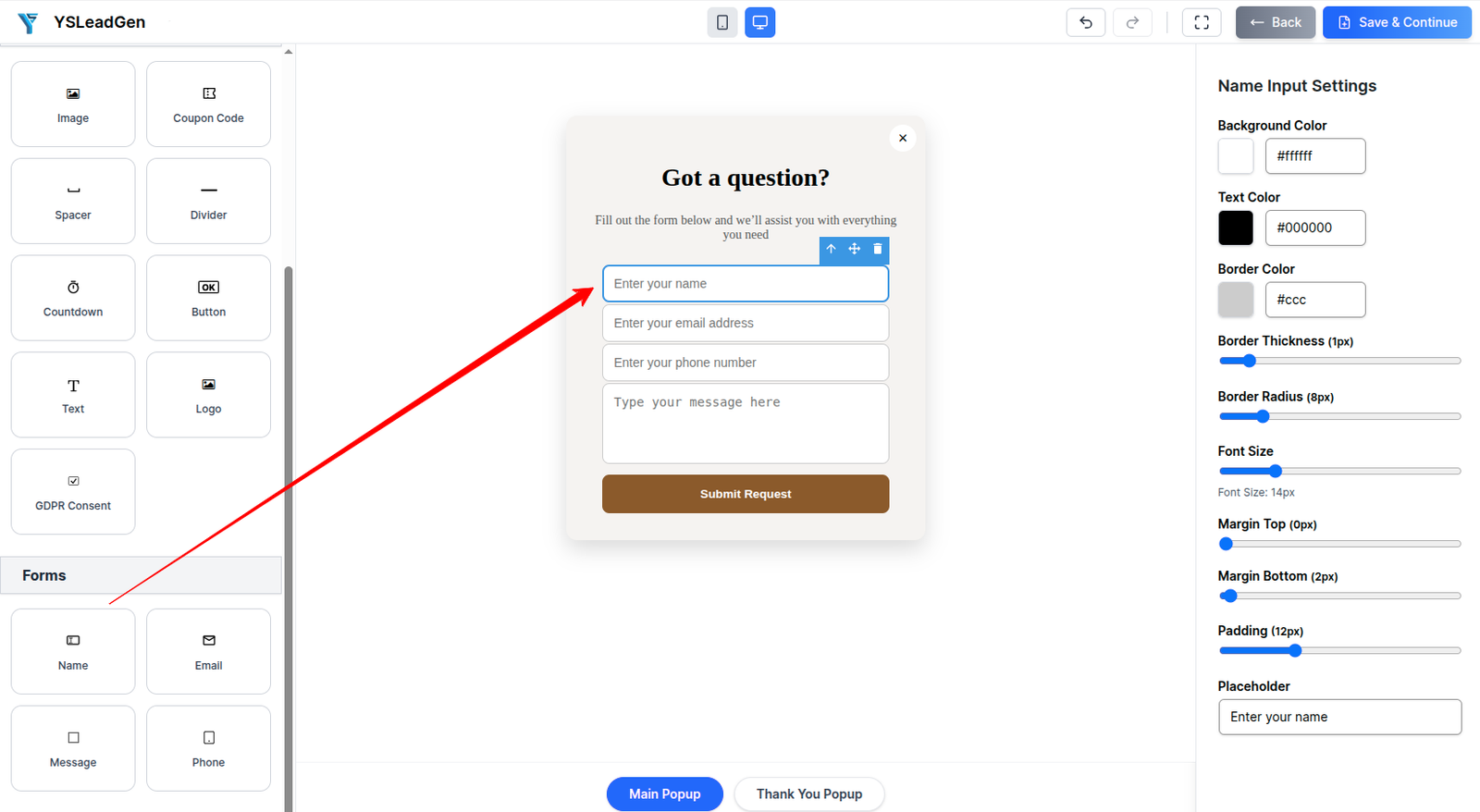
Step 5: Add a Lead Capture Form
A popup without a form is just an announcement. If your goal is leads or subscribers, add a form directly in the builder.
The number one mistake here is asking for too much. Every extra field, name, phone, company, industry, adds friction and lowers your conversion rate.
Rule of thumb: if you’re building an email list, ask for the email address only. If you’re generating service leads, ask for name and email and nothing more. You can always collect additional details later through a welcome sequence or follow-up call.
Step 6: Configure Your Popup Trigger
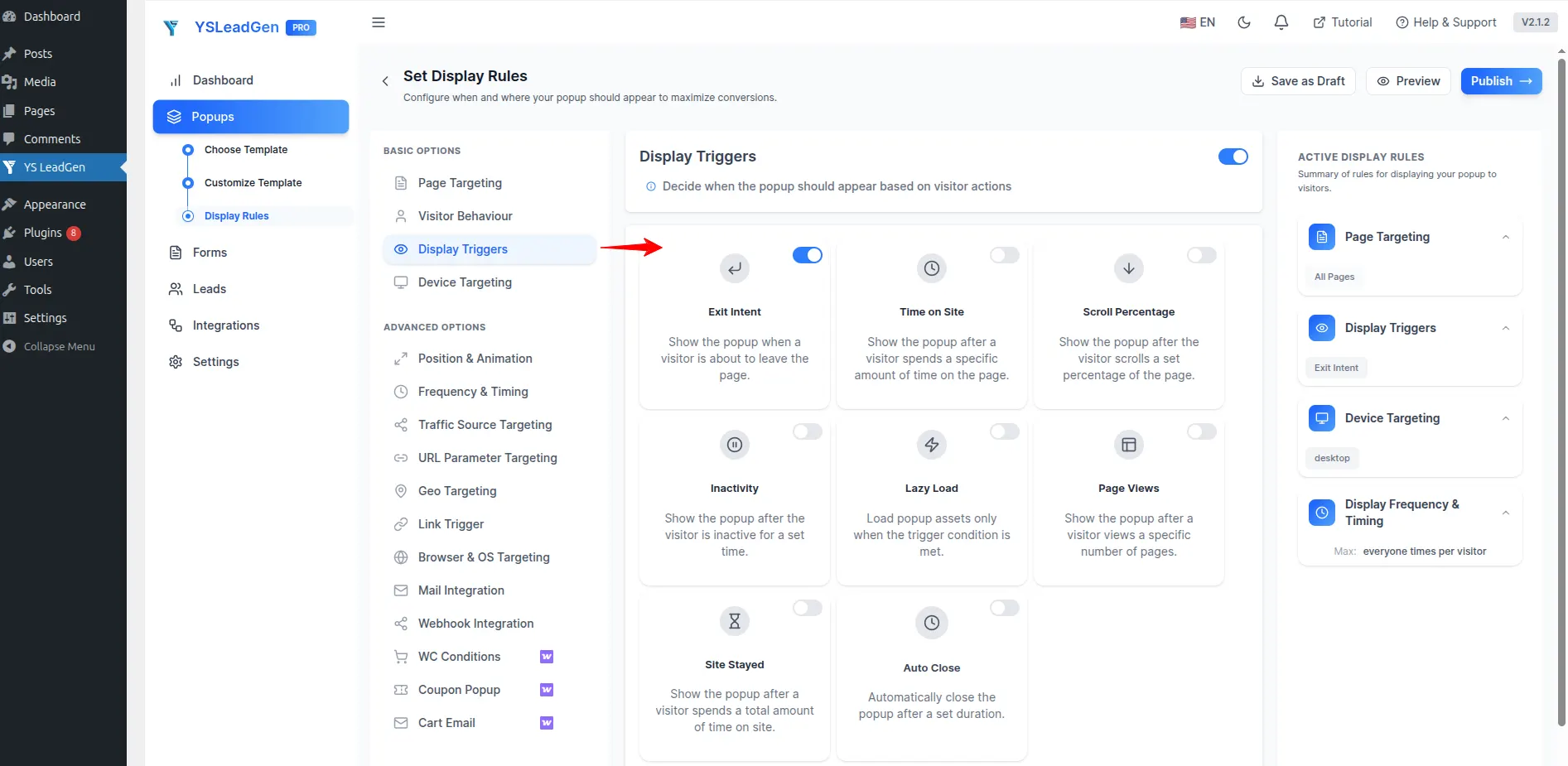
Timing decides whether your popup converts or gets closed on sight. Here are the four core trigger types and when to use each:
- Time delay: appears after a set number of seconds on the page. Good for giving visitors time to engage before you ask for anything.
- Scroll trigger: appears after visitors scroll a set percentage. Targets people already engaged with your content.
- Exit-intent: appears when the visitor’s mouse moves toward the browser’s close button. The strongest trigger for recovering visitors who are about to leave.
- Click trigger: appears when a visitor clicks a specific button or link. Best for high-intent, contextual offers.
Recommended starting combo: a scroll trigger at 40 to 60 percent, plus an exit-intent popup. This reaches engaged readers and catches visitors before they leave, without interrupting anyone too early.
Step 7: Publish and Test
Before hitting publish, run through this checklist:
- Is the headline compelling?
- Does the offer provide real value?
- Is the call to action clear and action-oriented?
- Are form fields limited to the essentials?
- Does the popup match the page’s context?
Once published, test the live version to confirm the popup appears correctly, the trigger fires as expected, the form submits successfully, the popup closes properly, and the mobile version looks and works correctly.
Mobile testing isn’t optional. A large share of your traffic is on phones, and a broken mobile popup is a broken lead generation channel.
Configure Triggers and Display Rules
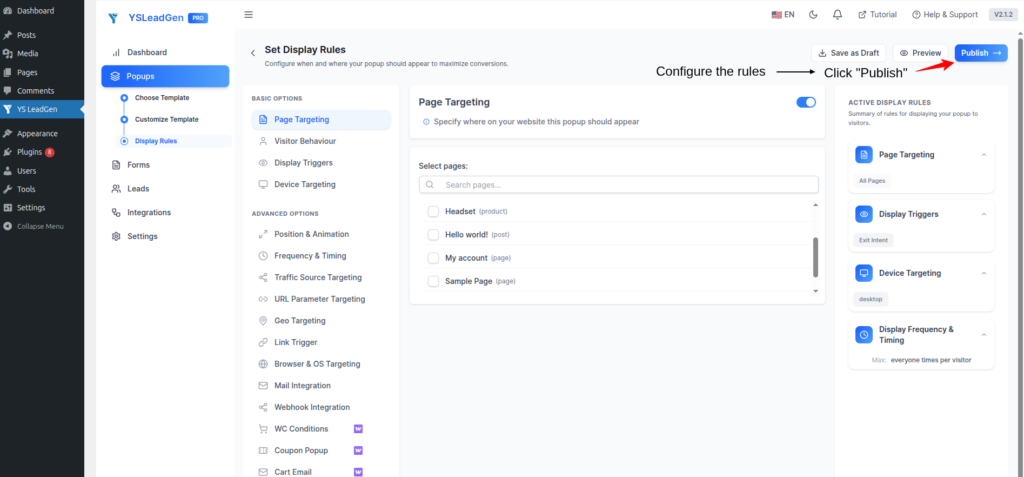
Once your popup content is built, the trigger and targeting settings decide who sees it and when.
- Scroll down to the Popup Settings or Triggers section inside the builder.
- Choose a trigger, such as time delay to show it after a few seconds, or exit-intent to catch visitors before they leave.
- Select targeting rules to pick which specific pages or posts should display the popup.
- Click Publish or Save Changes to make the popup live on your site.
Getting this step right matters as much as the design itself. A well-written popup shown to the wrong audience, or at the wrong moment, will still underperform.
Creating Popups With Other Plugins
If YS LeadGen isn’t the right fit for your setup, here’s how the same general process looks in three other popular WordPress popup plugins.
Method 1: OptinMonster
- Install and activate OptinMonster.
- Connect your WordPress site to your OptinMonster account.
- Create a campaign and choose a template.
- Customize design and copy with the drag-and-drop builder.
- Set display rules for page targeting and triggers.
- Publish and test.
Method 2: Popup Maker
- Install and activate Popup Maker.
- Go to Popup Maker, then Add New Popup.
- Add a title and design the popup with the block editor.
- Configure triggers such as time, scroll, or click.
- Set targeting rules for specific pages or posts.
- Publish and test.
Method 3: WP Popups Lite
- Install and activate WP Popups Lite.
- Create a new popup and choose a template.
- Customize content in the visual editor.
- Select triggers such as page load, exit, or scroll.
- Choose display rules for page targeting.
- Publish and test.
Best Popup Settings for Higher Conversions
After running many WordPress popup campaigns, a few settings consistently outperform the rest.
Don’t show popups immediately. Wait ten to twenty seconds, or trigger on 40 to 60 percent scroll, to give visitors time to engage first.
Stick to one goal per popup. A popup trying to collect emails, sell a product, and promote a webinar all at once tends to fail at all three. Pick one action.
Keep forms short. For email lists, ask for the email address only, nothing else.
Lead with a real value proposition, a discount code, free guide, checklist, template, or early access.
Use genuine urgency. Limited-time offers work, but fake countdown timers and false scarcity get noticed, and they damage trust.
Common Popup Mistakes to Avoid
Showing popups too early is one of the most common mistakes. Asking for an email before a visitor has seen any content is the fastest way to create a bad first impression.
Generic, low-value messaging is another. “Subscribe to our newsletter” communicates nothing on its own. Visitors need a reason.
Asking for too much information also hurts results. A five-field form on a first visit rarely gets completed.
Ignoring mobile is costly. A popup that works on desktop but breaks on phones is quietly costing you leads.
Showing the same popup to everyone wastes an opportunity for relevance. Blog readers respond to content upgrades, while product browsers respond to discounts.
Confusing or hidden close buttons frustrate visitors. If they can’t easily dismiss a popup, they’re less likely to come back to your site at all.
Do WordPress Popups Hurt SEO?
Short answer: No, not by default.
Google understands popups are a normal part of lead generation. What Google’s ranking systems actually penalize is poor user experience, specifically full-screen popups, or interstitials, that appear immediately on page load, especially on mobile; popups that block access to the main content; popups that are difficult or impossible to close on mobile; and the same popup repeating multiple times in one visit.
SEO-friendly WordPress popup best practices include waiting at least five seconds before showing a popup, always including a clear and easy-to-tap close button, using a responsive design that adapts to mobile screens, limiting each visitor to one popup per session, and focusing copy on genuine value rather than pressure tactics.
Done correctly, popups can actually support SEO indirectly, by improving engagement metrics like a lower bounce rate, longer time on page, and more repeat visits.
Advanced Popup Strategies for Serious Growth
Once the basics are working, layer in these tactics.
Segmentation and personalization let you show first-time visitors a welcome offer and returning visitors a loyalty discount instead of the same message for everyone.
A/B testing headlines, colors, triggers, and offers is worth doing continuously. Small changes often produce outsized results.
Behavior-based triggers can go beyond time and scroll to include pages visited, device type, and geotargeting.
Multi-step popups collect an email first and ask for additional details later, which reduces friction and improves completion rates.
Contextual popups match the offer to the page. A blogging guide should offer a content checklist, not a generic newsletter form.
Popup Patterns Worth Testing
These three patterns are widely used across WordPress sites and are a reasonable starting point if you’re unsure which combination of trigger, offer, and timing to try first. Actual conversion rates vary by traffic source, offer strength, and audience, so treat any conversion percentage you see quoted online as a rough industry reference point, not a guarantee, and track your own numbers from day one.
The content upgrade is triggered at 50 to 60 percent scroll on a long-form article, offering a downloadable resource directly related to what the visitor is reading, such as a checklist, template, or PDF version of the guide.
The exit-intent offer is triggered when a cart page visitor’s cursor moves toward the browser’s close button, offering a small discount to complete checkout. It’s commonly used on WooCommerce stores to recover otherwise-lost sales.
The timed welcome is triggered fifteen to twenty seconds after page load on a services or SaaS landing page, offering a consultation call or demo. It works best when the delay gives visitors enough time to understand what the page is offering before being asked for anything.
Run each pattern for at least two to four weeks before judging performance. Small sample sizes produce misleading early results.
Popup Not Showing? Troubleshooting Guide
If you’ve followed every step above and your popup still isn’t appearing, check these five causes before assuming the plugin is broken.
Caching plugins. Tools like WP Rocket or W3 Total Cache, or host-level caching, can serve an old cached version of the page. Clear your cache and reload.
Trigger conditions not yet met. A 60 percent scroll trigger or a 20-second delay genuinely won’t fire until that condition is met. This is expected behavior, not a bug.
Frequency capping. Most WordPress popup plugins, including YS LeadGen, remember when a visitor has already seen or closed a popup and won’t show it again for a set period. Test in an incognito or private browser window.
Conflicting page builder or theme scripts. Some page builders load JavaScript in ways that clash with popup scripts. Temporarily switch to a default WordPress theme to isolate the issue.
Targeting rules too narrow. Confirm the popup is scoped to display on the exact page you’re testing. A “homepage only” popup won’t appear anywhere else.
Still stuck after checking all five? The plugin’s support documentation is the next stop.
Frequently Asked Questions
Install a free WordPress popup plugin like YS LeadGen, create a popup campaign, customize the design, set a trigger such as exit-intent, and publish. No coding and no payment is required.
YS LeadGen is one of the best free popup builders for WordPress, since its free tier includes unlimited popups and flexible triggers like exit-intent and scroll, without gating core features behind a paid plan.
Install a WordPress popup plugin such as YS LeadGen, go to its dashboard menu, click Create Popup, choose a template, add your headline and form, set a trigger, and publish. The same general process applies across most WordPress popup builders.
Popups can be grouped by design format, such as lightbox, fullscreen, slide-in, floating bar, or gamified; by trigger method, such as exit-intent, timed, scroll-triggered, or click-activated; and by goal, such as email opt-in, cart abandonment, age verification, or feedback collection.
No. Modern WordPress popup plugins use visual, drag-and-drop builders. You can create a fully functional popup using only templates, form fields, and trigger settings, with no HTML, CSS, or JavaScript needed.
Exit-intent and scroll-triggered popups consistently outperform popups shown immediately on page load. A combination of a 40 to 60 percent scroll trigger and exit-intent typically delivers the best balance of reach and relevance.
As few as possible. For email list building, one field, the email address, is ideal. For lead generation, two fields, name and email, is the practical maximum before conversions start dropping.
Yes. Most WordPress popup plugins, including YS LeadGen, OptinMonster, and Popup Maker, let you set page-level or post-level targeting rules so different popups appear on different parts of your site.
They can be, but it depends on the plugin and template. Always test your popup on an actual mobile device before publishing. A popup that looks fine on desktop can be broken or hard to close on a phone.
A well-coded, lightweight WordPress popup plugin has minimal impact on load time. Performance issues typically come from bloated plugins loading unnecessary scripts, not from popups as a category.
With a plugin like YS LeadGen, most users can build and publish their first popup in under 15 minutes, including choosing a template, writing copy, and setting a trigger.
Elementor’s popup builder only works if you’re already using Elementor as your page builder, since it isn’t a standalone plugin. Popup Maker is a solid dedicated option, but its free version is more limited in trigger types than YS LeadGen’s free plan. For most sites that want a dedicated, lightweight popup plugin with exit-intent and scroll triggers included for free, YS LeadGen is the simpler starting point.
Any WordPress popup plugin that includes exit-intent as a trigger option will work, including YS LeadGen, OptinMonster, and Popup Maker. The difference usually comes down to whether exit-intent is included free or locked behind a paid plan. YS LeadGen includes it on its free tier.
Yes. An exit-intent popup triggered on the cart or checkout page, offering a small discount or free shipping, is one of the most common ways WooCommerce stores recover sales from visitors who were about to leave without buying.
Use frequency capping, a setting available in most WordPress popup plugins including YS LeadGen, to limit how often the same visitor sees a popup, such as once per session or once every few days after they’ve closed it.
Yes. Most WordPress popup plugins, including YS LeadGen, work independently of your page builder, since the popup displays as an overlay on top of the page rather than being built into the page layout itself.
A mobile popup should never require horizontal scrolling or cover the entire screen without an obvious way to close it. Most WordPress popup plugins automatically resize templates for smaller screens, but it’s worth checking manually on a real phone before publishing.
It depends on how much you want to interrupt the visitor. A centered popup usually converts at a higher rate because it demands attention, while a slide-in is less intrusive and better suited to sites that want a lighter touch, such as blogs with a steady stream of returning readers.
Final Thoughts: Turning Visitors Into Action-Takers
Creating a popup in WordPress is technically simple. Creating one that visitors actually want to engage with is the real skill.
It comes down to one question: are you interrupting visitors, or helping them?
An interrupting popup appears immediately, has no clear value proposition, asks for too much information, shows the same message to everyone, and is hard to close.
A helpful popup appears at the right moment, communicates clear and compelling value, keeps forms minimal, targets based on behavior and context, and respects the visitor’s experience.
Start simple. Install a WordPress popup plugin like YS LeadGen, build your first popup, test it thoroughly, track the results, and refine from there. The best-performing popup is rarely the flashiest one. It’s the one that offers real value at exactly the right moment.